153
Kaleido-X
User’s Manual
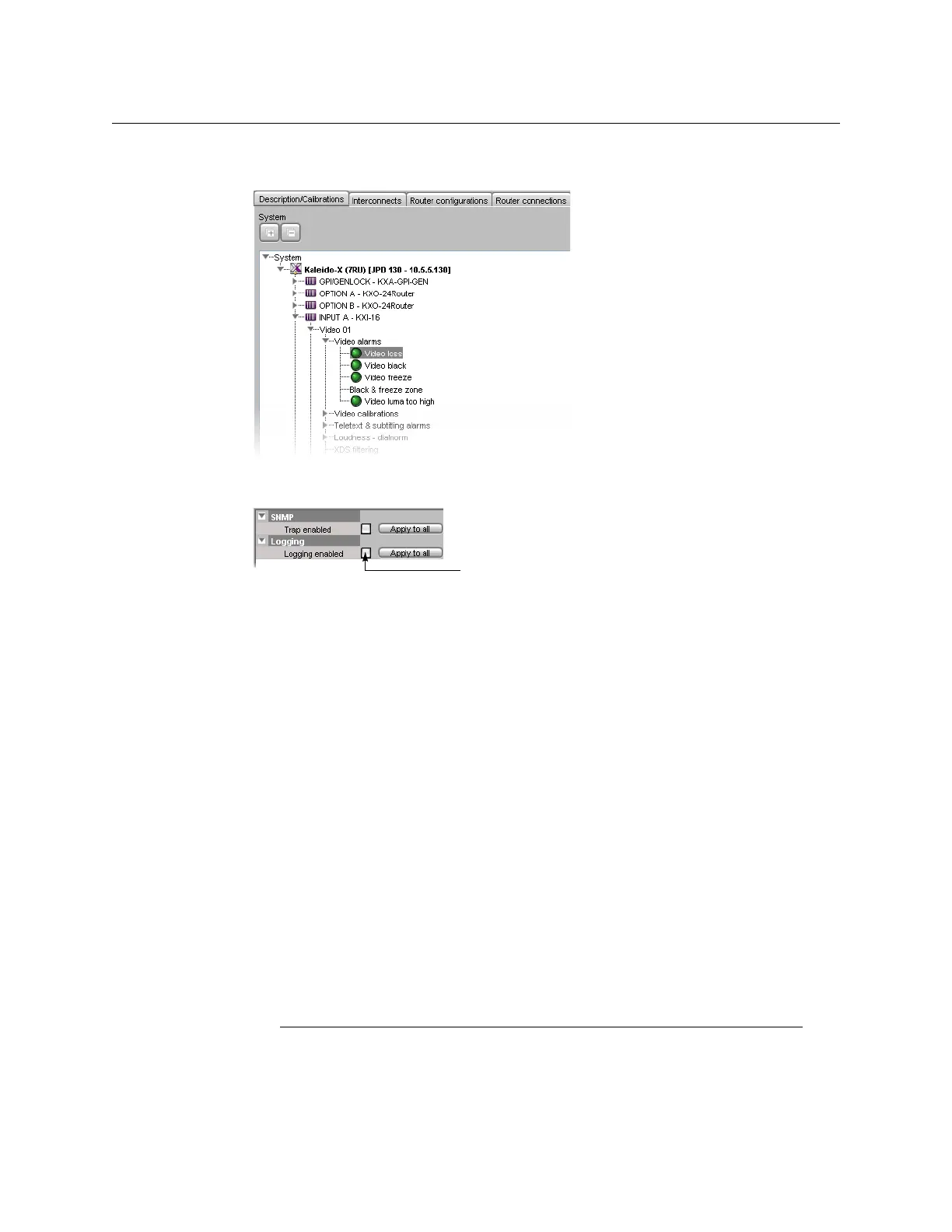
2 Expand the multiviewer whose alarms you wish to log, navigate to the appropriate
alarm, and then click the alarm to select it.
3In the Properties tab, select the Logging enabled check box to have the multiviewer
publish this alarm to the application server’s log, each time this alarm is triggered.
4Click Apply to all if you wish to apply this setting to all other alarms with the same name,
throughout the system.
In the example, clicking Apply to all will enable logging for the Video Loss alarm on
every multiviewer input in your system.
5 Repeat the procedure until logging is enabled for all desired alarms.
6On the File menu, click Save.
Disabling logging for a virtual alarm
To prevent a virtual alarm from being logged to the GSM log plug-in
1 In the sources table, select a text or alarm level.
Alternatively, click the Actions tab.
2 Expand the filtered System list, and navigate to the virtual alarm you wish to modify.
3 Right-click the alarm, point to Virtual alarm, and then click Edit.
The Build Virtual Alarm window appears.
4 In the bottom area of the window, select Not logged.
5Click OK to close the Build Virtual Alarm window.
Publishing Alarms to SNMP Devices
Notes
• This section does not apply to the KMV-3901/3911 multiviewer models,
which do not support SNMP-related calibrations and settings.



 To Next Page