397
Kaleido-X
User’s Manual
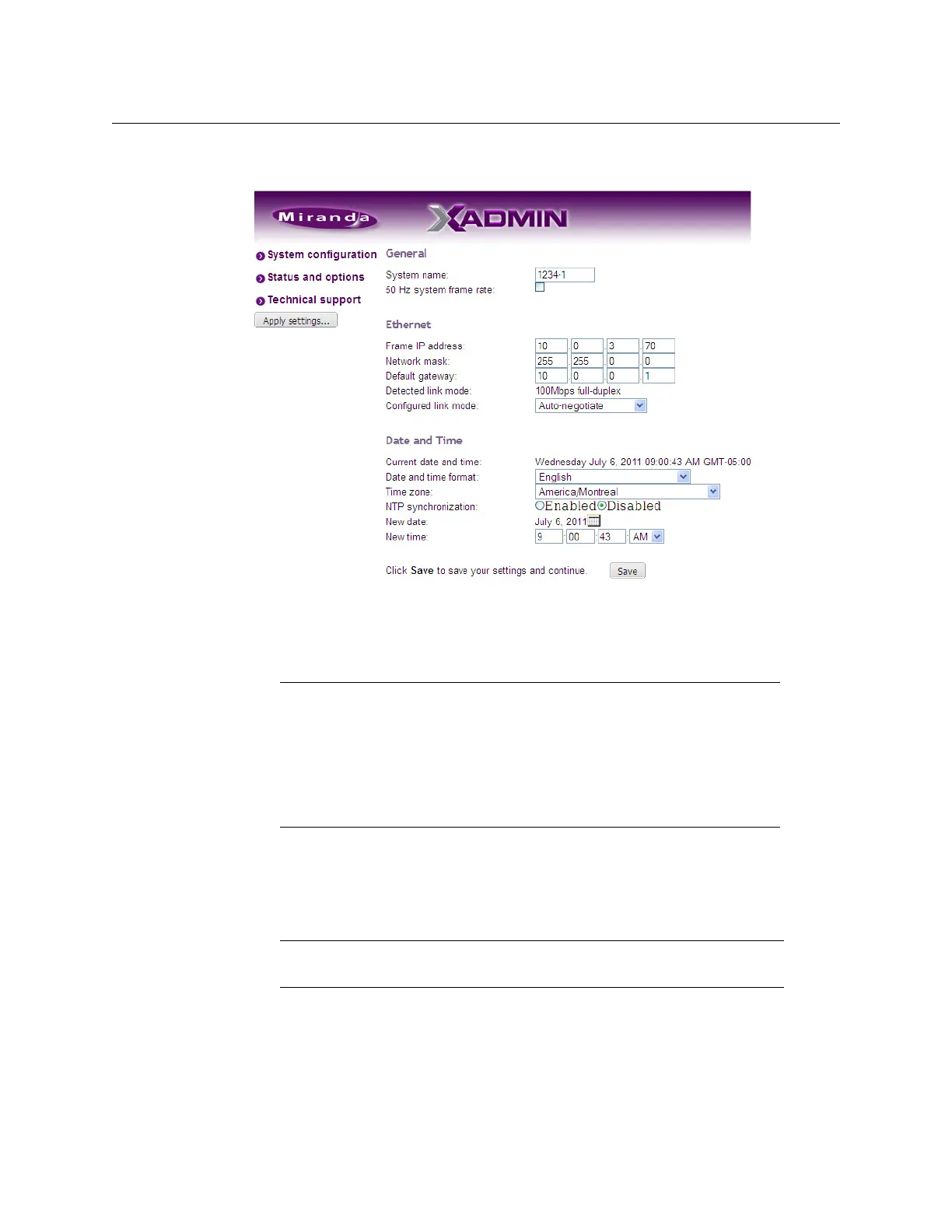
The System Configuration page appears, showing the current system name, IP settings,
as well as the date and time settings.
In the case of a Kaleido-X, Kaleido-X16, or KMV-3901/3911 model, the default system
name corresponds to your order number. In the case of a Kaleido-IP, the default system
name is K-IP.
5 Type a different name for your system if you wish.
In the absence of a reference signal, a Kaleido-X or Kaleido-X16 will process its video
inputs at a default frame rate of 59.94
Hz.
6 If your system requires a 50 Hz frame rate, to match the input signal data sampling rate,
in the absence of a reference signal, then select the corresponding check box.
7 Adjust the date and time settings, as required.
Clocks in your layouts will then display date and time in the applicable format.
8 Enter the appropriate IP information: frame or card IP addresses, network mask, and
default gateway.
Notes
• In the case of a Kaleido-IP multiviewer, the system name must comply
with RFC
1123, because it is also used as the device’s host name. Up to 8
characters are allowed, limited to A-Z, a-z, 0-9, and the hyphen. The system
name cannot start or end with an hyphen.
• For the other multiviewer models, only lower-ASCII characters are allowed
in the system name. Braces and tilde are not allowed.
Note: The 50 Hz system frame rate option applies to the Kaleido-X and
Kaleido-X16
multiviewers only.



 To Next Page