434
Administration and Servicing
Servicing
• In the case of a Kaleido-X (7RU) or Kaleido-X (14RU), cards are presented in the
order they appear, from left to right when looking at the front of the chassis.
• In the case of a Kaleido-X (4RU), cards are presented in the order they appear,
starting from the top left corner down, and again from the top right corner, when
looking at the front of the chassis.
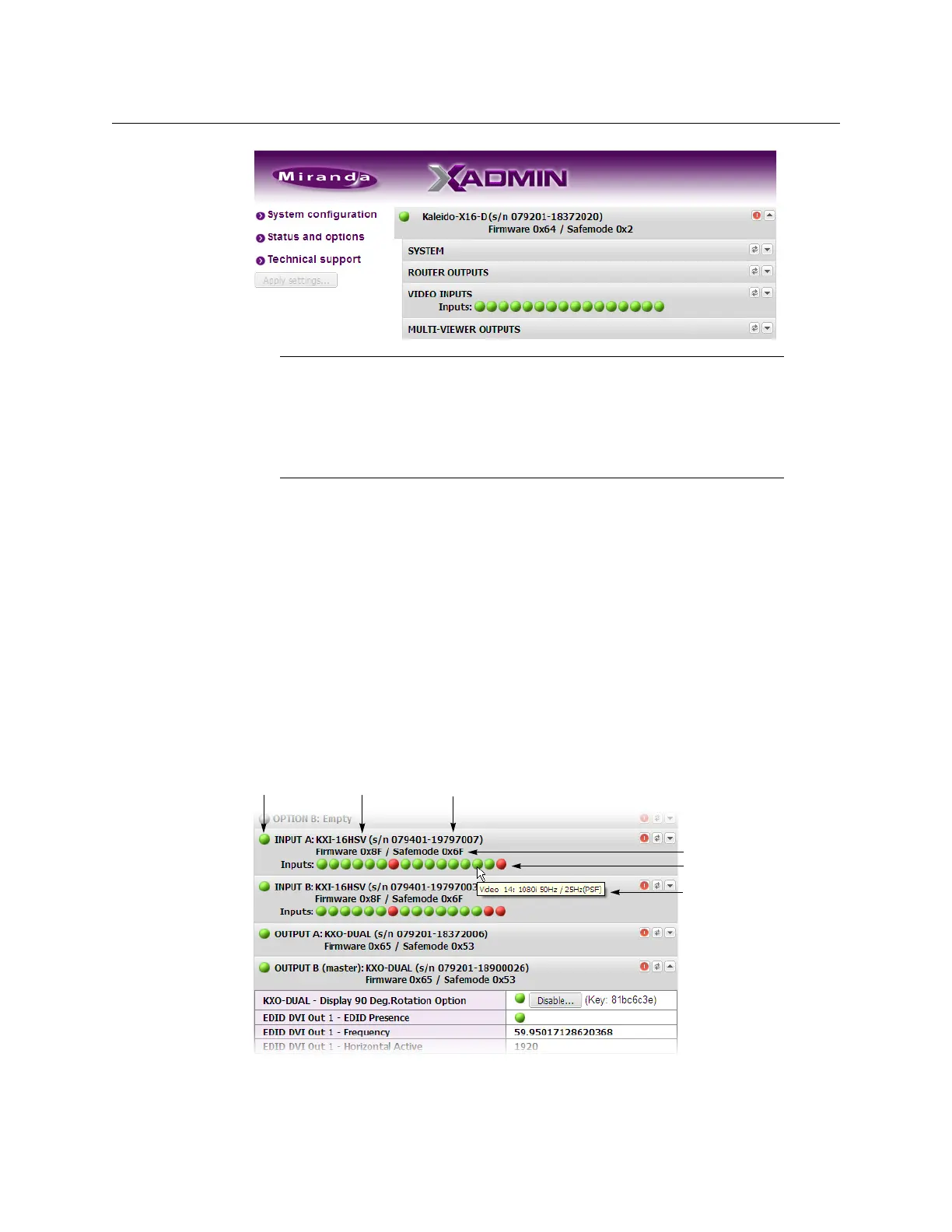
• Some heading rows may show a card type, serial number, firmware and safe mode
versions, a module status indicator, and input signal status indicators.
• The module status indicator shows whether the card (or module) is running
normally (green) or in safe mode (red).
• The signal status indicators reveals the presence of a valid input signal at the
corresponding connector.
3 Move the pointer to an input signal status indicator to view the associated signal
format.
4 Click the arrow button at the end of each heading row to view detailed information
about the associated module.
Internet Explorer and Chrome users:
• If the page remains blank, then refer to Enabling the Compatibility View in
Internet Explorer 10, on page 429.
• If you see a certificate error message instead of the Status and Options
page, then refer to
Registering your Multiviewer's Security Credentials
with your Browser, on page 421.
Card type Serial number
Version information
Input signal status
Input signal format
Status indicator



 To Next Page