EasyManua.ls Logo

Nikon D780 - F2: Customize I Menu (Lv)

Nikon D780
944 pages
Print Icon
To Next Page IconTo Next Page
To Previous Page IconTo Previous Page
Loading...
626
Menu Guide >
A
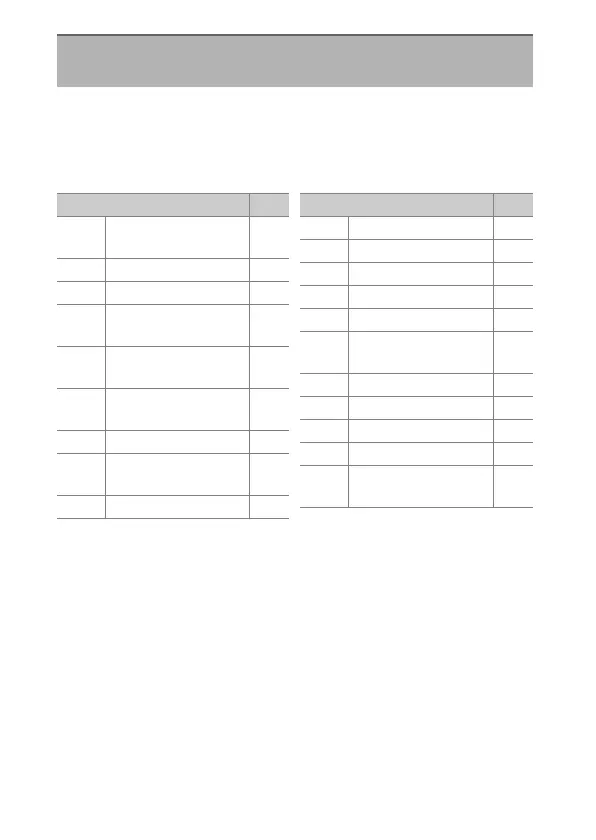
Custom Settings
Choose the items listed in the
i
menu displayed when the
i
button is pressed during live view. For information on
customizing the
i
menu, see “Customizing the
i
Menu:
Customize
i
Menu” (
0
347).
f2: Customize
i
Menu (Lv)
G
button
U
A
Custom Settings menu
Item
0
J
[Choose image
area]
129
8
[Image quality]134
o
[Image size]137
N
[View memory card
info]
624
E
[Exposure
compensation]
175
9
[ISO sensitivity
settings]
187
m
[White balance]195
h
[Set Picture
Control]
243
p
[Color space]554
y
[Active D-Lighting] 254
q
[Long exposure NR] 556
r
[High ISO NR] 557
w
[Metering] 166
c
[Flash mode] 465
Y
[Flash
compensation]
469
g
[Autofocus mode] 140
t
[AF-area mode] 145
t
[Auto bracketing] 224
$
[Multiple exposure] 287
2
[HDR (high
dynamic range)]
256
Item
0

Table of Contents

Related product manuals