EasyManua.ls Logo

Nikon D780 - G: Movie; G1: Customize I Menu

Nikon D780
944 pages
Print Icon
To Next Page IconTo Next Page
To Previous Page IconTo Previous Page
Loading...
643
Menu Guide >
A
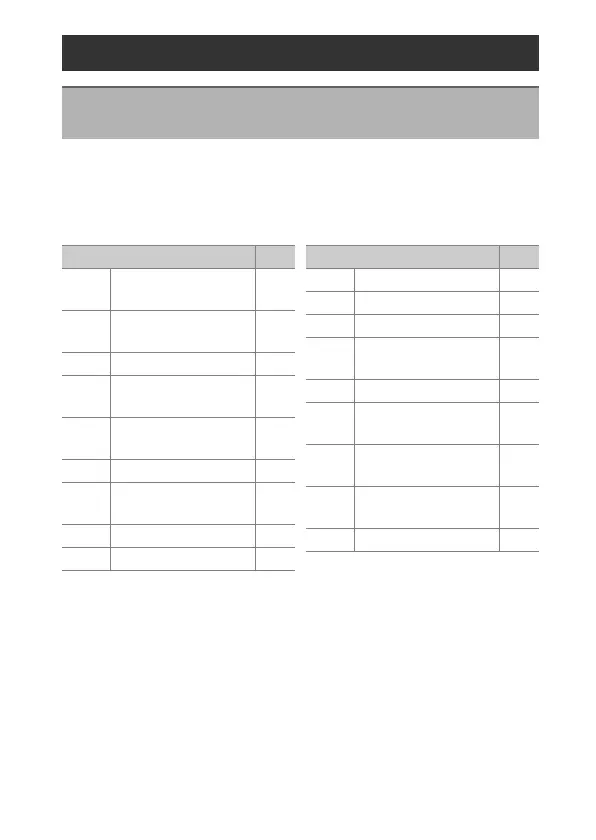
Custom Settings
Choose the items listed in the
i
menu displayed when the
i
button is pressed during movie recording. For information on
customizing the
i
menu, see “Customizing the
i
Menu:
Customize
i
Menu” (
0
347).
g: Movie
g1: Customize
i
Menu
G
button
U
A
Custom Settings menu
Item
0
J
[Choose image
area]
129
G
[Frame size and
rate/Image quality]
264
N
[Destination]572
E
[Exposure
compensation]
175
9
[ISO sensitivity
settings]
187
m
[White balance]195
h
[Set Picture
Control]
243
y
[Active D-Lighting]254
w
[Metering]166
g
[Autofocus mode] 140
t
[AF-area mode] 145
4
[Electronic VR] 580
H
[Microphone
sensitivity]
581
5
[Attenuator] 582
6
[Frequency
response]
582
7
[Wind noise
reduction]
583
8
[Headphone
volume]
583
w
[Custom controls] 628
Item
0

Table of Contents

Related product manuals