ACCESS GATEWAY
224 System Administration
1. From the Web Management Interface, click on System, then Static Port-Mapping Add.
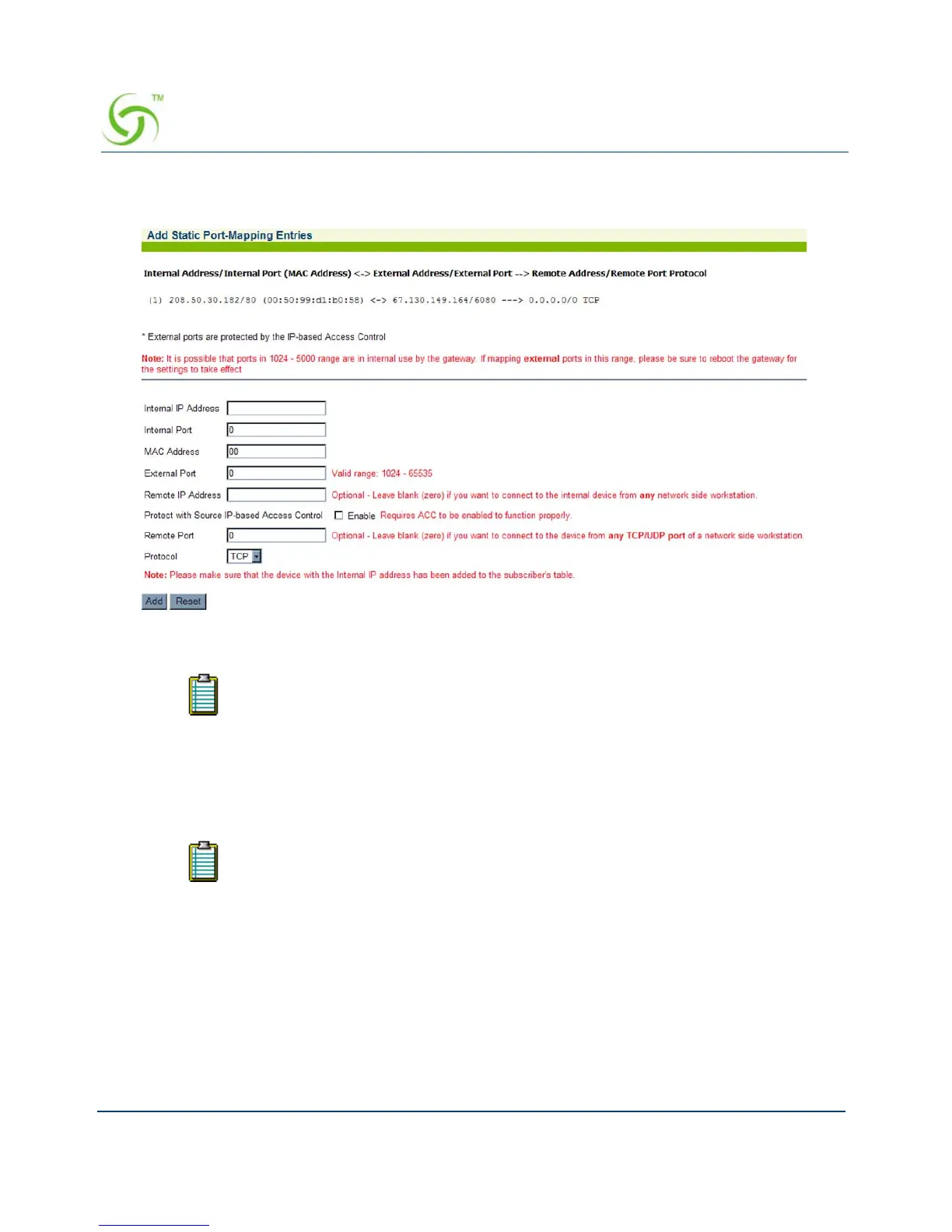
The Add Static Port-Mapping Entries screen appears:
2. Enter the Internal IP Address.
3. Enter the Internal Port reference.
4. Enter a valid MAC Address.
5. Enter the External IP Address.
6. Enter the External Port reference.
7. Optional: Enter the Remote IP Address. Leave this field set to zero if you want to connect
to the internal device from any network-side workstation.
8. Optional: Enable the Protect with Source IP-based Access Control option. Enabling
this will only allow address in the source-based access control list to connect on this port
mapping. Source-based access control needs to be enabled for this to be in effect.
9. Optional: Enter the Remote Port reference. Leave this field set to zero if you want to
connect to the device from any TCP/UDP port of a network-side workstation.
Ensure that the device with the Internal IP Address has been added to the
subscriber’s table.
The External IP address field will default to the IP address of the Access
Gateway.



 To Next Page