ACCESS GATEWAY
96 System Administration
4. Check the Subscriber Tracking Log save to file option to save the syslogs locally to
the NSE flash. Note: Not recommended.
5. Check the
Include User Name Reporting option to include the first 25 characters of
the username in the Syslog.
6. Check the
Port Location: Include Port Reporting option and Port Location: Include
Location
option to include the port information from the port location table and the
Port reported to the system by either VLAN or SNMP query. The Location
information is limited to 25 characters.
7. Check the
Include every 500th Packet option to follow the Danish law that requires
the 500
th
packet for each subscriber to be logged. Enabling this will send the 500
th
packet for each subscriber to the syslog system.
Click on the
Submit button to save your changes, or click on the Reset button if you want
to reset all the values to their previous state.
When logging is enabled, log files and error messages are sent to these servers for future
retrieval. To see sample reports, go to “Sample SYSLOG Report” on page 264 and “Sample
AAA Log” on page 263.
Enabling MAC Authentication {MAC Authentication}
1. From the Web Management Interface, click on Configuration, then MAC authentication.
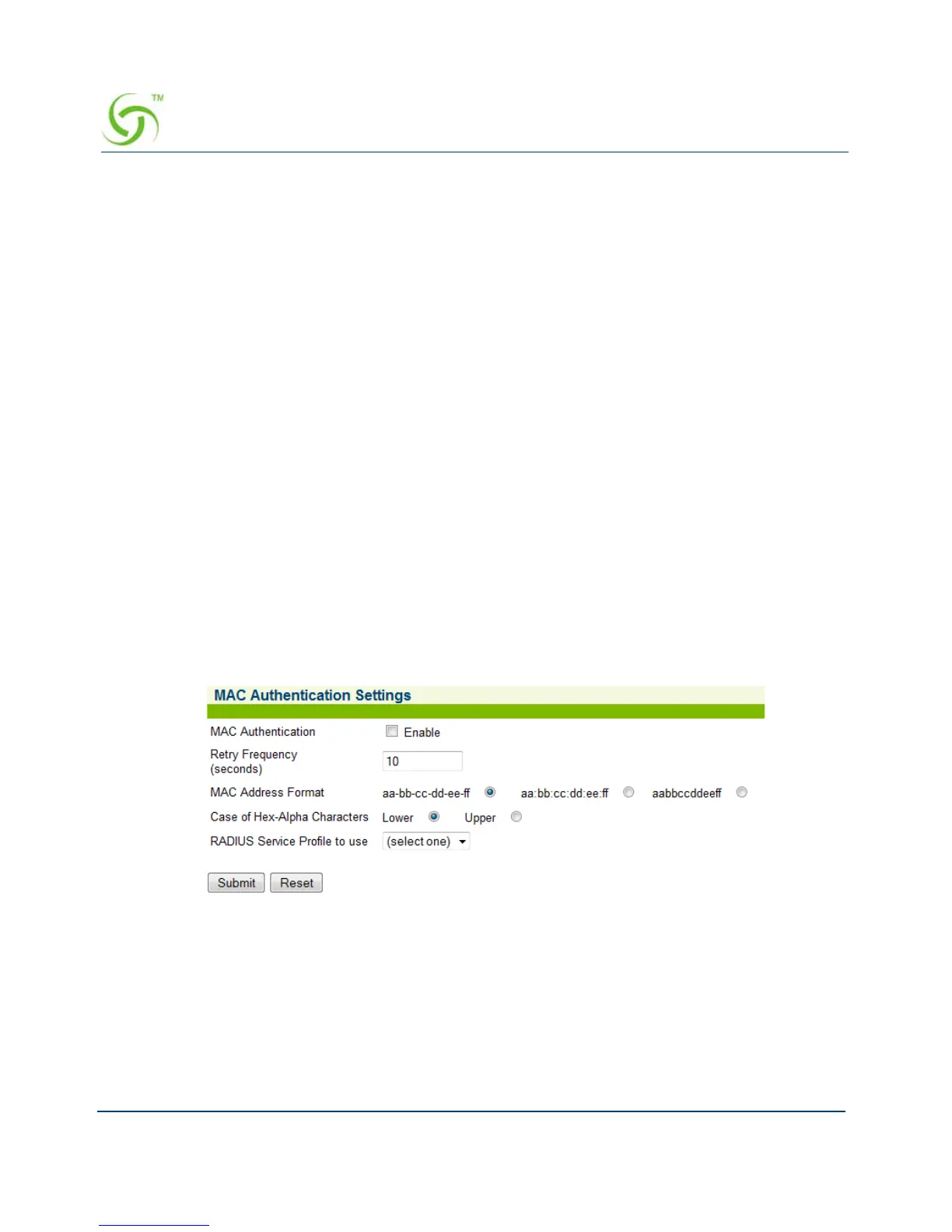
The MAC Authentication Settings screen appears:
2. Check the MAC Authentication checkbox to enable the MAC-based authentication
functionality. The default setting is disabled.
3. Enter the retry frequency (in seconds) in the Retry Frequency field. This setting is the
wait time, in seconds, before reattempting MAC authentication following a failed attempt.
The minimum (and default) value is 10 seconds.
4. Select the MAC Address Format. This setting is the format in which the subscriber’s
MAC address will be expressed in the RADIUS username and password attributes. The



 To Next Page