4-45
4-2 Function Mode
4
Functions
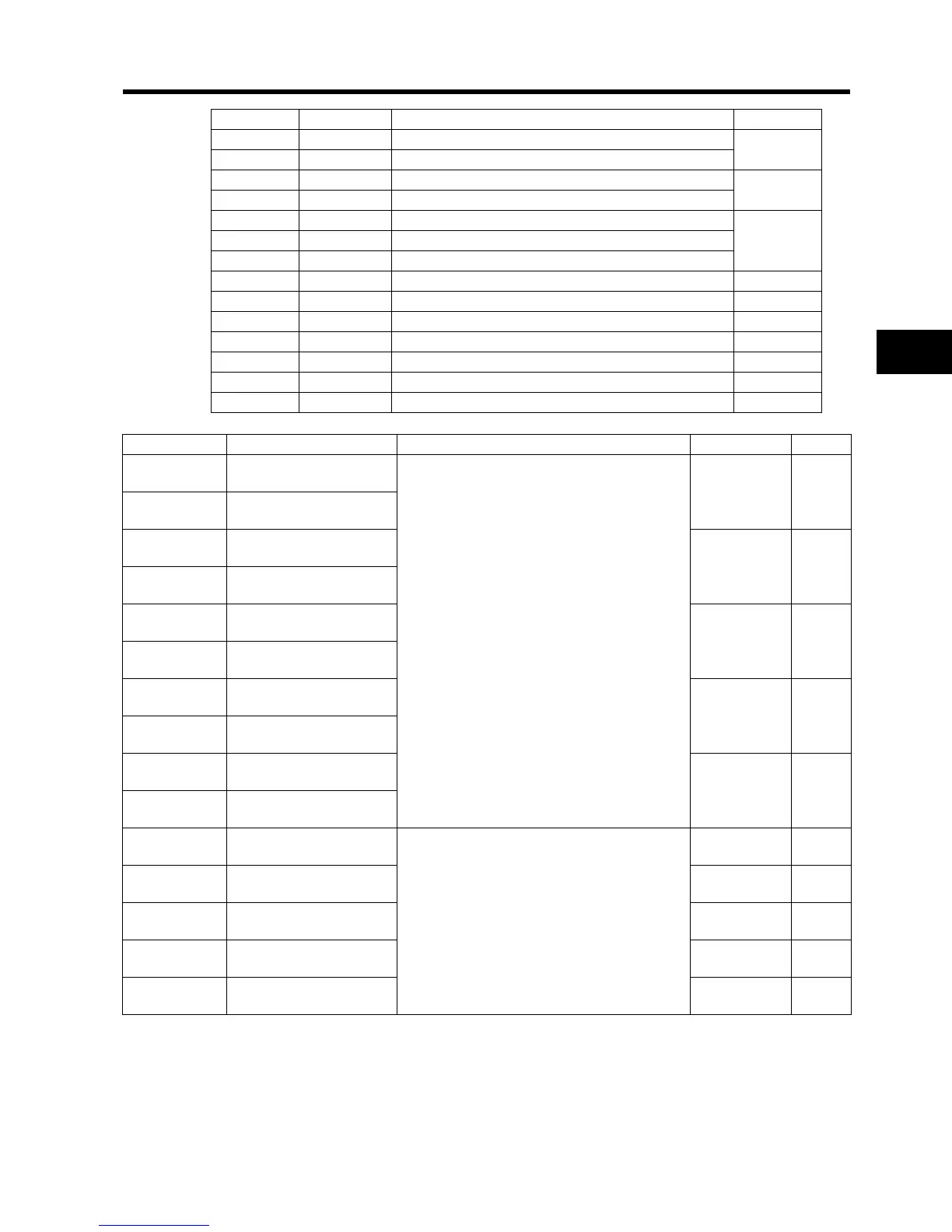
* To switch to the 2nd control, allocate 08 (SET) to the multi-function input terminal and then turn it on.
Note 1: The terminal with "18" (RS) allocated will automatically have an NO contact specifications.
Note 2: "19" (PTC) can only be allocated to multi-function input 5 (C005).
Note 3: "64" (EMR) is set forcibly with switch S8, not with parameters.
21 STP 3-wire stop
4-52
22 F/R 3-wire forward/reverser
23 PID PID enabled/disabled
4-22
24 PIDC PID integral reset
27 UP UP/DWN function accelerated
4-5328 DWN UP/DWN function deccelerated
29 UDC UP/DWN function data clear
31 OPE Forced operator 4-54
50 ADD Frequency addition 4-29
51 F-TM Forced terminal block 4-54
52 RDY Ready function 4-43
53 SP-SET Special 2nd function selection 4-47
64 EMR Emergency shutoff 4-46
255 No function Digital input not used -
Data Description Reference item Page
Parameter No. Function name Data Default setting Unit
C001
Multi-function input 1
selection
Refer to upper table for available settings
00 ⎯
C201
*2nd multi-function input
1 selection
C002
Multi-function input 2
selection
01 ⎯
C202
*2nd multi-function input
2 selection
C003
Multi-function input 3
selection
18 ⎯
C203
*2nd multi-function input
3 selection
C004
Multi-function input 4
selection
12 ⎯
C204
*2nd multi-function input
4 selection
C005
Multi-function input 5
selection
02 ⎯
C205
*2nd multi-function input
5 selection
C011
Multi-function input 1
operation selection
00: NO
01: NC
• NO contact: "ON" with the contact closed,
"OFF" with the contact open.
• NC contact: "ON" with the contact open.
"OFF" with the contact closed.
• For the RS terminal, only NO contact is
available.
00 ⎯
C012
Multi-function input 2
operation selection
00 ⎯
C013
Multi-function input 3
operation selection
00 ⎯
C014
Multi-function input 4
operation selection
00 ⎯
C015
Multi-function input 5
operation selection
00 ⎯


 To Next Page