All-New Event Presentation Switching Solutions
User Manual
The horizontal initial position of the Cut layer relative to the Fill layer
The vertical initial position of the Cut layer relative to the Fill layer
The horizontal pixels of the Cut layer
The vertical pixels of the Cut layer
6.1.6.1.6 Set DSK
Use luma key or chroma key for input sources.
Prerequisites
A common screen and regular layer are selected.
The layer source is accessed.
Notes
After DSK is turned on, the layer capacity changes to 4K automatically.
Menu Orientation
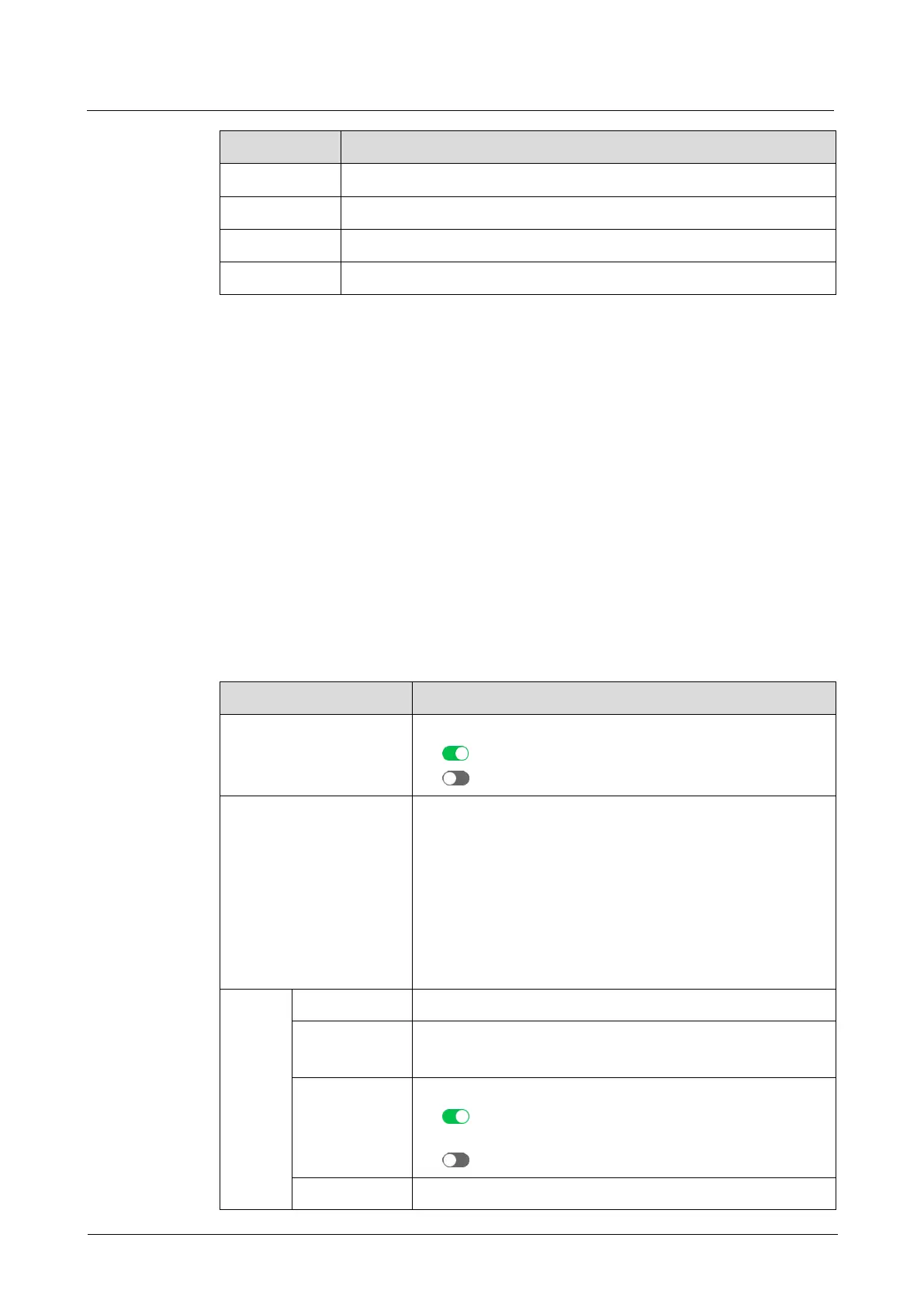
On the main menu screen, scroll to and select Layer > Layer Name > DSK.
Description
Turn on/off DSK.
: On
: Off
DSK mode
Luma key: Suitable for application scenarios where the
brightness of the background is significantly smaller
than that of the foreground. The result of luma key is that
the background becomes transparent and the
foreground is keyed out.
Chroma key: Suitable for application scenarios with a
single background color, such as blue/green screen
matting.
Distinguish between the foreground and background.
Hue softness of the transition area
The greater the value, the softer the transition.
Turn on or turn off foreground color adjustment.
: On. The RGB of the related parameter can be set to
adjust the keying effect.
: Off
RGB values of the foreground color



 To Next Page