(3)
On
the
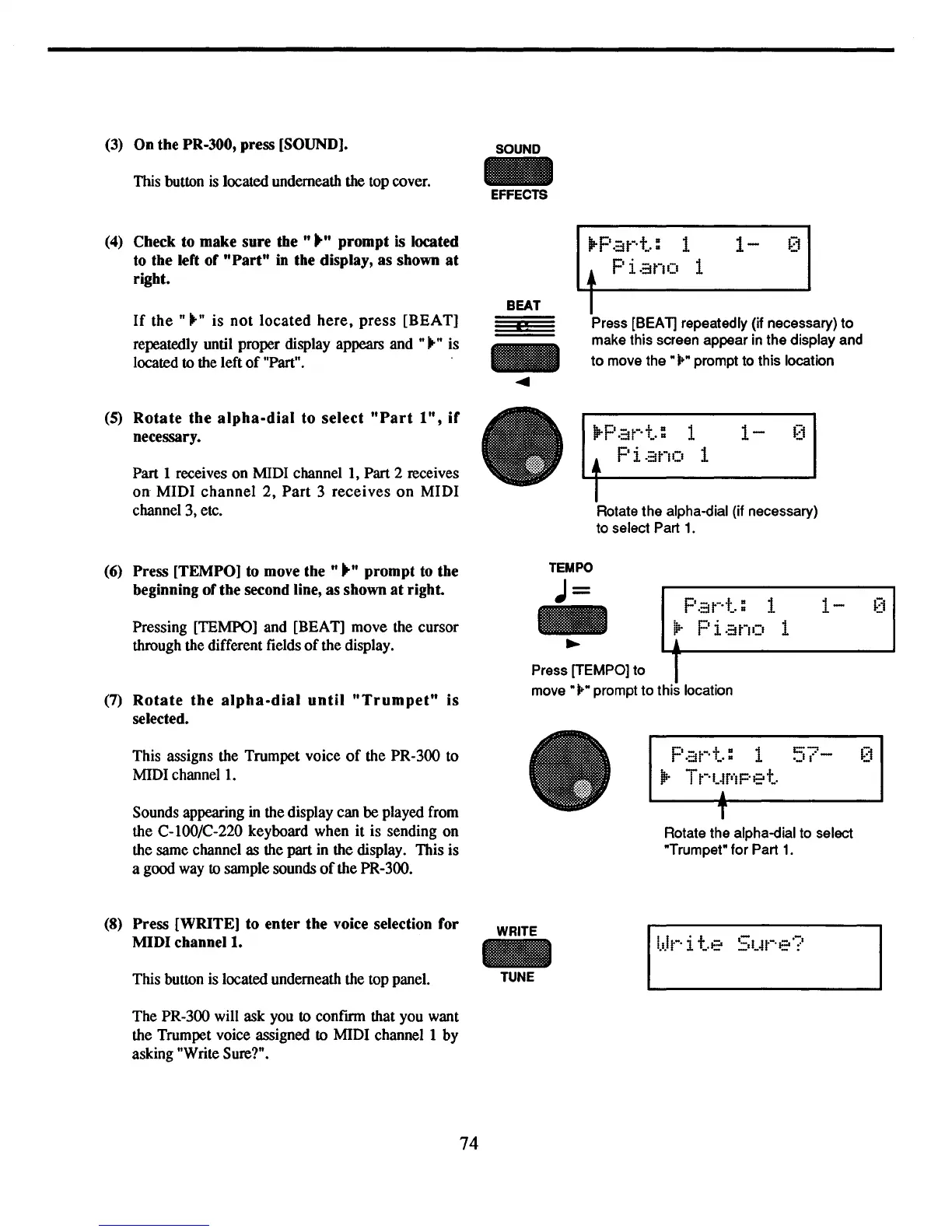
PR-300, press [SOUND].
SOUND
This button
is
located underneath
the
top cover.
-
EFFECTS
(4)
Check to
make
sure
the"""
prompt
is located
to
the
left
of
"Part"
in
the
display,
as
shown
at
right.
BEAT
If
the
" .." is
not
located
here,
press
[REA
T]
.,
repeatedly until proper display appears and ".." is
-
located to the left
of
"Part".
....
(5)
Rotate
the
alpha-dial
to
select
"Part
1",
if
•
necessary.
Part 1 receives on MIDI channel
I,
Part 2 receives
on
MIDI
channel
2,
Part
3
receives
on
MIDI
channel 3, etc.
.Parl:
1
1-
0
• Pi.::Jno 1
I
Press [BEAT] repeatedly (if necessary)
to
make this screen appear in the display and
to
move
the"
j." prompt to this location
IP-Par·+..:
1
1-
0
•
Piano
1
I
Rotate the alpha-dial (if necessary)
to select Part
1.
1-
(6) Press [TEMPO] to move
the"
..
"
prompt
to
the
beginning
of
the
second line,
as
shown
at
right.
Pressing [TEMPO] and [REA
T]
move the cursor
through the different fields
of
the display.
(7)
Rotate
the
alpha-dial
until
"Trumpet"
is
selected.
This assigns the Trumpet voice
of
the PR-300 to
MIDI
channel
1.
Sounds appearing
in
the display can be played from
the C-lOO/C-220 keyboard when it is sending on
the same channel as the part
in
the display. This is
a good way to sample sounds
of
the PR-300.
(8)
Press
[WRITE]
to
enter
the
voice selection
for
MIDI
channell.
This button is located underneath the top panel.
The PR-300 will ask you to confmn that you want
the Trumpet voice assigned to MIDI channel 1 by
asking "Write Sure?".
74
TEMPO
J=
p.::Jt-·+":
1
_
jl;-
Pi.:;jno 1
~
L.
....
l
---'
Press [TEMPO] to 1
move"
jo"
prompt to this location
Pat-·+":
1
57-
[1
•
Tt-·t~f'·IPe+..
,
T
Rotate the alpha-dial to select
"Trumpet" for Part
1.
WRITE
-
TUNE



 To Next Page