Operation 5
Lift height preselector (variant)
– After entering the target level (e.g. A1),
press the button for placing into stock (1).
The symbol for placing into stock (3) and
"auto" for automatic operation (4) appear in
the assistant (2). The display (5) changes
from the target height to the distance to the
target (target difference).
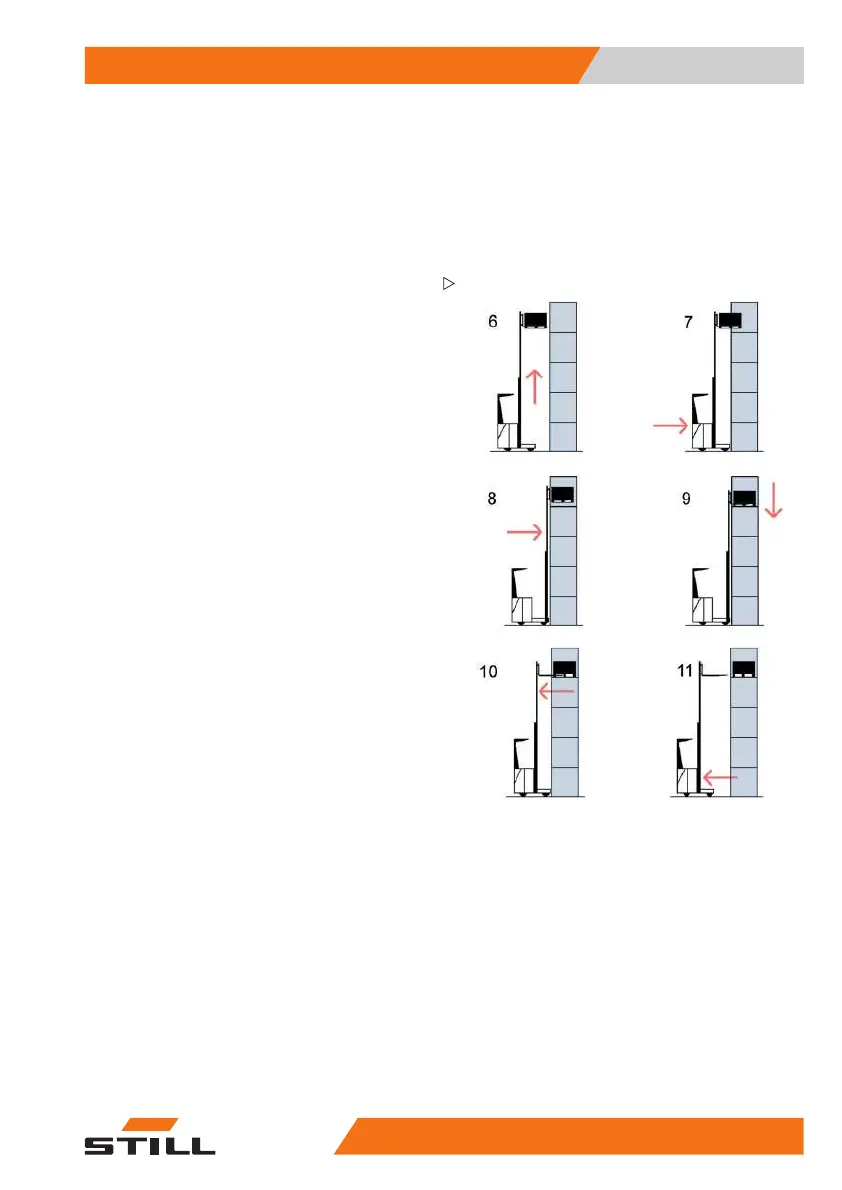
– Activate the lift function (displayed by
the assistant). The selected height plus
the pallet free lift height is reached and
the automatic stop is performed (6). The
display (5) shows a distance to the target ≤
6 mm.
– Drive up to the racking (7).
– Activate the LS shifting function (shown by
the assistant) and push the pallet onto the
shelf (8).
– Activate the lowering function (shown by
the assistant). The forks are lowered by the
pallet free lift (9) height.
– Activate the DS shifting
function and retract
the reach carriage compl
etely (shown by
the assistant) (10).
The automatic routine is complete. All func-
tions are available again (= manual operation).
– Back the truck away (11).
50
988078001 [EN] 163



 To Next Page