199
Installing the Oven Door Latch
1. Using a 2.5 mm hex wrench, install the sensor bracket mounting screws (2) to secure the sensor
mounting bracket to the oven door latch assembly. See Figure 7-40.
2. Using a 4 mm socket wrench, install the door latch assembly mounting nuts (2) to secure the
door latch assembly inside the oven door assembly. See Figure 7-39.
3. Connect the door latch assembly sensor cable connectors (2).
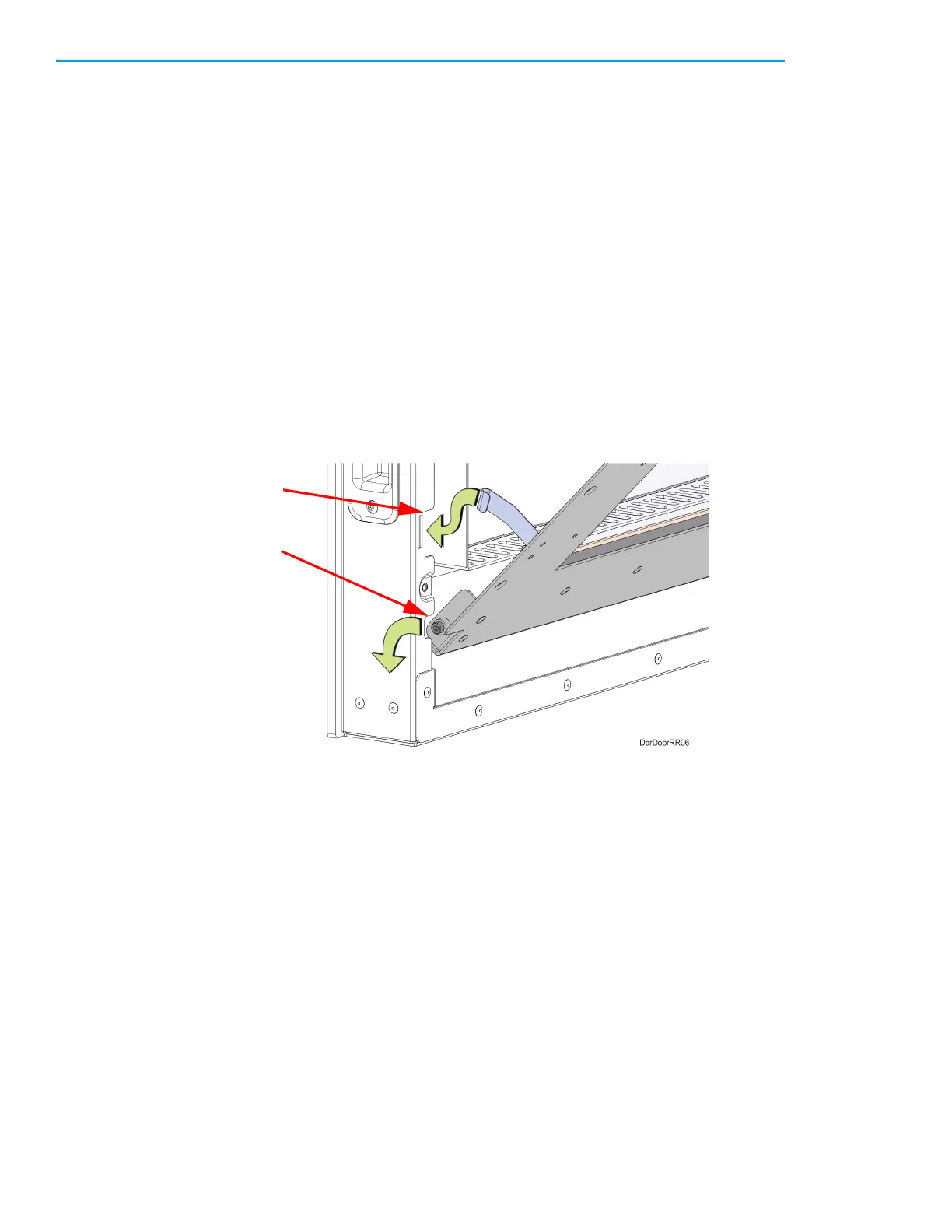
4. Install the inside door panel into the door assembly. See Figure 7-41.
A. Angle the inside door panel slightly and insert the pivot nuts into the lower notches on both
sides of the door frame.
B. Gently press down on the door panel until the pivot nuts are fully seated inside the door
frame.
C. Rotate the top of door panel toward the door assembly. Gently press in the pivot arms to
insert them into the upper notches on both sides of the door frame.
D. Close the door panel and make sure that the panel and frame mounting holes are aligned.
Figure 7-41: Inside oven door panel detail
5. Using a 2.5 mm hex wrench, install the inside door panel mounting screws (11). See Figure 7-38.
6. Close the oven door.
Pivot Nut
Notch
Pivot Arm
Notch














 To Next Page