Chapter 4 Replacing Motherboard Assembly Components 4-37
3. Remove the following components:
■ Air duct – Section 4.4.1, “Removing the Air Duct” on page 4-17
■ System fan assembly – Section 5.3.1, “Removing the System Fan Assembly” on
page 5-7
■ FB-DIMMs – Section 4.6.2, “Removing FB-DIMMs” on page 4-24
■ Alarm board – Section 5.6.1, “Removing the Alarm Board” on page 5-15
■ SCC module (also known as IDPROM chip) – Section 4.9.1, “Removing the SCC
Module” on page 4-35
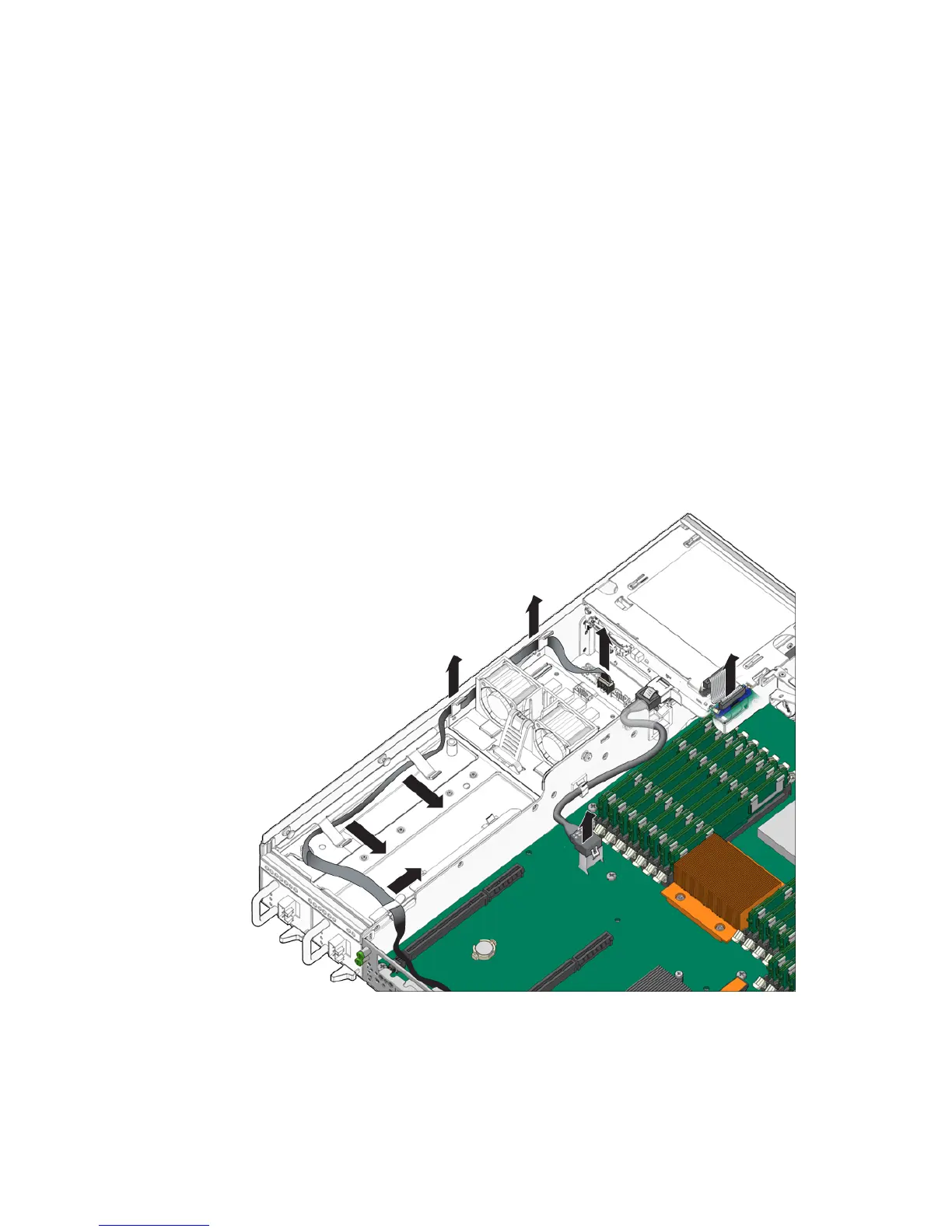
4. Disconnect the cables connected to the motherboard (
FIGURE 4-21).
a. Disconnect the cable connected to the PDB.
b. Disconnect the two cables connected to the media bay assembly.
FIGURE 4-21 Removing the Cables Connected to the Motherboard
5. Loosen or remove the screws that secure the motherboard assembly to the
chassis (
FIGURE 4-22).













 To Next Page