Chapter 3 Replacing Storage Components 3-9
■ Section 3.1.1, “Removing a Hard Drive” on page 3-2
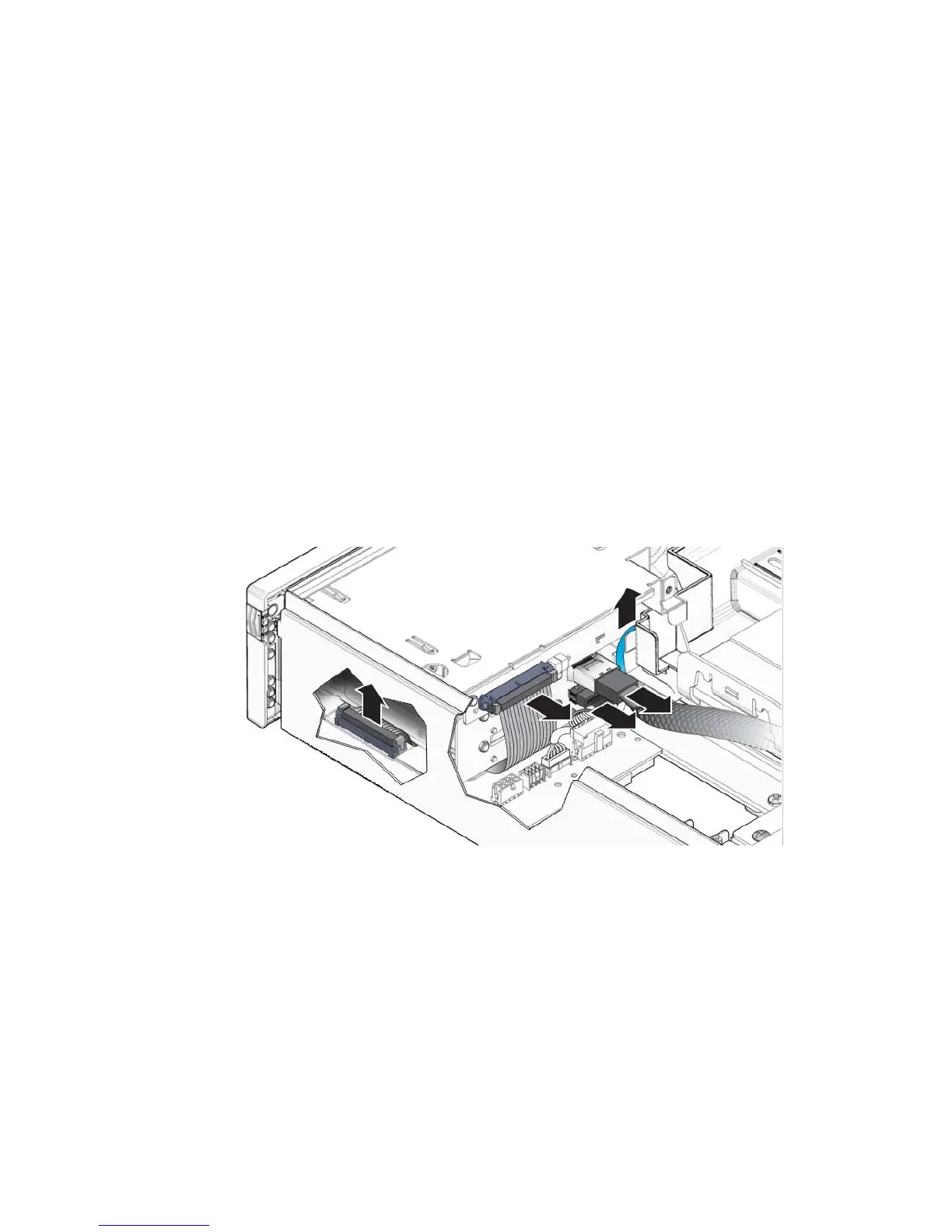
3. Disconnect the following cables from the media bay assembly (
FIGURE 3-9):
a. (Optional) Disconnect the blue system fan tray assembly cable that connects
to the PDB underneath the media bay assembly cables (
FIGURE 3-9).
This step allows easier access to the media bay assembly cables.
b. Disconnect media bay assembly cable (top) that connects to the motherboard
(
FIGURE 3-9).
c. Disconnect media bay assembly cable (bottom) that connects to power
distribution board (PDB) (
FIGURE 3-9).
d. Disonnect media bay assembly ribbon cable that connects to the PDB
(
FIGURE 3-9).
You can disconnect this cable from the rear of the media bay assembly or from
the PDB after loosening the screws and lifting the assembly out of the chassis.
FIGURE 3-9 Media Bay Assembly Cables













 To Next Page