108 Sun Server X4-2 Service Manual • May 2014
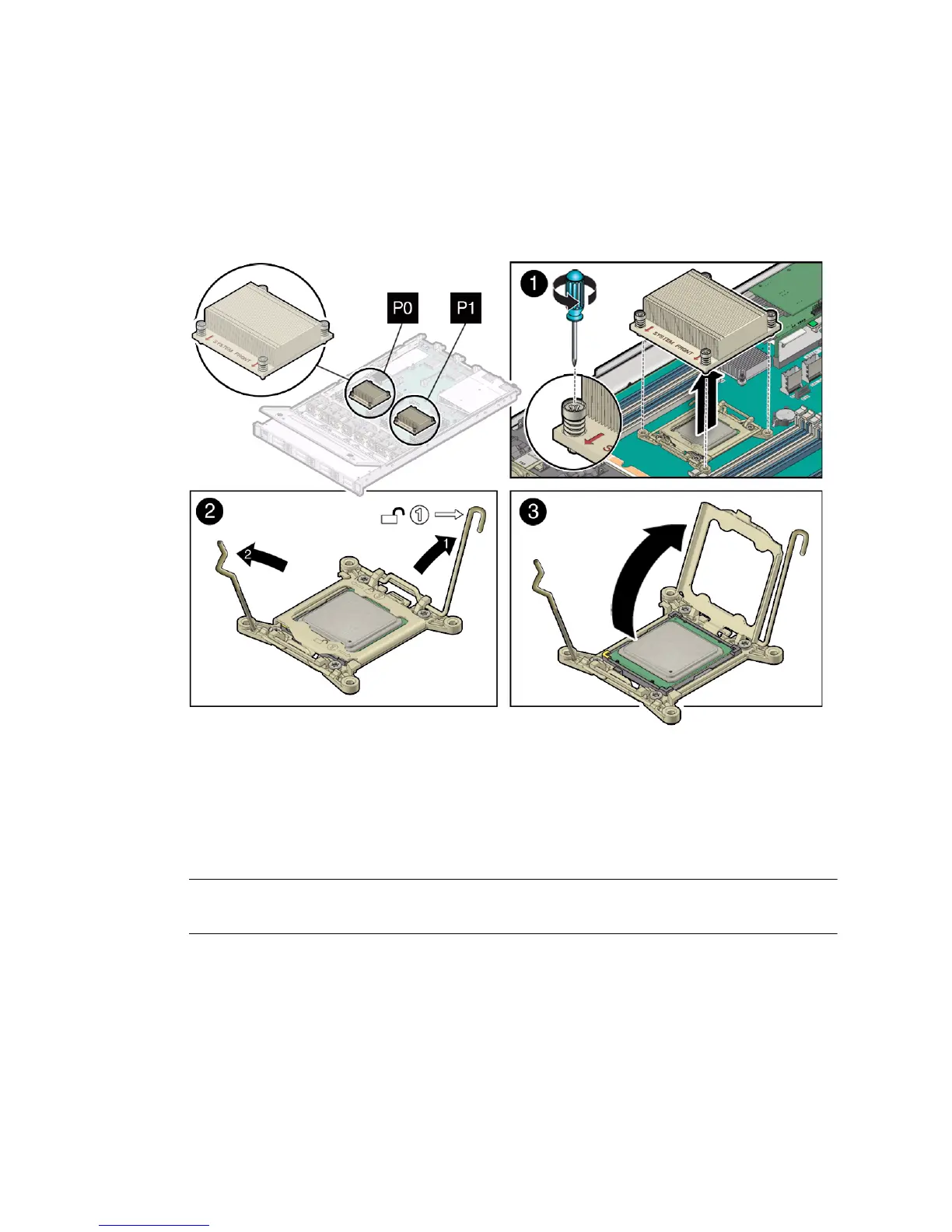
3. Gently press down on the top of the heatsink to counteract the pressure of the
captive spring-loaded screws that secure the heatsink to the motherboard and
loosen the four Phillips captive screws in the heatsink for the processor [1].
Using a No. 2 Phillips screwdriver, turn the screws counterclockwise alternately
one and one half turns until they are fully removed.
4. To separate the heatsink from the top of the processor, gently twist the heatsink
left and right, while pulling upward, and then lift off the heatsink and place it
upside down on a flat surface [1].
A thin layer of thermal grease separates the heatsink and the processor. This
grease acts as an adhesive.
Note – Do not allow the thermal grease to contaminate the work space or other
components.
5. Use an alcohol pad to clean the thermal grease from the underside of the
heatsink.
Be careful not to get the thermal grease on your fingers.



 To Next Page