Servicing FRUs 115
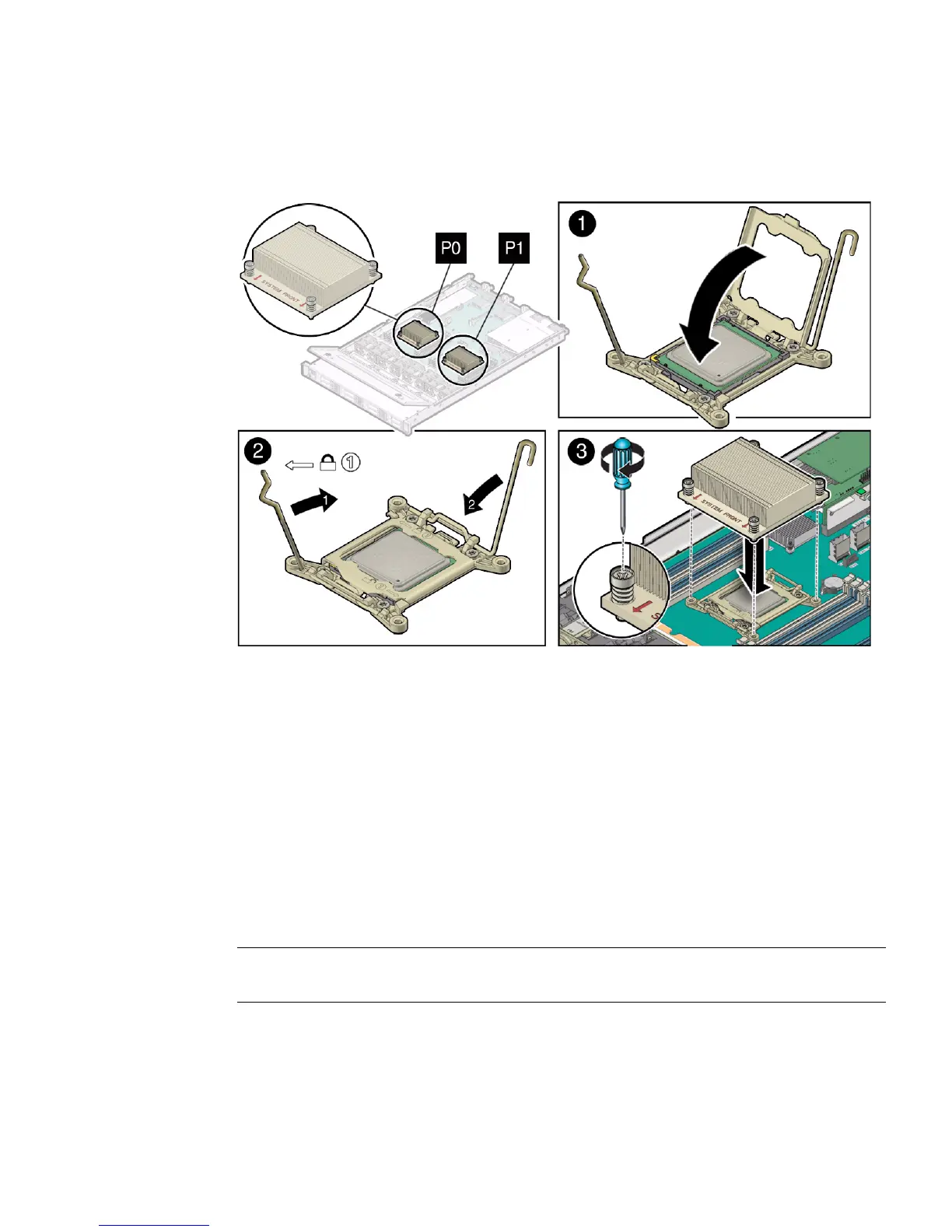
7. Swing the processor ILM assembly load plate into the closed position [1].
Ensure that the load plate sits flat around the periphery of the processor.
8. Engage the processor ILM assembly load lever on the left side of the socket
(viewing the server from the front) by rotating it downward and slipping it
under the catch [2].
9. Engage the processor ILM assembly hinge lever on the right side of the socket
(viewing the server from the front) by rotating it downward and slipping it
under the catch [2].
10. Use the syringe (supplied with the new or replacement processor) to apply
approximately 0.1 ml of thermal grease to the center of the top of the processor.
To measure 0.1 ml of thermal grease, use the graduated scale on the thermal
grease syringe.
Note – Do not distribute the grease; the pressure of the heatsink will do so for you
when you install it.
11. Inspect the heatsink for dust and lint.
Clean the heatsink if necessary.



 To Next Page