132 Sun Server X4-2 Service Manual • May 2014
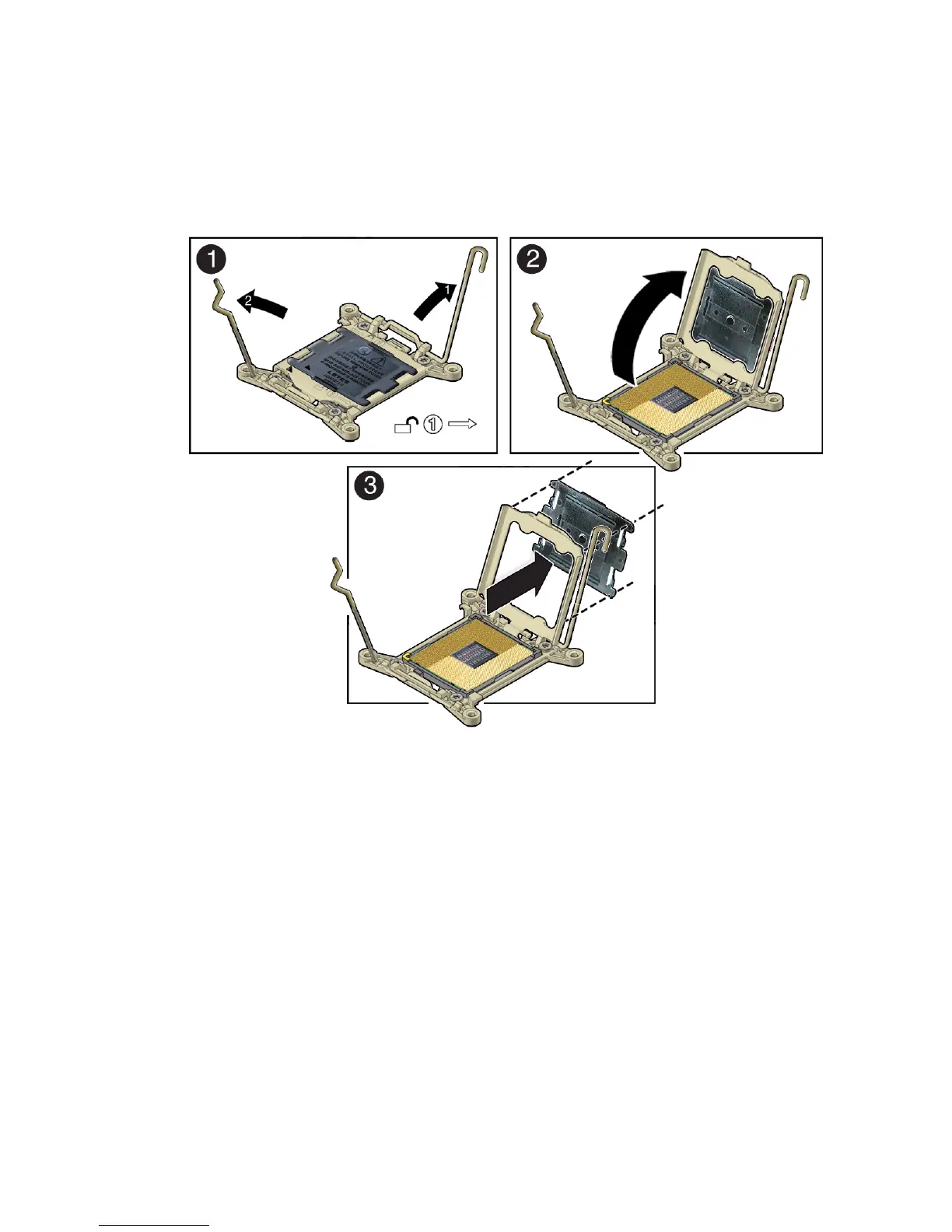
a. Disengage the processor ILM assembly hinge lever on the right side of the
processor socket (viewing the server from the front) by pushing down on the
lever and moving it to the side away from the processor, and then rotating the
lever upward [Frame 1].
b. Disengage the processor ILM assembly load lever on the left side of the
processor socket (viewing the server from the front) by pushing down on the
lever and moving it to the side away from the processor, and then rotating the
lever upward [1].
c. To lift the processor ILM assembly load plate off of the processor socket,
rotate the ILM assembly hinge lever on the right side of the processor toward
the closed position (the load plate is lifted up as the hinge lever is lowered)
and carefully swing the load plate to the fully open position [2].
d. Grasp the top and underside of the processor socket cover with one hand
(place your thumb against the underside of the cover), place your other
thumb against the underside of the cover, and carefully push the cover out of
the processor ILM assembly load plate [3].



 To Next Page