
EasyManua.ls Logo

Technicolor TB30 - User Manual

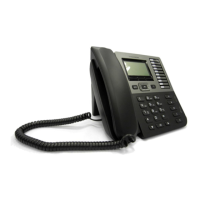
Technicolor TB30
266 pages
Print Icon
To Next Page IconTo Next Page
Loading...
TB30
Administrator Guide
SIP STACK
VERSION 1.3
9 September, 2010

Table of Contents

Questions and Answers

  • A
    Anthony OlsenAug 1, 2025
    What to do if Technicolor IP Phone has no dialing tone?
    • M
      Miguel BennettAug 1, 2025
      If your Technicolor IP Phone has no dialing tone, it might be due to a connection problem with the LAN. Ensure that the Ethernet cable is correctly connected to both the LAN port on your phone and the hub.
  • C
    cmoranAug 6, 2025
    Why can't I hear my call partner on my Technicolor IP Phone?
    • K
      Kyle LoweAug 6, 2025
      If your call partner cannot hear you, or you cannot hear them on your Technicolor IP Phone, the handset cable may not be correctly plugged in. Make sure the handset cable is securely connected to both the handset and the phone.
  • B
    Benjamin BryantAug 10, 2025
    How to fix a Technicolor TB30 IP Phone with no display?
    • M
      Miranda JenkinsAug 10, 2025
      If your Technicolor IP Phone has no display, it is likely due to a power issue. Ensure that the power supply is correctly plugged in.
  • R
    Ronald McleanAug 15, 2025
    Why does my Technicolor TB30 say it needs to be rebooted?
    • J
      jacobsericaAug 15, 2025
      Your Technicolor IP Phone may display a message indicating it needs to be rebooted after configuration changes. Press the "OK" key to reboot the phone. Also, this can be caused by call forwarding or the 'Do not disturb' facility being active. Deactivate the Call forward function by pressing Fwd and “enable.”
  • M
    Mark CamposAug 20, 2025
    What to do if Technicolor TB30 IP Phone is waiting for CA and there is no dialing tone?
    • C
      Connor GrayAug 20, 2025
      If your Technicolor IP Phone displays a 'Waiting for CA…' message and there is no dialing tone, it indicates that one of the following parameters is not set correctly: Phone IP address, Call agent (CA) address, Subnet mask, or Gateway address. Check these parameters with your system administrator.
  • D
    Daniel ValdezAug 26, 2025
    Why is the time wrong on my Technicolor TB30 IP Phone?
    • R
      rsharpAug 26, 2025
      If the time on your Technicolor IP Phone is incorrect, it is because the time is automatically specified by the network. Ask your system administrator.

Summary

PART 1 SAFETY INFORMATION

PART 2 PRODUCT OVERVIEW AND CONNECTIONS

Network and PC Connections

Explains connecting the phone to the network and PC via Ethernet.

Powering the Phone and Headset Connection

PART 3 PHONE OPERATIONS

Display, Soft Keys, and Indicators

Explains the LCD display, soft key functions, and visual cues like icons and LEDs.

Icons, Indicators, and LED Definitions

Definitions of LED

Explains the status indicated by different LED lights on the phone.

PART 4 CALL SERVICES

Talking Modes and Main Call Functions

Covers communication modes and essential functions for making and receiving calls.

Call Handling During Conversation

Explains features like hold, transfer, conference, and options during active calls.

Call Transfer and Conference Call Details

Call Options and Adjustments

Details options like volume, mute, and multi-line display during calls.

Volume Control, Mute, and Line Management

Call Pickup, Park, and Log Management

Explains call pickup, parking, and managing call logs.

Call Logs and Phone Book Management

Missed, Received, and Dialed Calls

Describes the handling and display of different types of call logs.

PART 5 CONFIGURATION THROUGH LCD

User and Admin Settings Sub-menus

Details sub-menus for user settings (personalize, alarm) and admin settings (networking, SIP).

Admin Settings Details and Option Menus

Shortcut, Information, and Memory Keys

Explains configuration of shortcut keys, access to phone info, and memory key management.

Network and PPPoE Configuration

NTP and SIP Configuration Settings

Guides on configuring NTP and SIP settings for phone operation.

SIP Profile Management

PART 6 CONFIGURATION VIA WEB INTERFACE

Web Interface Access and IP Discovery

Introduces web configuration and methods to find the phone's IP address.

PART 7 AUTO-PROVISIONING

TFTP Auto-Provisioning Process

Details TFTP auto-provisioning, including requirements and files.

TFTP Provisioning Practice and HTTP Method

USB Auto-Provisioning Process

Describes provisioning via USB drive when network is unavailable.

PART 10 FEATURE OVERVIEW

Resetting Parameters to Default

Phone Lock Feature Configuration

Details the phone lock feature, its setup, and usage.

Blocking Web GUI Access

USB Login;Logout Feature

BLF (Busy Lamp Field)

Security Features

Improve HTTPS APS Feature

Encrypted Configuration Files in APS

Explains encryption of configuration files for secure data transfer during APS.

Feature Activation for Supervision

Star Codes Overview

Explains Star Codes (SC) or Feature Access Codes (FAC) for invoking server features.

Ad-Hoc Conference (RFC 4579)

Downloadable;Uploadable Local Phonebook

Login;Logout Feature Details

Broadsoft Shared Call Appearance

Makes the phone compatible with Broadsoft Shared Call Appearance facility.

PART 11 - REMOTE PHONEBOOK SPECIFICATION

PART 12 TELNET ACTIVATION

Telnet Commands and Reset to Default

Lists Telnet commands for management and procedures for resetting the phone.

PART 13 TR069 & TR111

TR069 RPC Methods and Connection Flows

Lists supported RPC methods and describes ACS HTTP connection flows.

PART 14 TROUBLESHOOTING

Troubleshooting Remedies and Solutions

Provides remedies and steps to resolve identified phone problems.

PART 15 APPENDIX

Configuration Parameters and Commands Reference

Lists configurable parameters and commands for TB30 phone management.

Technicolor TB30 Specifications

General IconGeneral
TypeIP Phone
ProtocolsSIP
CodecsG.711, G.722, G.726, iLBC
Operating Temperature0°C to 40°C
Humidity10% to 90% non-condensing
ModelTechnicolor TB30