Various menu settings
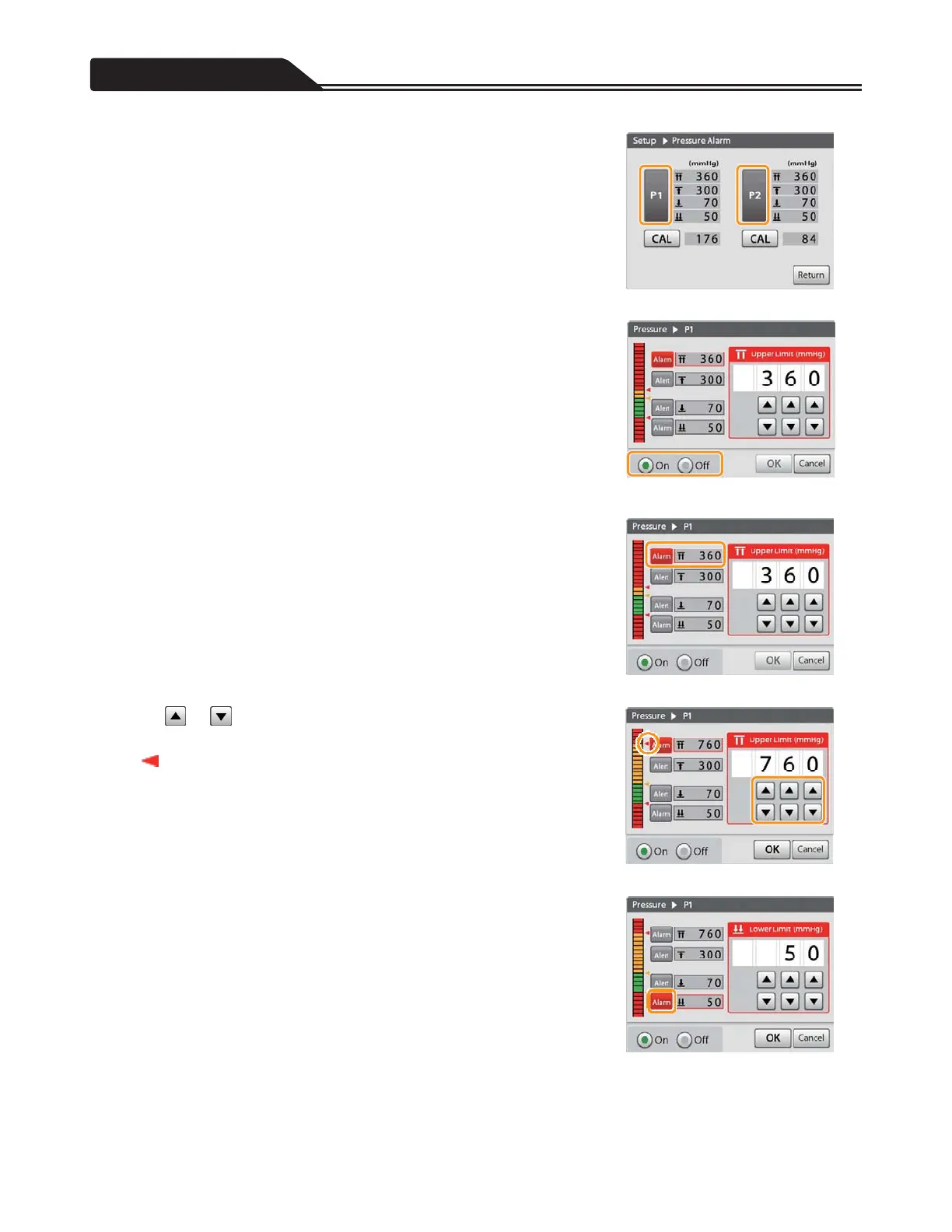
2. Tap the channel (P1 or P2) you want to set. (Figure 3-8)
The following figures show the example when [P1] is selected.
<<Setting the on/off status of the pressure measuring
function>>
3. Tap [On] or [Off]. (Figure 3-9)
When turning it off, tap [OK] to complete the setting.
Figure 3-8
<<Setting the threshold value of the Pressure Alarm>>
4. Confirm that [Alarm] of the upper limit is selected.
(Figure 3-10)
Figure 3-9
5. Tap or to input the upper limit value you want to set.
(Figure 3-11)
“
(red)” indicates the threshold value of the Over Pressure Alarm in
accordance with an input pressure value.
Figure 3-10
6. Tap [Alarm] of the lower limit. (Figure 3-12)
Figure 3-11
Figure 3-12
86








 To Next Page