108
Chapter 6: Graph Tools
06TOOLS.DOC TI-86, Chap 6, US English Bob Fedorisko Revised: 02/13/01 2:23 PM Printed: 02/13/01 3:01 PM Page 108 of 2206TOOLS.DOC TI-86, Chap 6, US English Bob Fedorisko Revised: 02/13/01 2:23 PM Printed: 02/13/01 3:01 PM Page 108 of 22
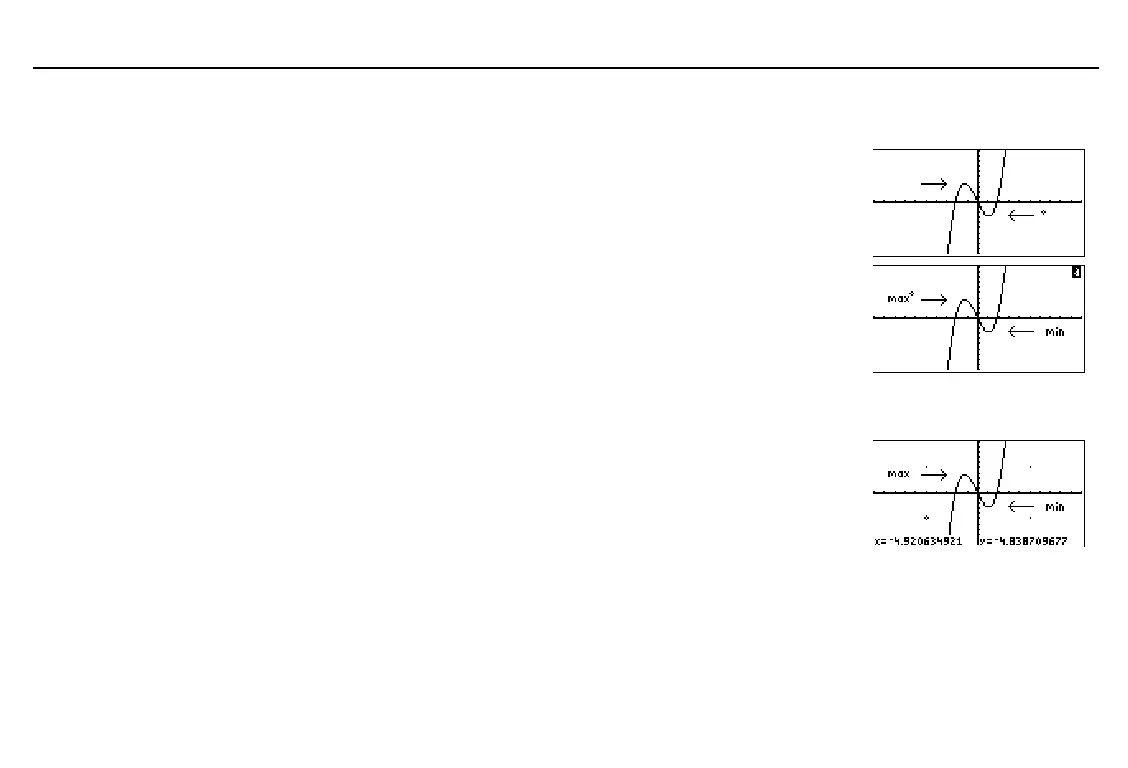
Placing Text on a Graph
Select
TEXT
from the
GRAPH
DRAW
menu.
The text cursor is displayed.
Move the cursor to where you want to enter
text. Text is entered below the text cursor.
6/ '
/ / /
&
" # ! $
Set alpha-lock and enter
min
. (The alpha
cursor ( Ï ) is displayed in the top-right
corner.
Move the cursor to another location.
Enter
max
(alpha-lock remains on).
- n 1
ã
M
ä
ã
I
ä
ã
N
ä
" # ! $
ã
M
ä
ã
A
ä
ã
X
ä
Turning On or Turning Off Points
Select
PTON
(or
PTOFF
) from the
GRAPH
DRAW
menu.
Move the cursor to where you want to draw
(or erase) a point.
Turn on (or turn off) the point.
6 / '
/ (
" # ! $
b
To continue drawing points, repeat steps 2 and 3. To cancel
PTON
, press
:
.
This example adds to the
PEN
example drawing.
Before you start, you may
want to store the arrows to a
picture variable (page 102).
To erase a character when
using
TEXT
, move the
TEXT
cursor above it and then
press
1
¤
or
-
n
¤
to overwrite it.
In the example, the function
y(x)=x^3+.3x
2
N
4x
is selected.
Also,
ZSTD
was executed.
Points are turned on at (
L
5,5),
(5,5), (5,
L
5), and (
L
5,
L
5).


 To Next Page