Chapter 16: Programming
227
16PROG.DOC TI-86, Chap 16, US English Bob Fedorisko Revised: 02/13/01 2:36 PM Printed: 02/13/01 3:04 PM Page 227 of 1616PROG.DOC TI-86, Chap 16, US English Bob Fedorisko Revised: 02/13/01 2:36 PM Printed: 02/13/01 3:04 PM Page 227 of 16
The STRNG (String) Menu
-
“
" sub lngth Eq
4
St St
4
Eq
"
string
"
Marks the start and end of
string
sub("
string
",
begin
,
length
)
sub(
stringName
,
begin
,
length
)
Returns a subset of
"
string
"
or
stringName,
starting at
begin
character place and
length
characters long
lngth
"
string
"
or
lngth
stringName
Returns the number of characters in
"
string
"
or
stringName
Eq
4
St(
equationVariable
,
stringName
)
Converts
equationVariable
contents to
stringName
St
4
Eq(
stringName
,
equationVariable
)
Converts
stringName
to
equationVariable
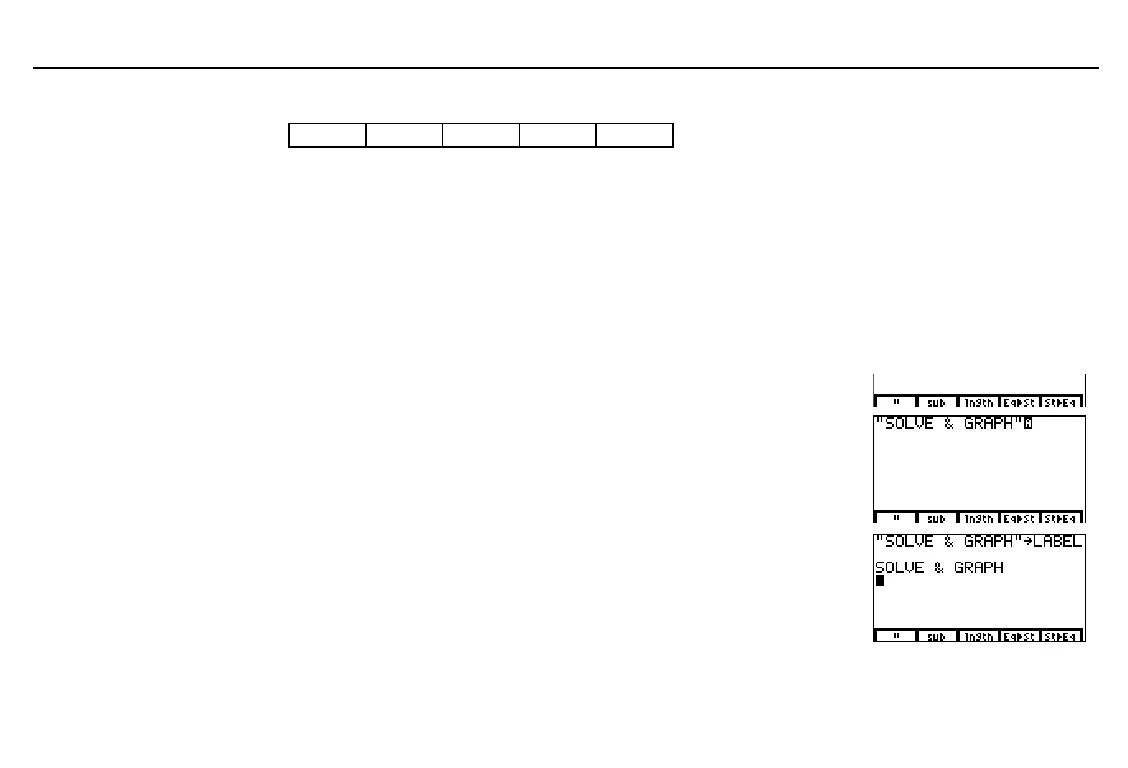
Creating a String
Display the
STRNG
menu. - “
Enter the open quotation mark, then
the string
SOLVE & GRAPH
, and then
the close quotation mark.
& 1 1
ã
S
ä
ã
O
ä
ã
L
ä
ã
V
ä
ã
E
ä
¤
- Ÿ & ( ¤
ã
G
ä
ã
R
ä
ã
A
ä
ã
P
ä
ã
H
ä
- “ &
Store the string to the string variable
name
LABEL
.
1 X
ã
L
ä
ã
A
ä
ã
B
ä
ã
E
ä
ã
L
ä
b
"
also marks the start and
end of a formula to be
attached to a list; it is also an
item on the list editor menu
(Chapter 11).
Begin these steps on a blank
line on the home screen or in
the program editor.
To evaluate the contents of a
string, you must use
St
4
Eq(
to convert it to an equation.



 To Next Page