110
Chapter 7: Tables
07TABLES.DOC TI-86, Chap 7, US English Bob Fedorisko Revised: 02/13/01 2:25 PM Printed: 02/13/01 3:02 PM Page 110 of 607TABLES.DOC TI-86, Chap 7, US English Bob Fedorisko Revised: 02/13/01 2:25 PM Printed: 02/13/01 3:02 PM Page 110 of 607TABLES.DOC TI-86, Chap 7, US English Bob Fedorisko Revised: 02/13/01 2:25 PM Printed: 02/13/01 3:02 PM Page 110 of 6
Displaying the Table
The table displays the independent values and corresponding dependent values for up to 99
selected functions in the equation editor. Each dependent variable in the table represents a
selected function stored in the equation editor for the current graphing mode.
TABLE Menu
7
TABLE TBLST
table screen
table setup editor
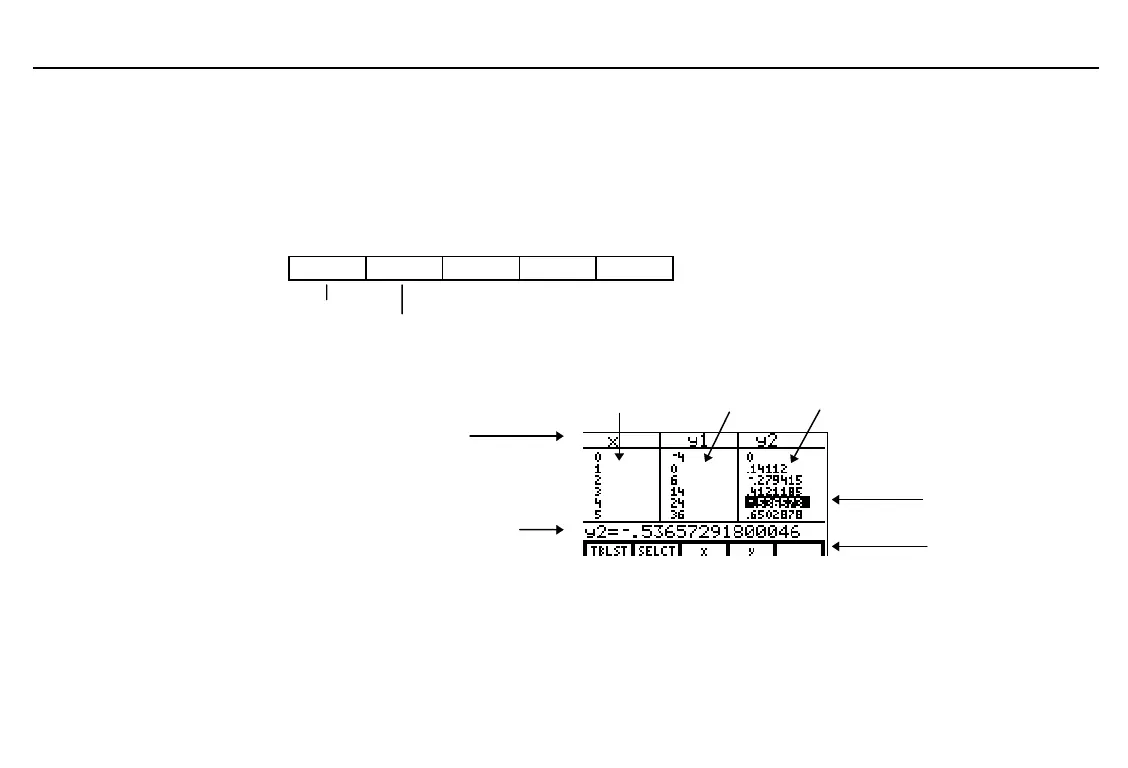
The Table
7
&
independent variable values dependent (equation) variable values
variable names
edit line (function name and
full value of current cell shown)
current cell
table menu
To edit an equation, press
$
in the equation’s table column until the cursor highlights the
equation variable on the top line, and then press
b
. The expression stored to the
current equation variable is displayed in the edit line.
To display the equation
editor, press
6
&
(Chapter 5).
In the example,
y1=x
2
+3x-4
and
y2=sin (3x)
are selected
and all defaults set.
The table abbreviates values
in the columns, if necessary.



 To Next Page