Chapter 16: Programming
217
16PROG.DOC TI-86, Chap 16, US English Bob Fedorisko Revised: 02/13/01 2:36 PM Printed: 02/13/01 3:04 PM Page 217 of 1616PROG.DOC TI-86, Chap 16, US English Bob Fedorisko Revised: 02/13/01 2:36 PM Printed: 02/13/01 3:04 PM Page 217 of 16
"string"
Specifies the beginning and end of a
string
Outpt(row,column,"string")
Outpt(
row,column,stringName)
Outpt(
row,column,value)
Outpt(
row,column,variable)
Displays
string
,
stringName
,
value
, or a value stored to
variable
beginning at the specified
row
and
column
on the display
Outpt("CBLSEND",listName)
Although using
Send(
is preferred on the TI
-
86, you can use
Outpt(
to
send
listName
to a CBL 2/CBL or CBR (for TI
-
85 compatibility)
InpSt promptString,variable
InpSt variable
Pauses a program, displays
promptString
or
?
, and waits for a
response; stores the response to
variable
always as a string; omit
quotation marks from your response
The TI
-
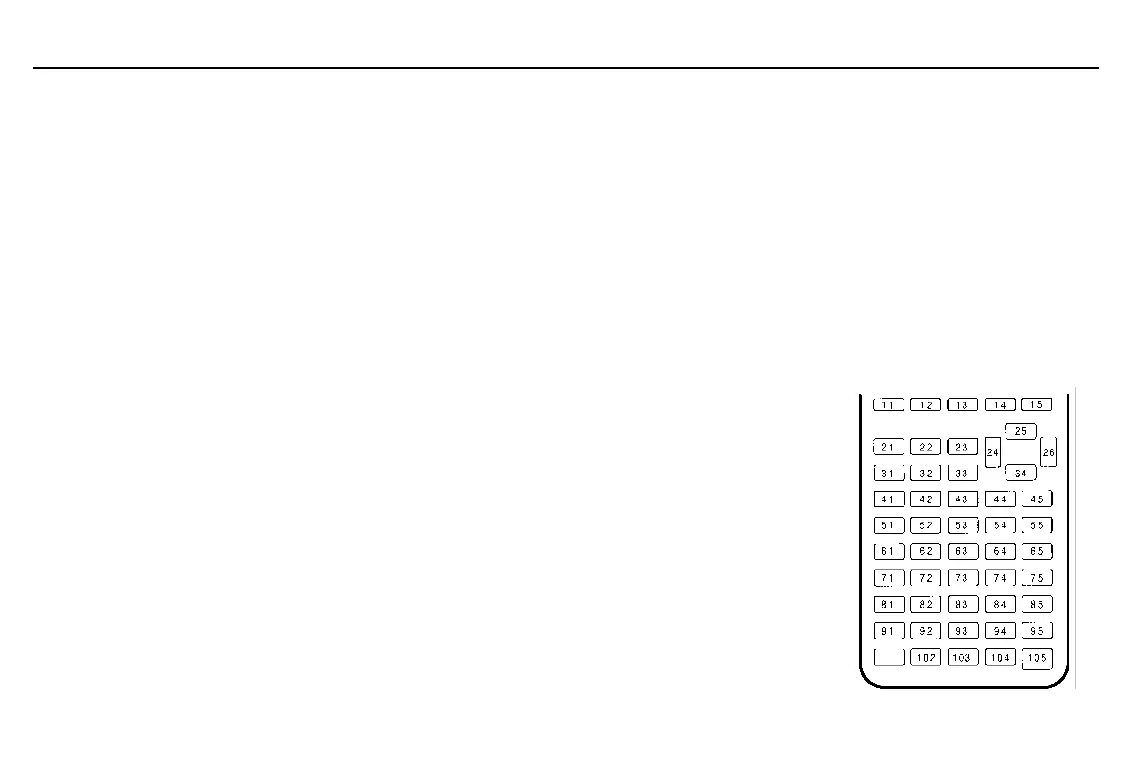
86 Key Code Diagram
When
getKy
is encountered in a program, it returns a number
corresponding to the last key pressed, according to the key code
diagram to the right. If no key has been pressed,
getKy
returns
0
.
Use
getKy
inside loops to transfer control, such as when you
create a video game.
This program returns the key code of each key you press.
:Float
:0

A
:Lbl TOP
:getKy

A
:If A>0
:Disp A
:Goto TOP
To break (interrupt) the program, press ^ and then press *.



 To Next Page