Chapter 20: A to Z Function and Instruction Reference
287
20ATOZ.DOC TI-86, Chap 20, US English Bob Fedorisko Revised: 02/13/01 2:42 PM Printed: 02/13/01 3:05 PM Page 287 of 11820ATOZ.DOC TI-86, Chap 20, US English Bob Fedorisko Revised: 02/13/01 2:42 PM Printed: 02/13/01 3:05 PM Page 287 of 118
DrEqu(
† GRAPH menu
To enter the ' character for
the Q' variables, use the
CHAR MISC
menu.
DrEqu(
xAxisVariable
,
yAxisVariable
,
xList
,
yList
,
tList
)
In
DifEq
graphing mode, draws the solution to a set of
differential equations stored in the
Q'
variables
specified by
xAxisVariable
and
yAxisVariable
. If
direction fields are off (
FldOff
is selected), the initial
values must be stored also.
After the solution is drawn,
DrEqu(
waits for you to
move the cursor to a new initial value and press b
to draw the new solution.
You then are prompted to press
Y
(to specify another
initial value) or
N
(to stop).
For the last-drawn solution, the
x
,
y
, and
t
values
(beginning at their initial values) are stored to
xList
,
yList
, and
tList
, respectively.
DrEqu(
xAxisVariable
,
yAxisVariable
)
Does not store
x
,
y
, and
t
values for the solution.
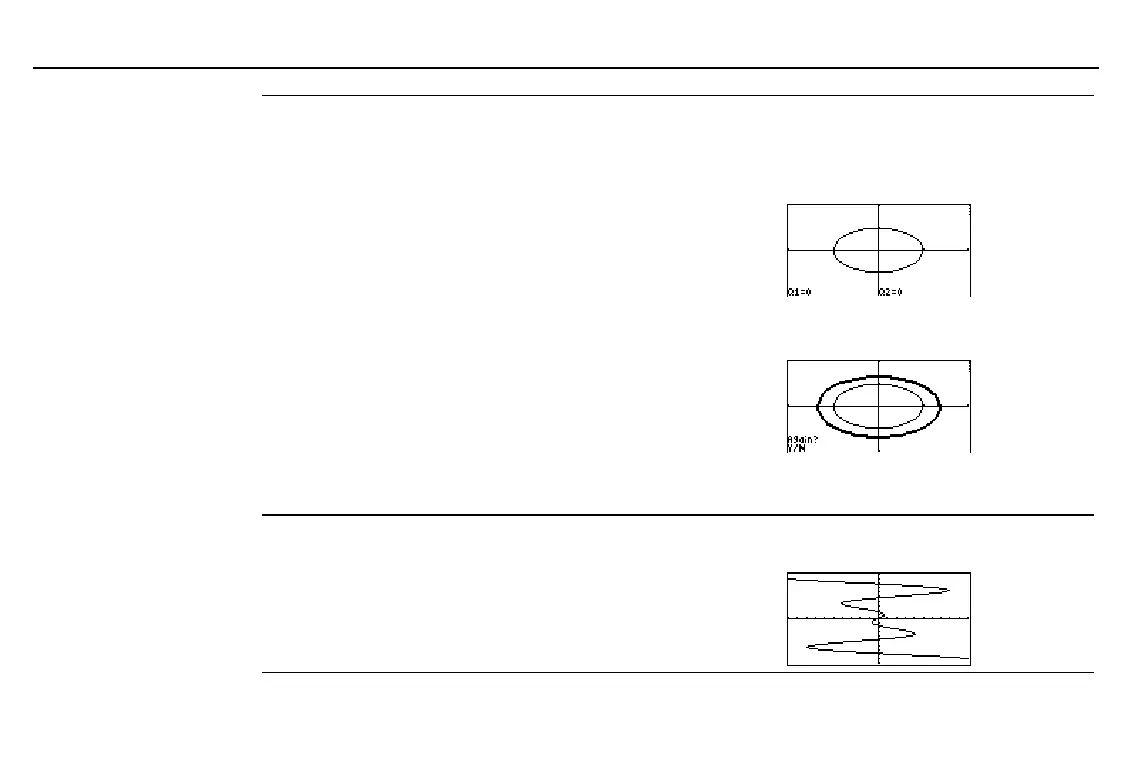
In
DifEq
graphing mode, starting with a
ZStd
graph screen:
Q'1=Q2:Q'2=
L
Q1
b
Done
0
¶
tMin:1
¶
QI1:0
¶
QI2
b
0
DrEqu(Q1,Q2,XL,YL,TL)
b
Move the cursor to a new initial value.
b
Press
N
to stop graphing. You can then
examine
XL
,
YL
, and
TL
.
DrInv
GRAPH DRAW menu
DrInv
expression
Draws the inverse of
expression
by plotting
x
values on
the y-axis and
y
values on the x-axis.
In
Func
graphing mode:
ZStd:DrInv 1.25 x cos x
b


 To Next Page