CFM-BL10Pro General instruction manual
26 / 87
Screen switching:
Once OPE and Teach screen are displayed, the arrow icons are
appeared on the center of left and right edges for a several
seconds. OPE and Teach display can be switched by sliding your
finger to left or right while touching around the center of the
screen.
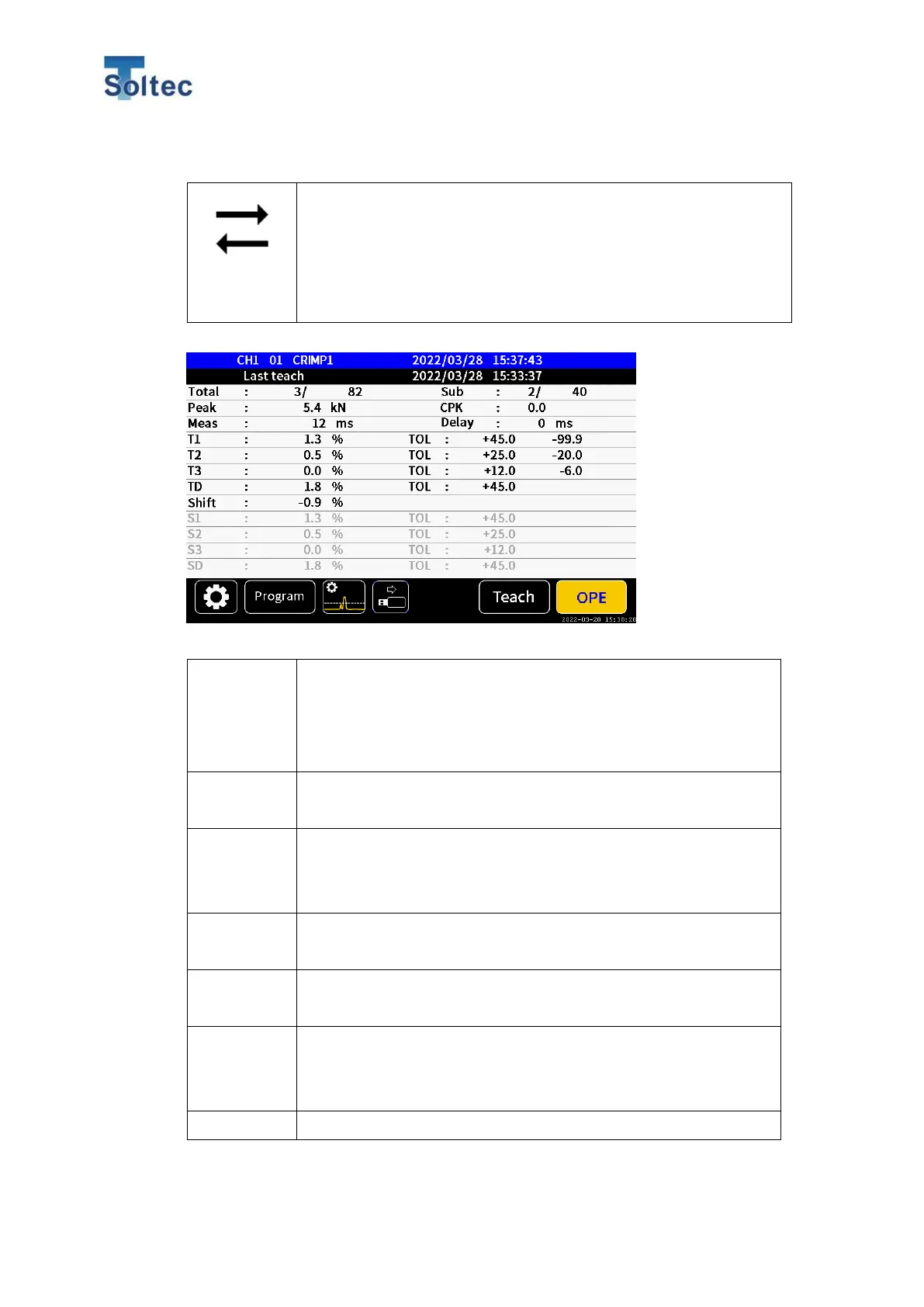
Numerical screen: This screen is common for OPE and Teach mode.
CH1 00 0000 means Channel, Program number and Product
number. If Program is disabled, “00” is displayed.
0000/00/00 00:00:00 means Yeas, Month, Date, and time when
a force curve is last captured.
0000/00/00 00:00:00 means Yeas, Month, Date, and time when
Teach is last performed.
Show Not ok count / Total crimp count.
It is not cleared until “Clear counter” button in System setting 2 is
pressed. It keeps counting when CFM is turned off.
Show Not ok count/ total crimp count after last Teaching.
It is cleared every Teaching.
Show Peak force of captured force curve. Unit of Peak force can
be selected from kg, kN, and lb in System setting 1.
Show CPK value calculated by T3 area of latest 10 samples.
You can select whether CPK value is shown or not in System
setting.
Show measurement time of a force curve.



 To Next Page