CFM-BL10Pro General instruction manual
35 / 87
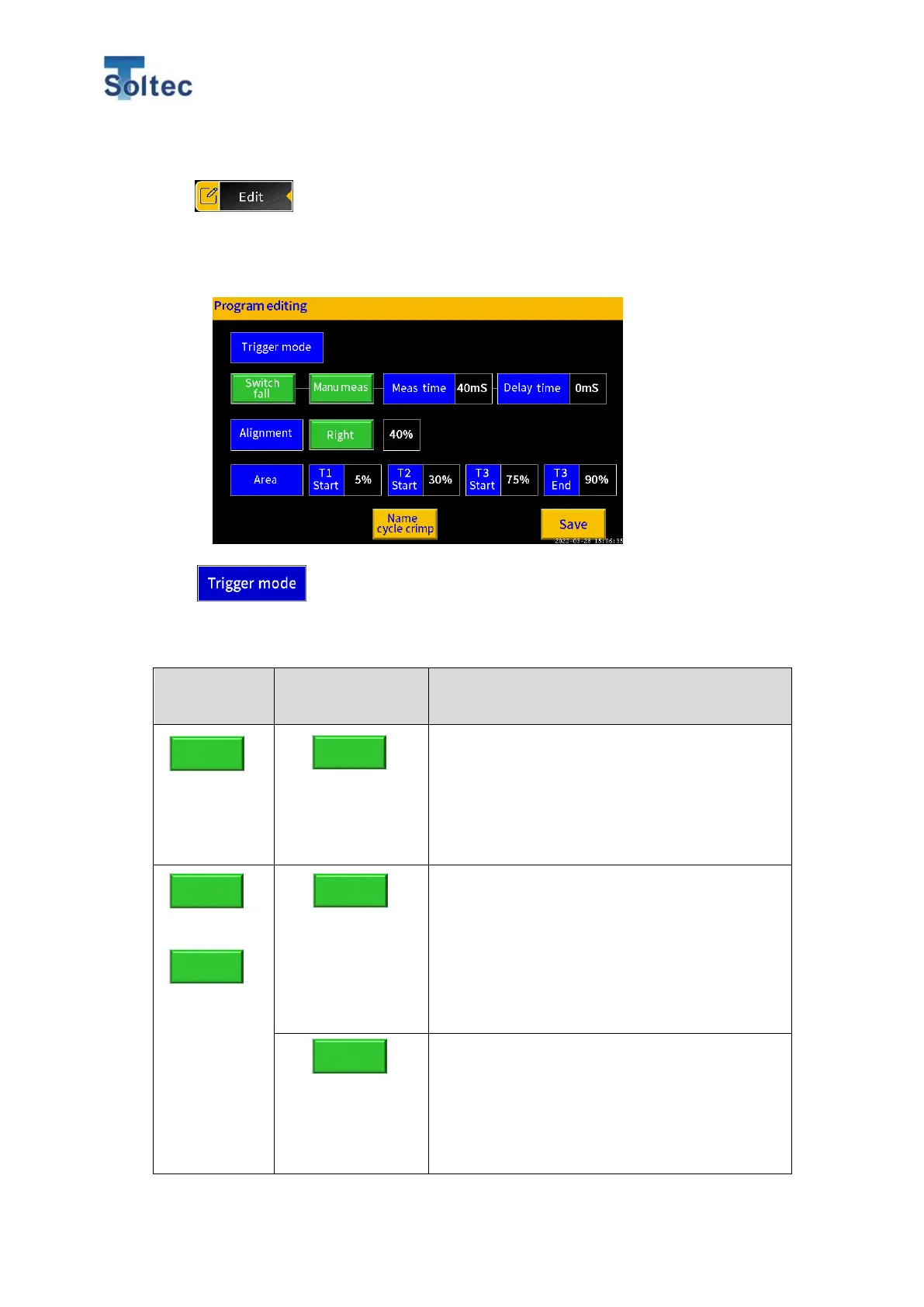
2) Program edit
Program edit screen is displayed from the Edit button.
If “No Program” is selected in System setting, this Program edit screen is
directly displayed from the Program button on the Main screen.
A timing of capturing force curve of crimping or measurement time can be set.
There are several trigger modes below.
This is a mode in which the start of force curve
capturing is detected by a sensor signal over a
certain level and the measurement time is
automatically set until a sensor signal goes
below a certain level.
This is a mode in which the force curve
capturing is started by a signal from an external
trigger signal (from an optional trigger switch
and so on) and measurement time and delay
time are automatically decided by a time when
sensor signal over a certain level.
This is a mode in which the force curve
capturing is started by a signal from an external
trigger signal (from an optional trigger switch
and so on), and measurement time and delay
time are manually decided.
Auto meas
Auto meas
fall
rise



 To Next Page