D292144.9.fm Adjusting Nozzle Vacuum Sensors
Chapter 6: Troubleshooting 6-15
Adjusting Nozzle Vacuum Sensors
The TM-500’s Nozzle Vacuum Sensor is setup before the machine is shipped. It may occasion-
ally require adjustment depending on vacuum sensitivity and the type of part that is being pro-
cessed.
If the TM-500 places “empty” pockets (i.e. places as though it held a part when it did not) or
returns a picking part error when it picked a part, the vacuum sensor’s threshold point probably
needs to be adjusted.
Vacuum Sensor Settings
1. Close the enclosure doors, then open the Head Setup Tab.
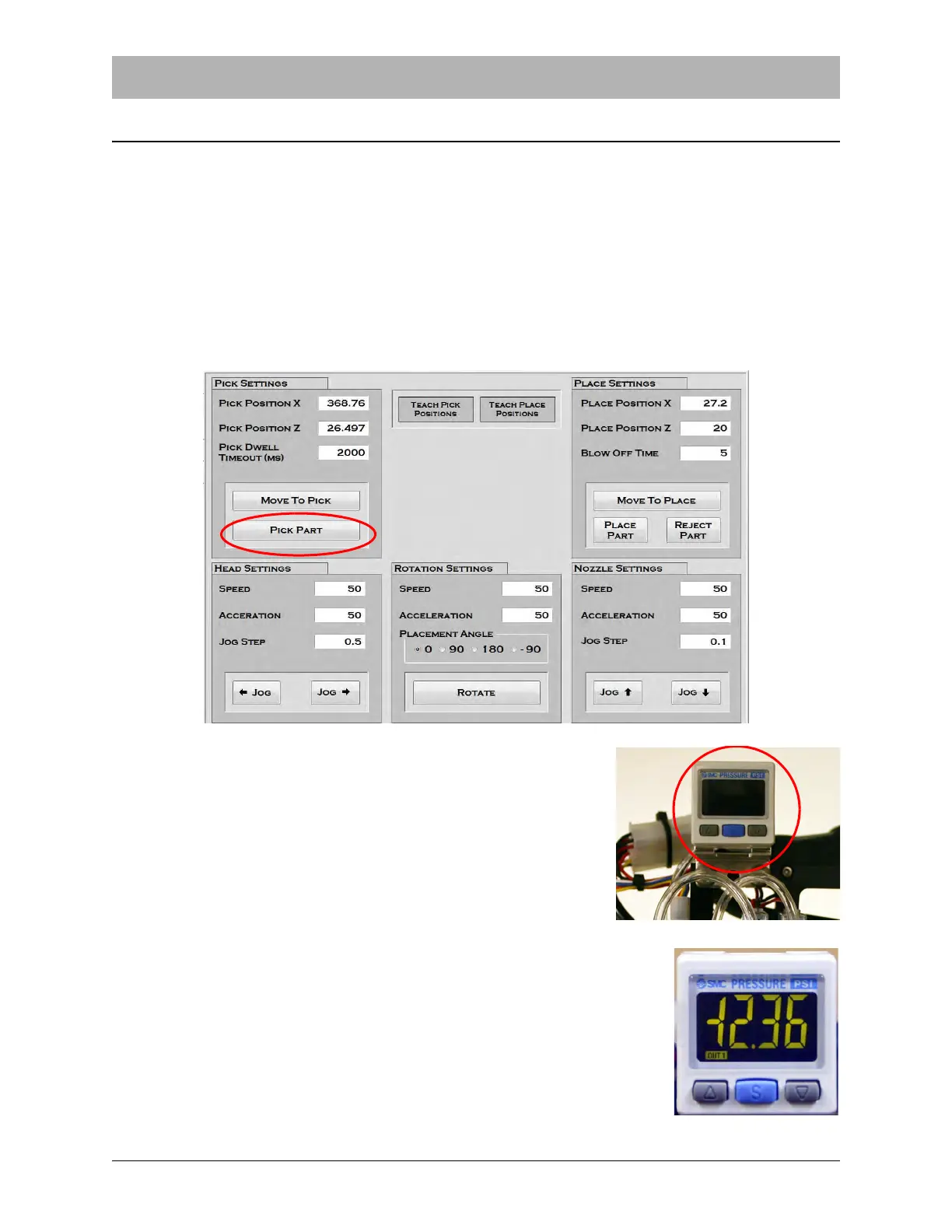
2. Press the Pick Part button to activate vacuum and pick a
part. Observe the vacuum sensor indicator which is located
on the Pick & Place Head above the nozzles The numbers
should be lit in green with components on the nozzle and
red if components are not.
3. If the sensors require adjustment, Press the blue Set button
once. The sensor will alternately flash P_1 and the current
value.
4. Use the Up/Down Arrow Keys to adjust the sensor as needed
with components both on and off of the nozzles..
5. Press the blue Set button again to exit back to normal operation.


 To Next Page