Keyence FS-N40 Series Sensor Amplifiers D291511.18a.fm
A-5 Appendix A: Sensors
Keyence FS-N40 Series Sensor Amplifiers
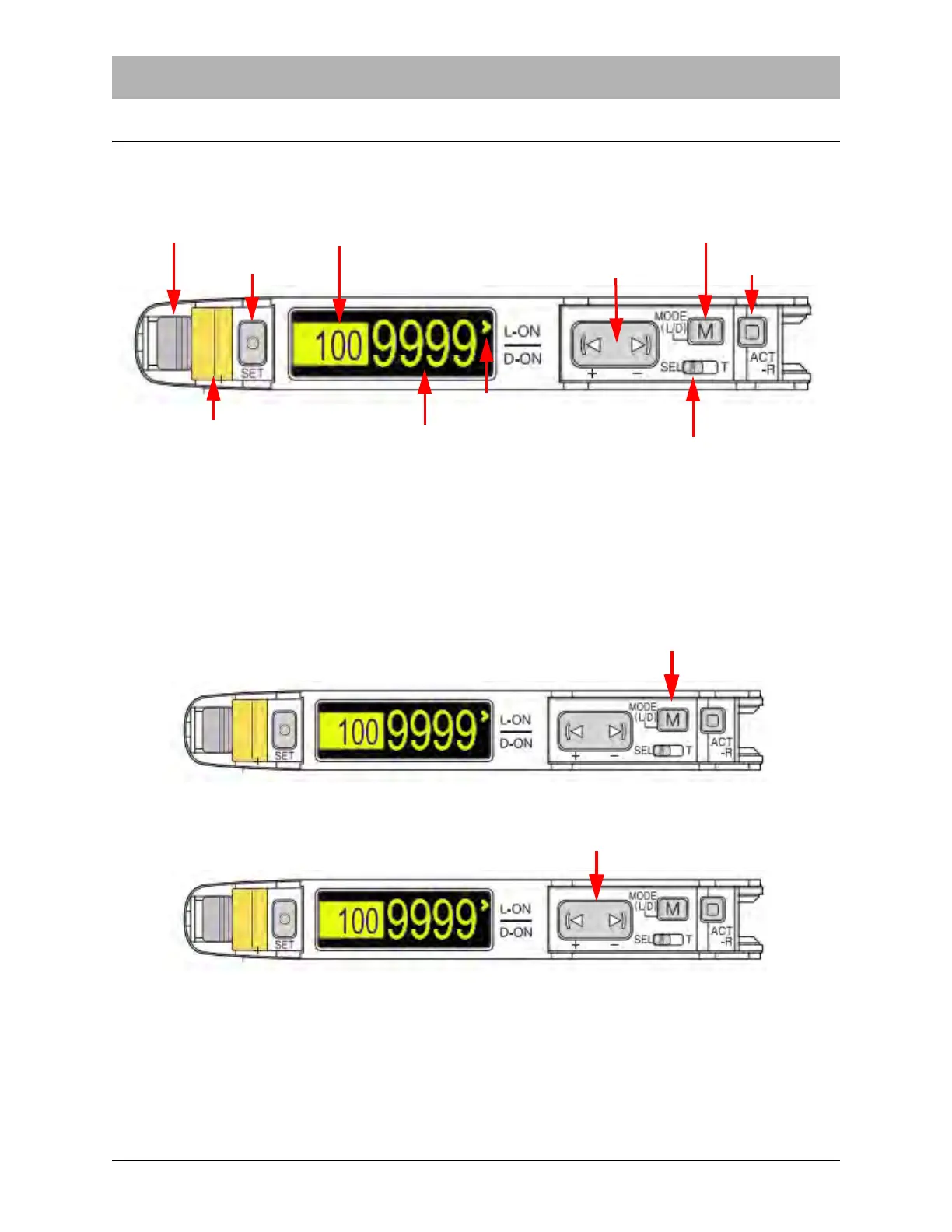
The Keyence FS-N40 Series sensor amplifiers (shown below) are used for the taper’s Empty
Pocket Detector (EPD), Jam in Track Sensor and Low Cover Tape Sensor. They may also be
used on the Bowl Input option, which may include Part Present Sensors.
Select the Output Mode
The FS-N40 Sensor Amplifiers can be set to two Output Modes: light-ON or dark-ON. This set-
ting determines under what conditions the sensor is triggered and the Output Indicator is lit. In
light-ON mode, the sensor will be triggered when the Current Value (CV) of detected light from
the emitter is higher than the Preset Value (PV). In dark-ON mode, the sensor is triggered when
the CV of detected light is lower than the PV.
1. Press Mode (M) once. The Current Value (CV) Indicator will display the current mode.
2. Press the Manual (I< >I) button to switch the output style. Select dark-ON. This mode is
used for all TM-50 and TM-500 sensors.
Fiber Lock Lever
Set Button
Preset Value (PV) Indicator
Manual Button
Mode Button
Output Indicator Light
Current Value (CV) Indicator
Power Selector
ACT - R
Light - ON/Dark - ON
Indicator



 To Next Page