3-20 TM-500 User’s Guide
The Setup Screens D292144.6.fm
Head Setup Tab
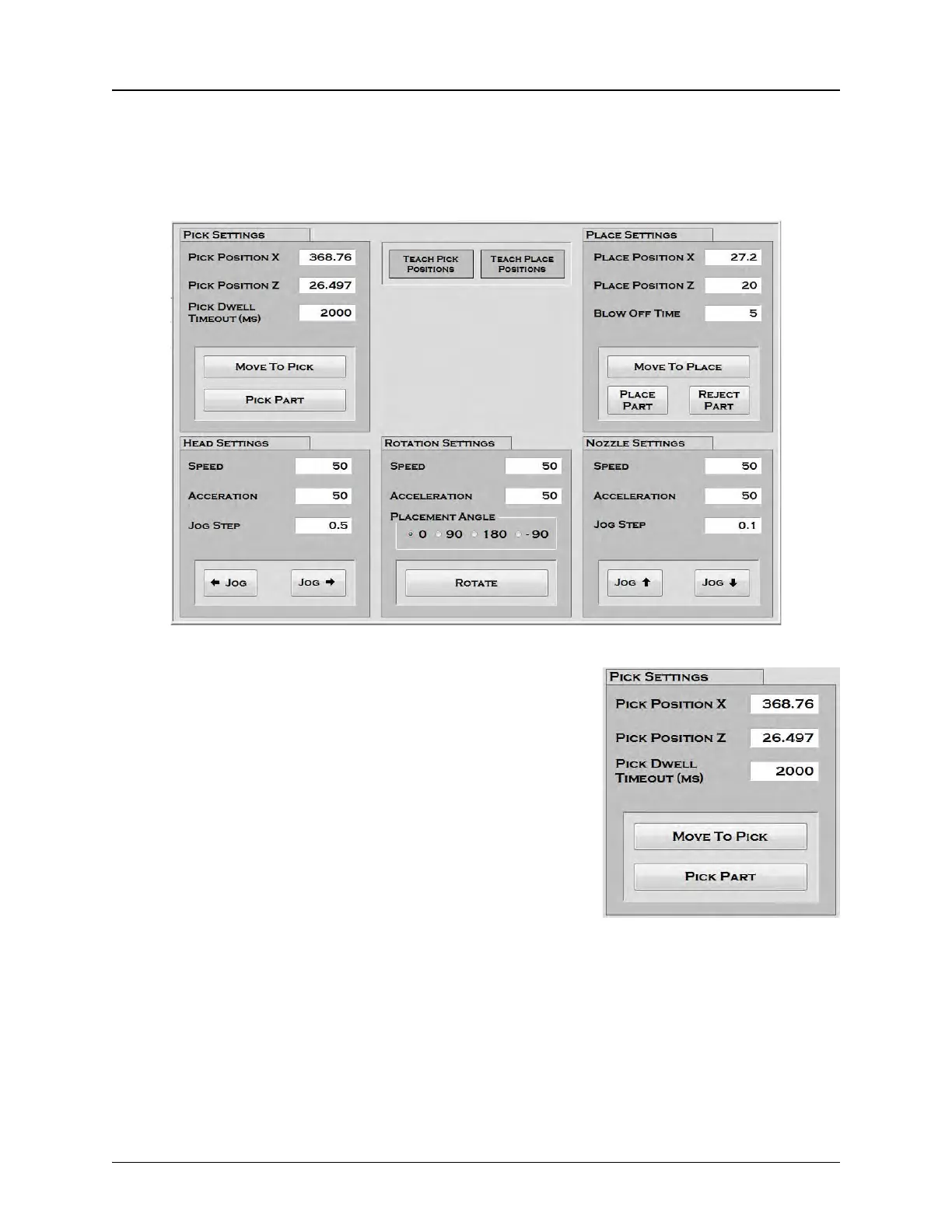
The Head Setup Tab allows the user to set pick, place and inspect head positions and dwell
times and set head speed and acceleration. There are also buttons that allow the user to manu-
ally rotate, pick, test, place and reject parts
1. Pick Settings
Pick Position X indicates the X Axis (left/right) pick position.
This is the position the pick head will move to when picking a
part from the Input Module.
Pick Position Z indicates the Z Axis (up/down) pick position.
This is the position the nozzle will move to when picking a part
from the Input Module.
Pick Dwell Time-out is the amount of time in milliseconds that
the nozzle vacuum will be activated as the nozzle attempts to
pick a part before timing out and signalling an error.
The Move To Pick button moves the head & nozzle to the preset Pick X and Z Positions. (hori-
zontal and vertical positions).
The Pick Part button moves the head from its current location and picks a part from the pro-
grammed pick location. It then returns the nozzle to its Ready (retracted) position.



 To Next Page