4-20 TM-500 User’s Guide
Taper Setup D292144.7.fm
SEALER SETUP
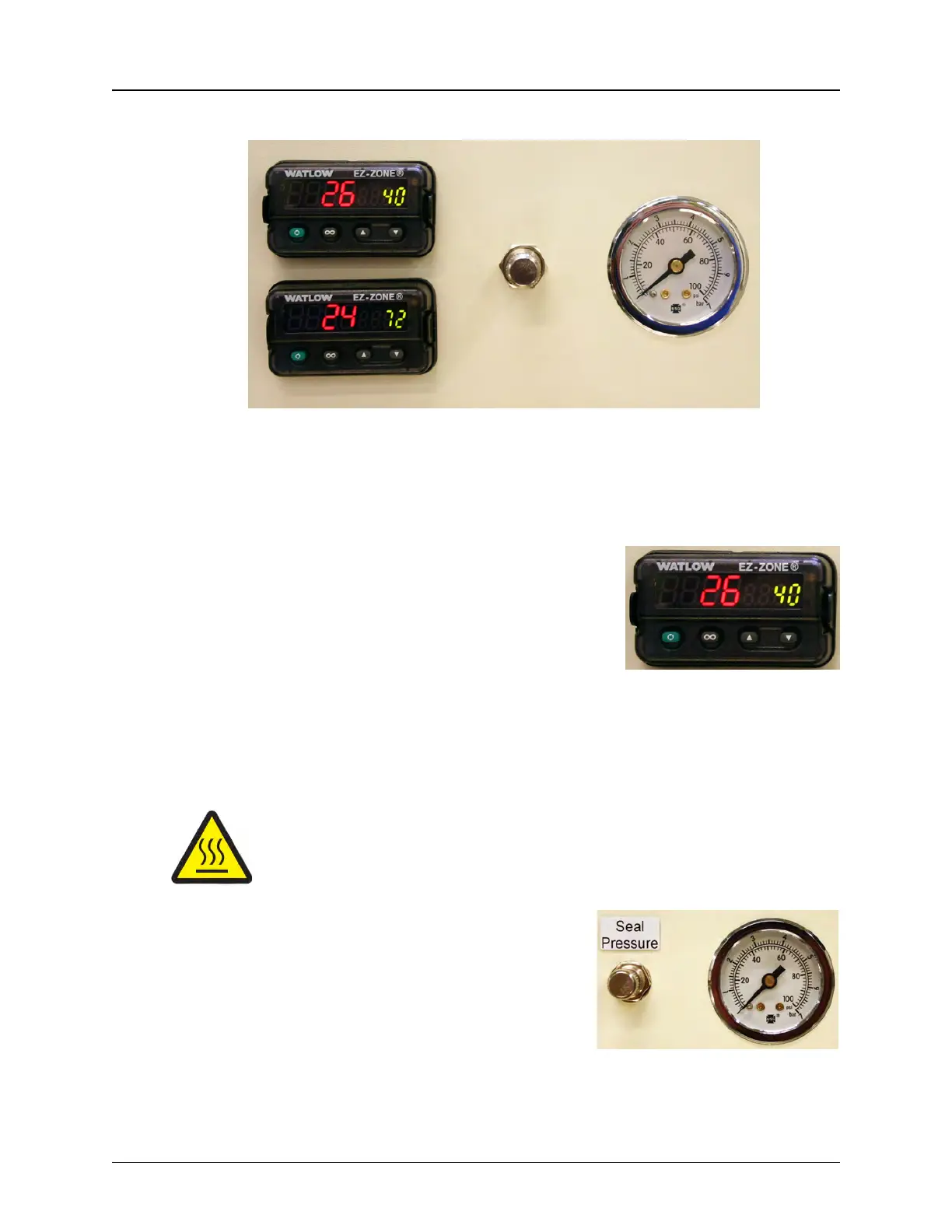
A. Inside Heat Seal Shoe Temperature Control
B. Outside Heat Seal Shoe Temperature Control
C. Heat Shoes - Seal Pressure Control
D. Heat Shoes - Seal Pressure Gauge
Heat Sealer Setup
1. Turn the heat sealer on and set the temperature
controls for 120 degrees.
Note: The TM-500 accommodates a wide range
of carrier tapes and cover tapes. Settings may
vary from one tape product to another.
The suggested starting point is 120 degrees Cel-
sius. The temperature for each seal shoe should
be increased or decreased as needed after running a peel force test.
2. Allow the heat sealer to reach its operating temperature before continuing.
Caution! Temperature Hazard!
Touching the heat block guard while the Heat Sealer is in operation may
result in burns. Use care when working near this area and allow it to cool
before performing maintenance.
3. Adjust the heat shoe Seal Pressure to the
appropriate setting. This setting controls the
amount of force applied when the sealer
shoes drop. PSI can be set anywhere
between 40-60 psi.
Turning the Seal Pressure control clockwise
will increase the pressure, while turning it
counter-clockwise will decrease the
pressure.
Step 5:
Setup
Output
HEAT
SEALER



 To Next Page