D292144.7.fm Setup the Pick Head
Chapter 4: Machine Setup 4- 45
Setup the Pick Head
If this it the first time the TM-500 has been powered up or if a new Input or Output Module
has been loaded, the Pick & Place Head must be configured. Setting the pick, test and
place positions teaches the head where to position the nozzle for each part of the pro-
cess.
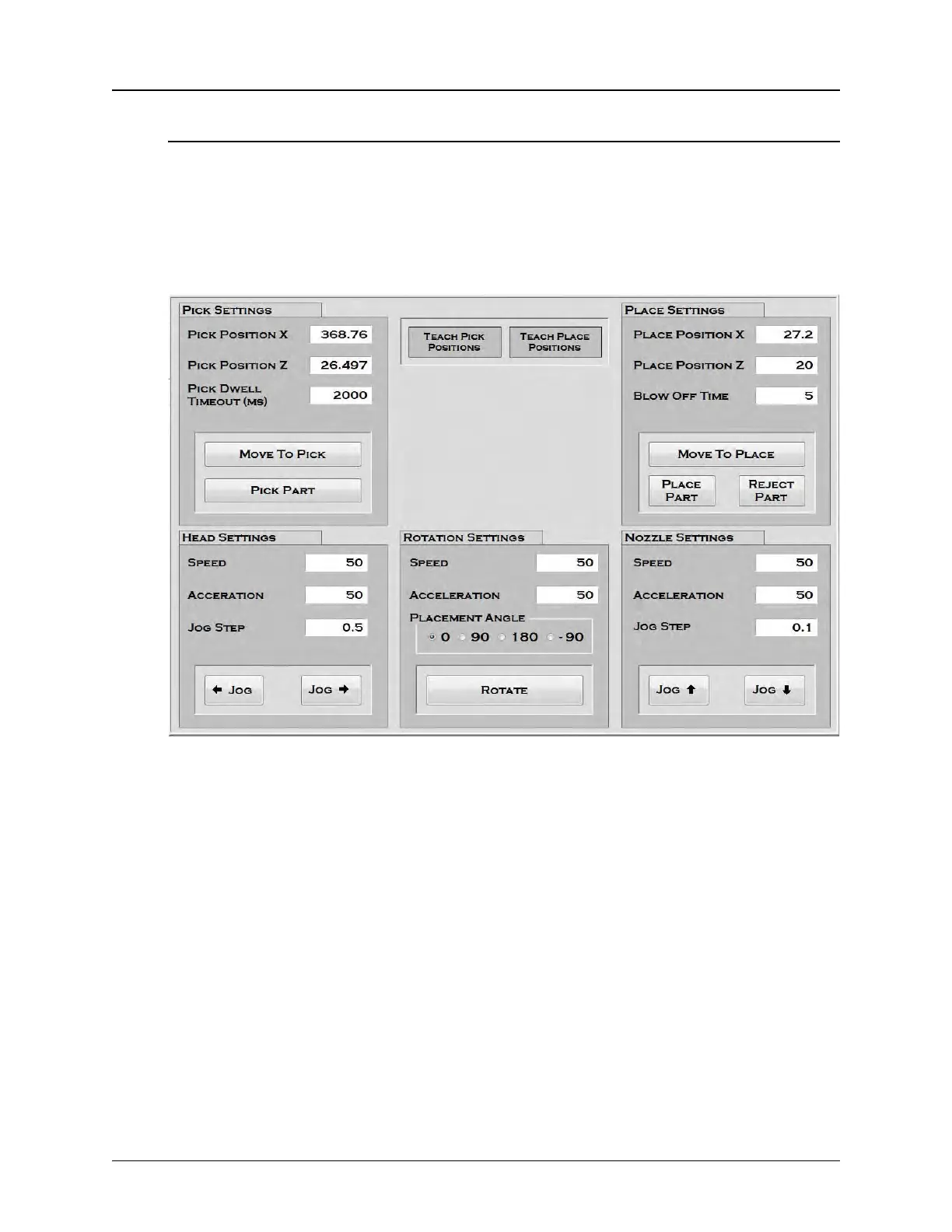
1. Open the HMI Head Settings tab.
2. Open the TM-500 doors to de-energize the motors and access the pick head. With
the motors de-energized, the pick head can be freely moved along the X and Z
axis.
3. Manually move the pick head to the Pick location and center it above the first part
to be picked.
4. Lower the nozzle until it is almost touching the part.
Note: Closing the enclosure doors before Step 5 may change the nozzle position
slightly. The doors should remain open for Step 4 unless the nozzle adjustments
are being made through the HMI. (see below).
5. Once the nozzle is in the correct position, press the Teach Pick Positions button.
6. Close the enclosure doors, then press the Pick Part button to activate vacuum and
pick a part.



 To Next Page