D292144.6.fm The Setup Screens
Chapter 3: Human Machine Interface 3-27
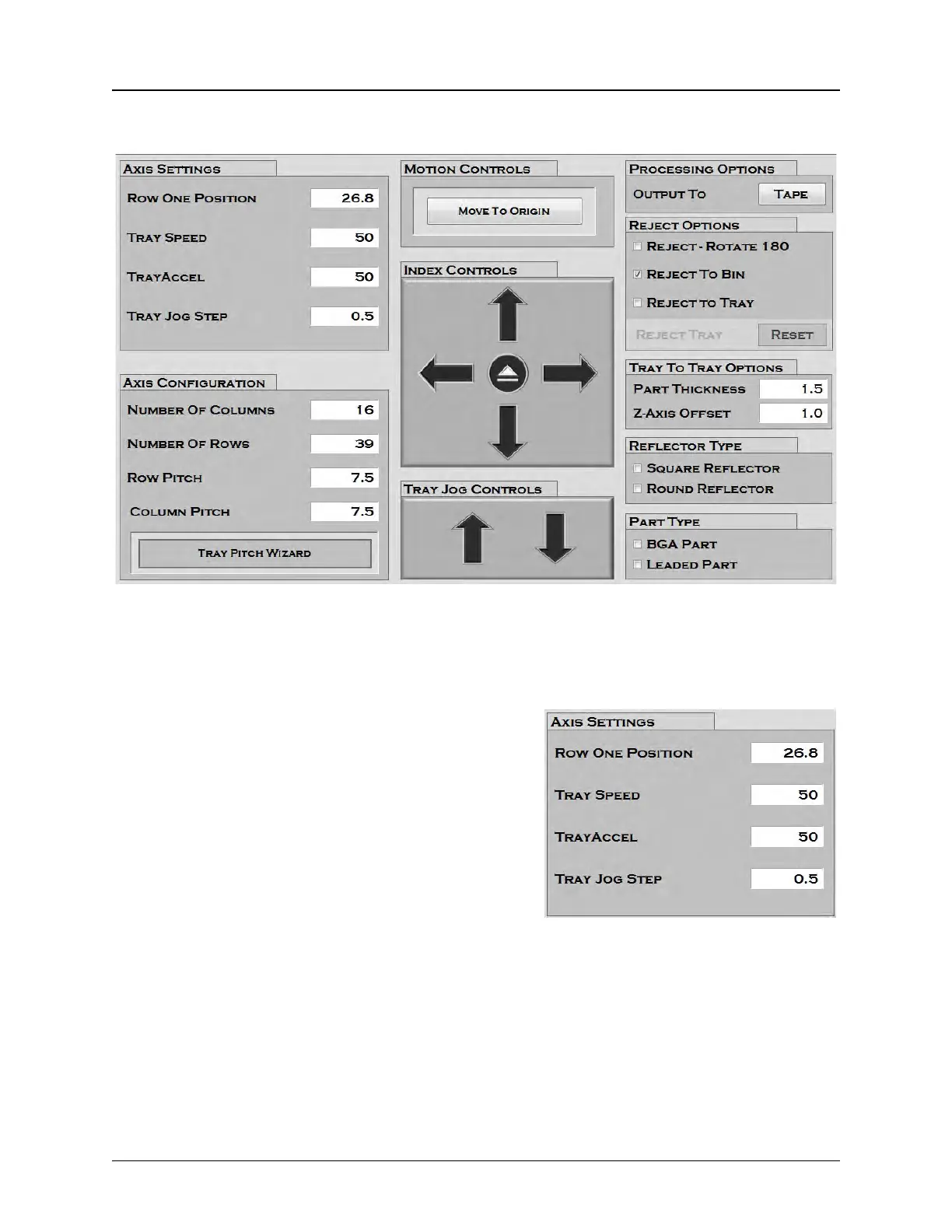
Tray Setup Tab
Note: All settings in the right column of the Tray Setup Tab (#4-8) will appear greyed out
if the 3D Camera option is not installed.
1. Axis Settings
Row One Position is the user defined setting for the
first pick pocket in the tray. Position the tray and head
so the nozzle is centered over the desired first pocket,
then drag the current Y position into the Row One
Position field. This value may also be entered manu-
ally by clicking to activate the keypad.
Tray Speed can be set from 1-100 and reflects the
percentage of maximum speed at which the tray
moves when the Move to Origin or Eject Tray but-
tons are pressed.
Tray Acceleration can be set from 1-100 and reflects the percentage of maximum acceleration
at which the tray moves to its preset speed when the Move to Origin or Eject Tray buttons are
pressed.
Tray Jog Step is the distance in millimeters that the tray steps forward or backward when the
Jog buttons are pressed.



 To Next Page