Vertiv™ | Liebert® STS2/PDU
™
User Manual | Rev. 6 | 10/2017 106
Configuring the Modem
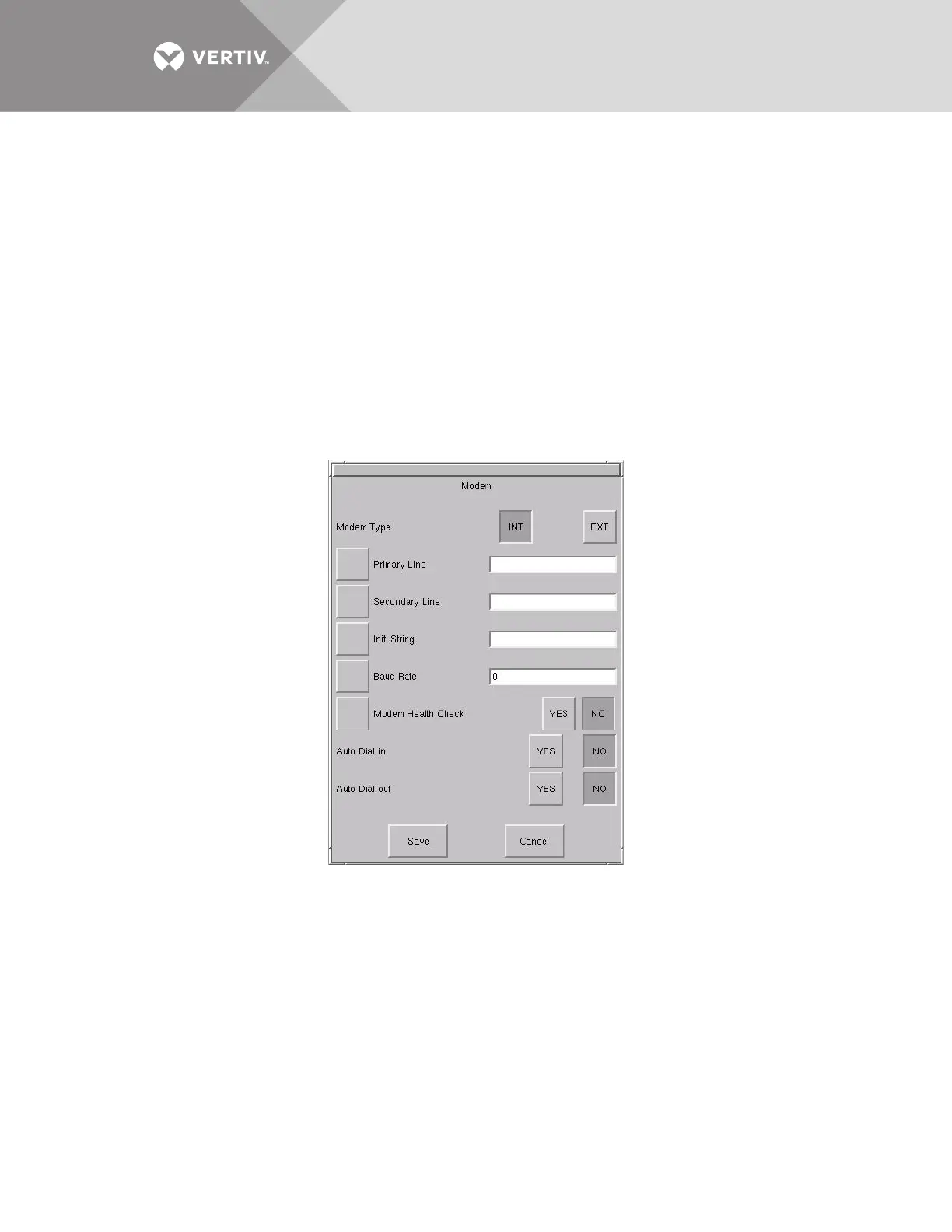
The Modem dialog box allows configuring an external modem connected to the Liebert STS2/PDU.
The dialog box contains a series of choices that access either a keypad or a secondary dialog to configure
settings. Auto dial can also be configured for the modem to be triggered by events, as set up in the Event Mask
choices.
Designated major alarms activate the auto dial modem sequence. Automatic dial attempts are made to the first
number three times, at 30 seconds between attempts. If connection is not established in that time period, the
system automatically rolls over to the second number. Auto dial attempts are made again three more times at 30
seconds between attempts. The process is repeated until a successful connection is made. Upon successful
connection, the system transmits a present status data, including all active alarms messages. After transmission,
the modem automatically hangs up and returns to the auto-answer mode.
To configure the modem:
1. Select MODEM from the Comm Options menu. The Modem dialog box is displayed.
Figure 70 Modem dialog box
2. Select the type of modem that the Liebert STS2/PDU will be using:
• Select INT internal modem not available.
• Select EXT if the Liebert STS2/PDU will be communicating via an external modem.
3. Select the PRIMARY LINE choice to enter the primary telephone number for the modem to dial when an alarm is triggered.
4. Enter the number in the keypad dialog box.
5. Select OK to save the telephone number. The number is displayed in the field adjacent to the Primary Line choice.
6. Select the SECONDARY LINE choice to enter the secondary telephone number for the modem to dial when an alarm is
triggered.
7. Enter the number in the keypad dialog box.
8. Select OK to save the telephone number. The number is displayed in the field adjacent to the Secondary Line choice.
9. Select INIT. STRING to configure the initialization string. This string configures the parameters of the modem. Check your
modem’s documentation for this setting.
10. Select BAUD RATE to display a dialog with the baud rate choices:
• For an external modem, select from 2400 bps, 9600 bps or 19200 bps.



 To Next Page