Vertiv™ | Liebert® STS2/PDU
™
User Manual | Rev. 6 | 10/2017 96
13.0 TOUCHSCREEN DISPLAY
The Liebert STS2/PDU can be configured with a Color Graphical LCD touchscreen that allows you to quickly
check the status of the unit and identify problems.
A touchscreen LCD is available through the front of the Liebert STS2/PDU. This screen provides a graphical
(Mimic) display of the switch’s operation, plus system information including system parameters, alarms and
faults.
The LCD provides a color, back-lit touchscreen as a user interface. In addition to the Mimic and the system
parameters, the screen provides a series of menus to allow you to configure the Liebert STS2/PDU, including the
control of the preferred source, auto/manual retransfer selection, alarm notification and other system setpoints.
The touchscreen also provides buttons to reset alarms and turn off audible alarms.
13.1 Display Overview
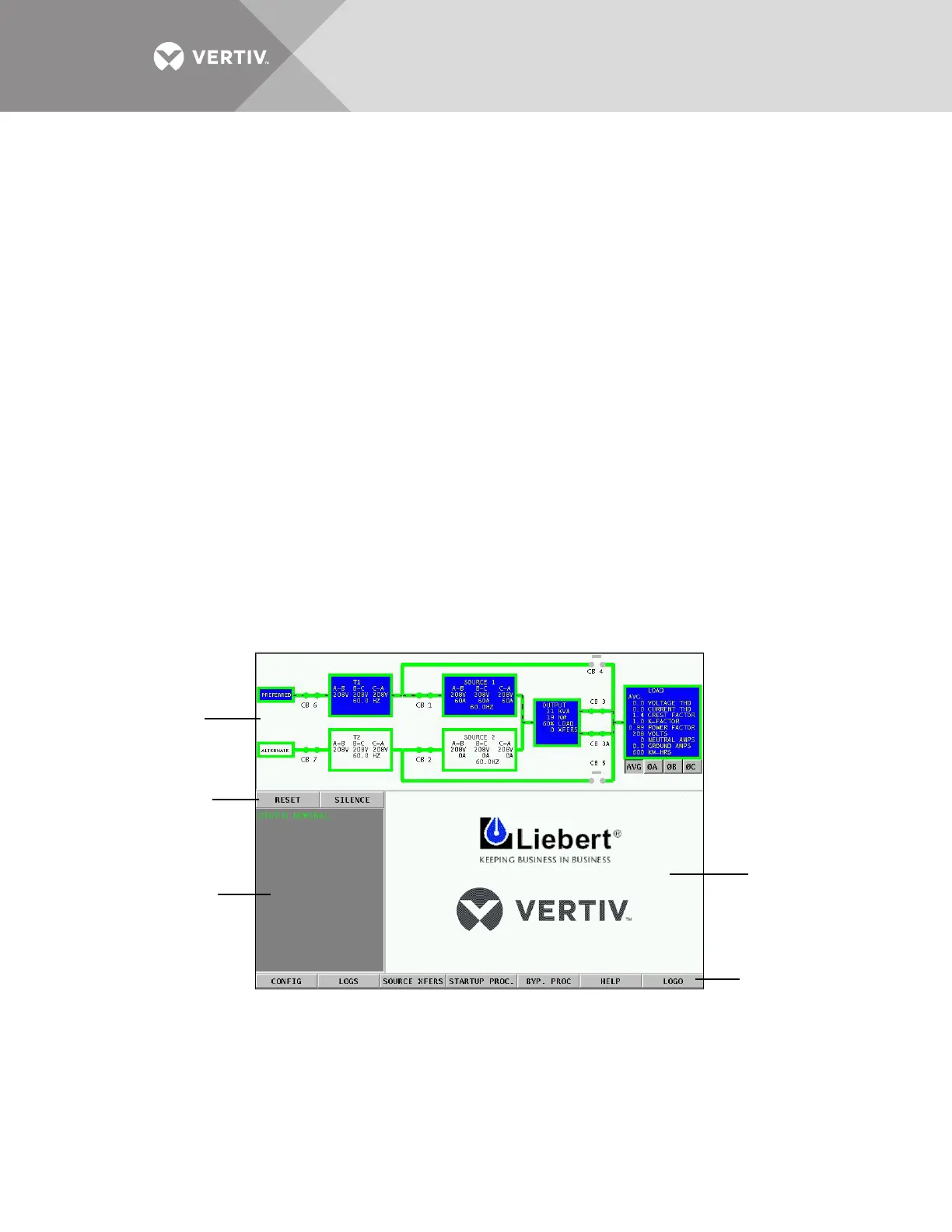
The Liebert STS2/PDU Color Graphical Display provides three areas of information, plus buttons and a series of
menu choices.
The Color Graphical Display contains the following features:
• Mimic — a graphical diagram of the status of the unit.
• Event controls — allow you to reset alarms and turn off audible alarms.
• Event display — displays any active alarm or fault condition, in real-time.
• Menus — provide choices and configuration settings in dialog boxes or information in the display panel.
• Display panel — provides additional information, depending on the menu choice that was last selected. This information
includes event help text and startup and bypass procedures.
Figure 61 Liebert STS2/PDU touchscreen
Mimic
Event display
Event controls
Display panel
and
help screen
Menu options



 To Next Page