Alpha/Delta (Kinetic Operator) Installation and Maintenance Manual Revision 1 - MAY 2023
87
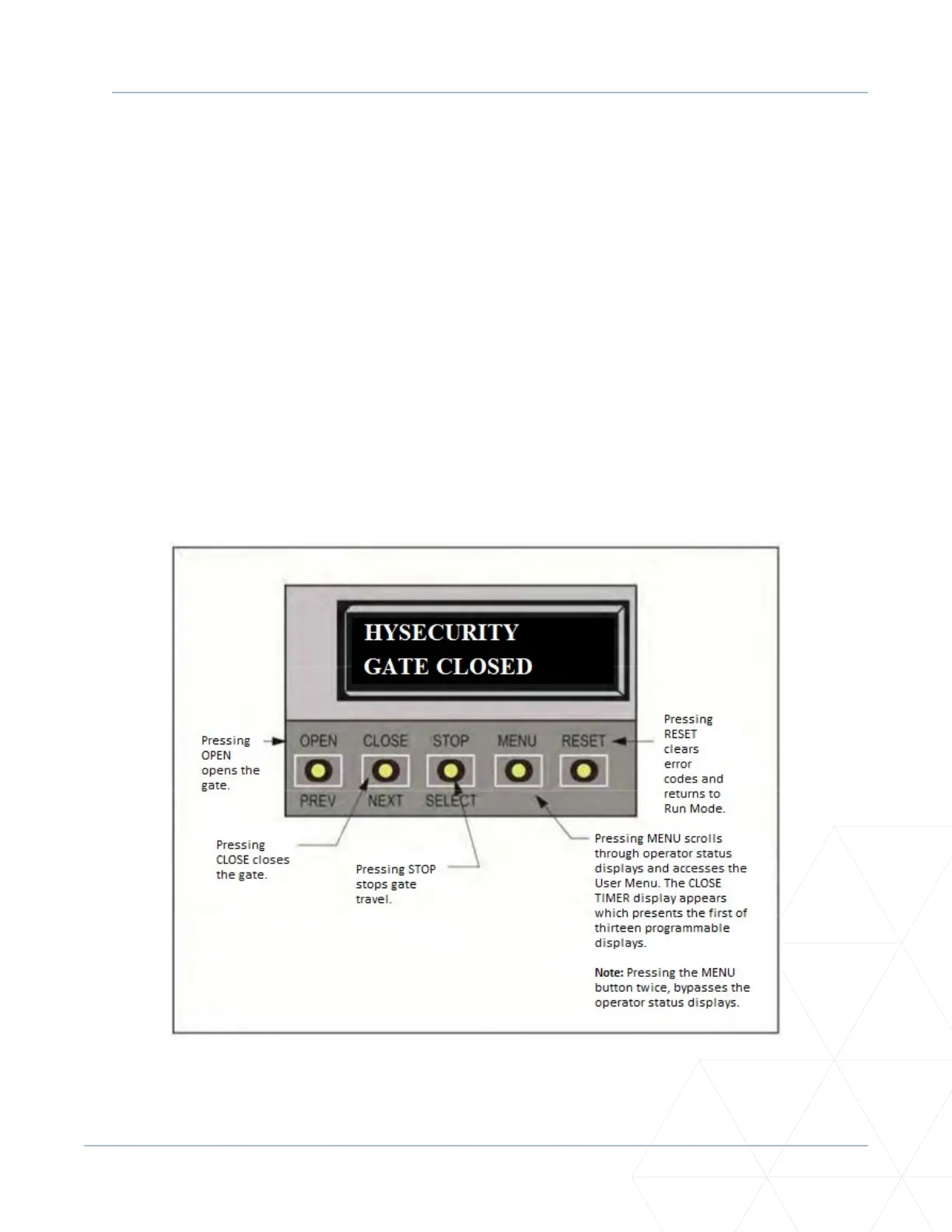
USING THE SMARTDC CONTROLLER BUTTONS IN RUN MODE
Using the SmartDC Controller Buons in RUN Mode
The Run Mode buons are disnguished by the fact that their name appears above each buon. The
Controller buons with text above and below funcon dierently depending on the mode of the operator.
Three dierent modes exist:
• Run Mode - gate is operaonal awaing commands.
• Menu Mode - motor disengages and operator commands are ignored. Menu navigaon and menu
selecon can be accomplished using the SmartDC Controller buons or through a S.T.A.R.T. soware
connecon via the USB port. Refer to “Using the SmartDC Controller Buons in Menu Mode” on
page 85�
• Fault Mode - alerts, faults or errors appear on the display. Some errors or faults can be reset with
the STOP buon while more serious faults require the RESET buon or cycling power. Faults indicate
a need for diagnosis and resoluon. Refer to “SmartDC Controller Troubleshoong” on page 151�
Figure 26. Funcon of SmartDC Controller Buons in RUN Mode



 To Next Page