Alpha/Delta (Kinetic Operator) Installation and Maintenance Manual Revision 1 - MAY 2023
99
RESETTING THE OPEN AND CLOSE LIMITS
Reseng the OPEN and CLOSE Limits
On occasion, the open and close limits may need to be ne-tuned. Reseng the open and close limits
is easily accomplished by accessing the Installer Menu. Examples where reseng the limits is necessary,
include:
• Removing or Replacing the Target Magnet.
• Seng the LEARN LIMITS display to 1 (erases the open and close target posions from memory).
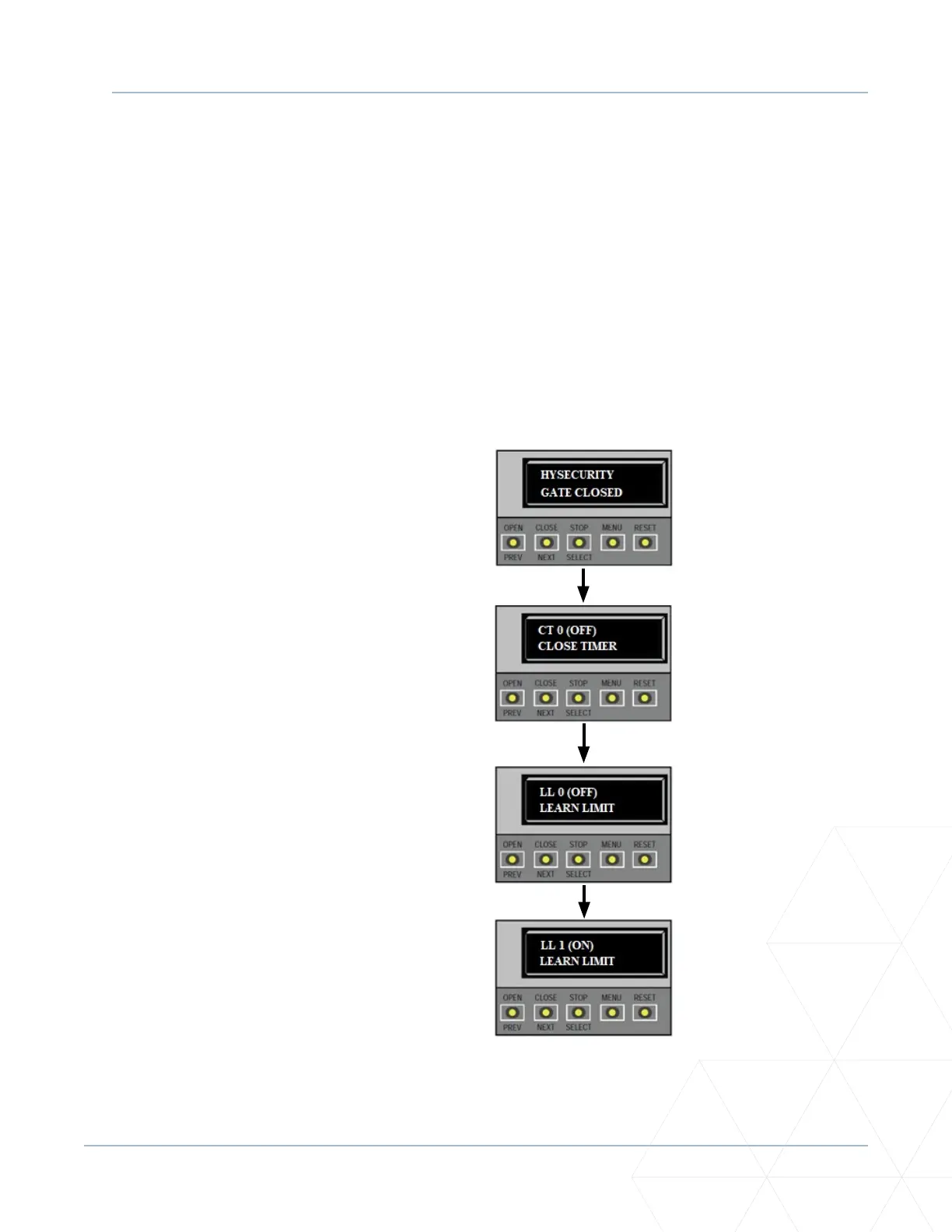
To re-learn limits, take the following steps:
1. At a gate status display, press the MENU
buon twice. This accesses the User Menu
and the CLOSE TIMER display appears.
2. Simultaneously, press the OPEN and RESET
buons to enter the Installer Menu. Release
the buons and the LEARN LIMITS display
appears. It is the rst item in the Installer
Menu.
3. Press SELECT, and then NEXT to change the
seng to 1. Press SELECT again. LEARN OPEN
ashes on the display indicang that operator
is ready to relearn the open limit.
4. Hold the OPEN buon unl the gate reaches
the desired open limit. Release the OPEN
buon. (Note that if you go too far, you can
press CLOSE to reverse direcon.)
5. Press STOP twice to preserve the open stop
locaon. LEARN CLOSE appears on the display.
6. Hold the CLOSE buon unl the gate slides to
full close. Release the CLOSE buon. (Note
that if you go too far, you can press OPEN to
reverse direcon.)
7. Press STOP twice. The full close stop is
retained in memory. For more informaon,
refer to “Establishing the OPEN and CLOSE
Limits” on page 63.
8. An ALERT 15 message appears on the display.
To clear the alert, perform a full cycle so
the soware recognizes the target. Press
OPEN, and then CLOSE. The gate will stop
automacally on the close cycle when it
reaches the programmed limit. As the target
magnet passes the sensor, the operator beeps
and the ALERT 15 message is cleared.
1. Start at a gate status
display.
2. Access the User Menu
by pressing the MENU
buon twice.
3. Access the Installer
Menu by simultaneously
pressing the OPEN and
RESET buons.
4. Press SELECT and
change the seng to 1
using the NEXT buon.
Press SELECT again. The
LEARN OPEN display
appears. Refer to steps 4
through 8.



 To Next Page