Alpha/Delta (Kinetic Operator) Installation and Maintenance Manual Revision 1 - MAY 2023
61
OPERATOR INSTALLATION AND GATE ADJUSTMENTS
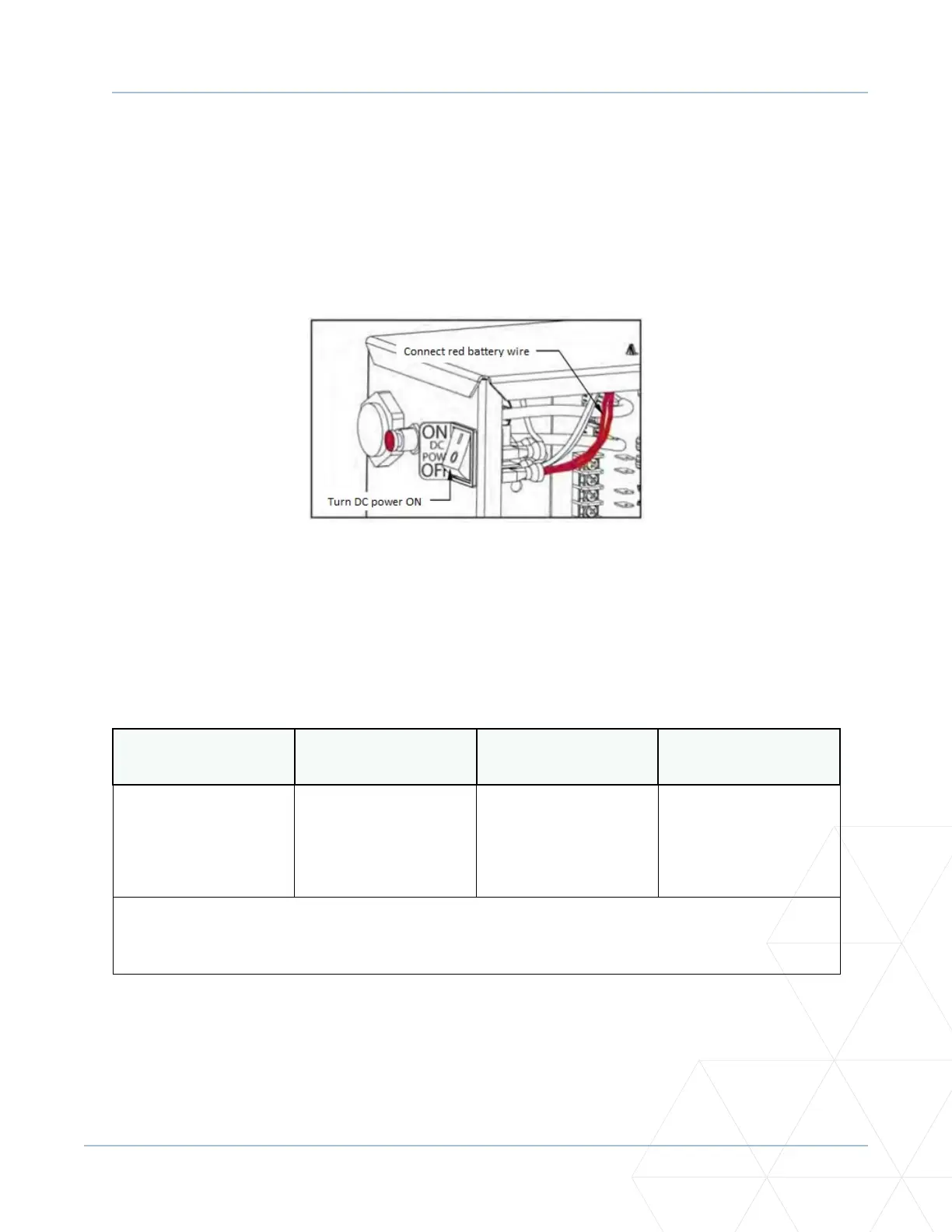
Connecng the Baery and Turning DC Power ON
1. Connect the red baery wire to its spade terminal. See Figure 10.
2. Turn DC power ON. The USAGE CLASS appears when power is rst supplied to the operator.
3. To navigate within the Setup Menu, use the SELECT, NEXT and PREV buons as shown in Table 1.
Programming the Inial Setup Menu
Several sequenal displays present informaon which must be congured before the Kinec operator will
funcon. Once the conguraon is complete, the informaon is retained even when a power loss occurs.
Table 1. Menu Mode Navigaonal Buons
To edit the menu
To navigate through
the SELECTIONS
To choose what is on
the display
To navigate between
menus
Press SELECT.
Two top characters
blink.
Press NEXT.
Connue pressing NEXT
to view all selecons.
Press SELECT.
Blinking characters
become stac.
Press NEXT or PREV.
Advance – Press NEXT.
Previous – Press PREV.
NOTE: Programming the Setup Menu is usually a one-me occurrence unless factory defaults are
reinstated through the Installer Menu. The RESET and MENU buons do not funcon during the inial
conguraon of the Setup Menu.
Figure 10. Connecng Baery



 To Next Page