Analysis Protocols
Stratus OCT User Manual PN 2660021134133 A
6-40
average value weighted by location. The advantage of Median Smoothing is that it
removes noise while preserving small details in the data.
Scan Profile
Select Sc
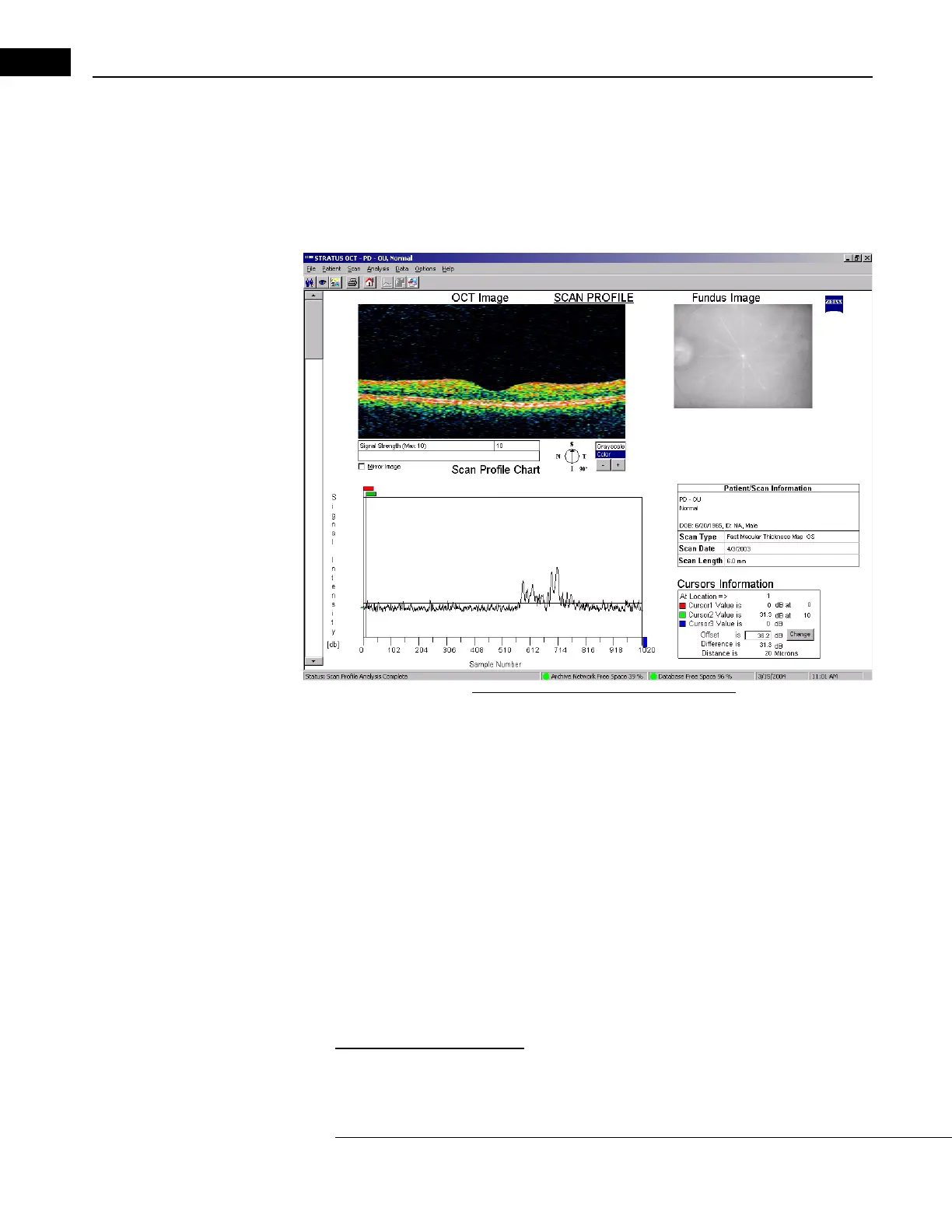
an Profile to display an interactive profile of all signal values for any single scan
group, as pictured below.
Figure 6-23 Scan Profile Analysis Output
This protocol provides signal values for all 1024 data points of each A-scan, and has
features for detailed comparative and technical analysis of the scan data.
The primary output is a graph of interferometer Signal In
tensity values (reflectivity) for all
1024 longitudinal data points of each A-scan. The output graph shows signal values of the
first A-scan location by default. The OCT Image (upper left) is unprocessed. When you
move the pointer over the scan image, the graph changes dynamically with A-scan
location. Under Cursors Information, the current A-scan location appears at lower right
(e.g., “At Location ==> 1").
• Click the Mi
rror Image checkbox to horizontally reverse the scan image and the
corresponding Scan Profile Chart.
•Select Gr
ayscale or Color (default) for the OCT image. Use the + and – buttons to
adjust the image brightness.
Measure A-Scan Location
You can measure and compare signal values at each A-scan location. The graph offers
three cursors to measure and compare signal values through the depth of each A-scan.


 To Next Page