Introduction
Stratus OCT User Manual PN 2660021134133 A
1-8
Stratus OCT System Hardware
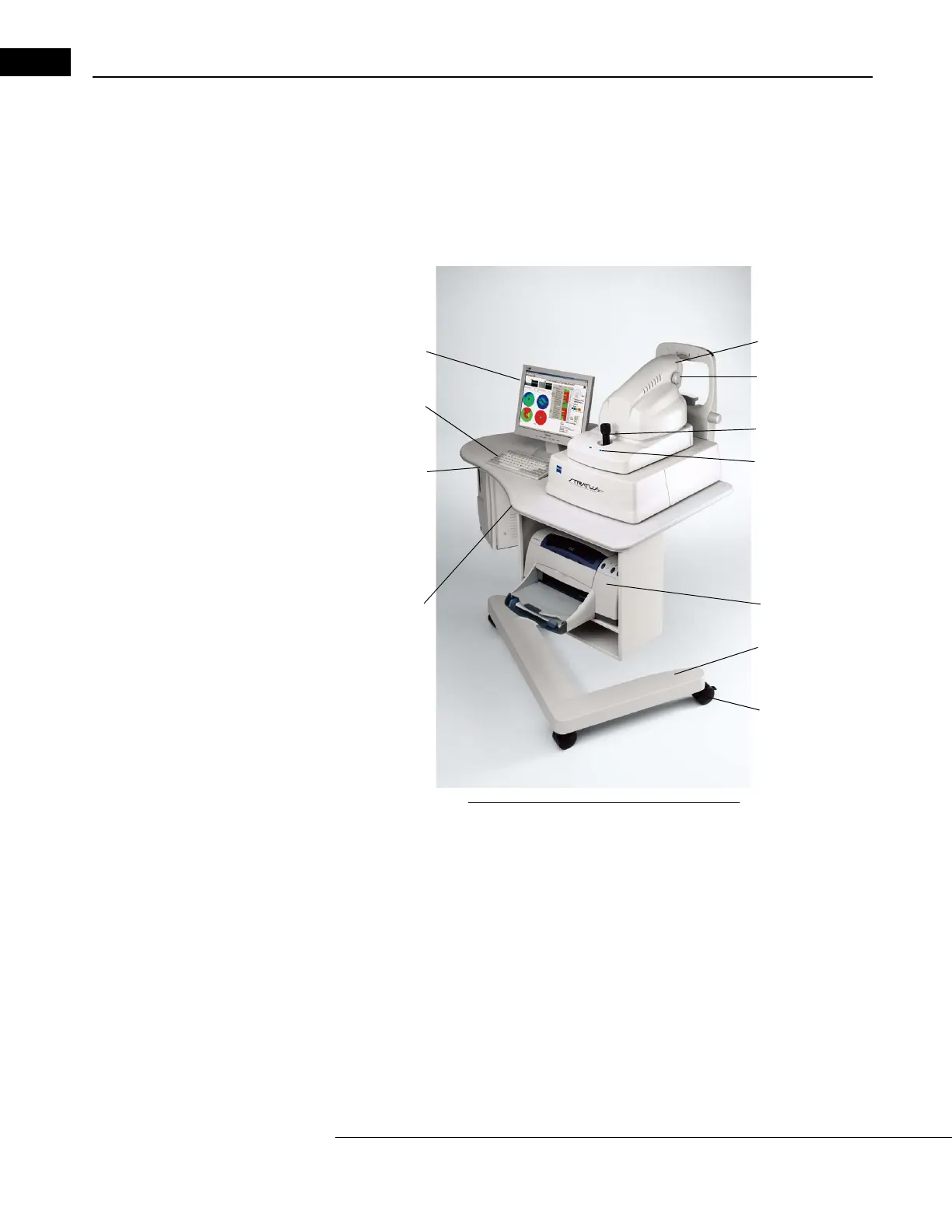
The Stratus OCT system hardware consists of the Patient Module; the Computer Unit; the
Flat Screen Video Monitor; the keyboard, mouse and color inkjet printer. The hardware
mounts on a wheelchair accessible motorized power table. The table accommodates
elevation adjustment to each patient's height. The illustration below labels hardware
elements. System specifications are in Chapter (11).
Flat Screen
Video Monitor
Patient Module
Focus Adjustment
Knob
Blue PM
Function Buttons
Keyboard
Joystick
Printer
Wheel Chair
Accessible
Power Table
Caster
Table Height
Switch
Computer Unit
System Power
Switch
Mouse
(not pictured)
Figure 1-1 Stratus OCT System Hardware
Software and Storage Media
Carl Zeiss Meditec pre-installs all softwar
e necessary to operate the Stratus OCT. We
recommend the use of a network solution for daily archive and backup, either a network
file server or network attached storage device. You can purchase a network attached
storage device designed for this purpose from Carl Zeiss Meditec.
Note: We recommend you use the automated data maintenance features to archive
scans and backup the patient database. This helps ensure the preservation of
patient data in case of computer malfunction. See Chapter (8), Archive, Retrieve &
Backup.



 To Next Page