Stratus OCT User Manual PN 2660021134133 A
Acquire Scans
3-13
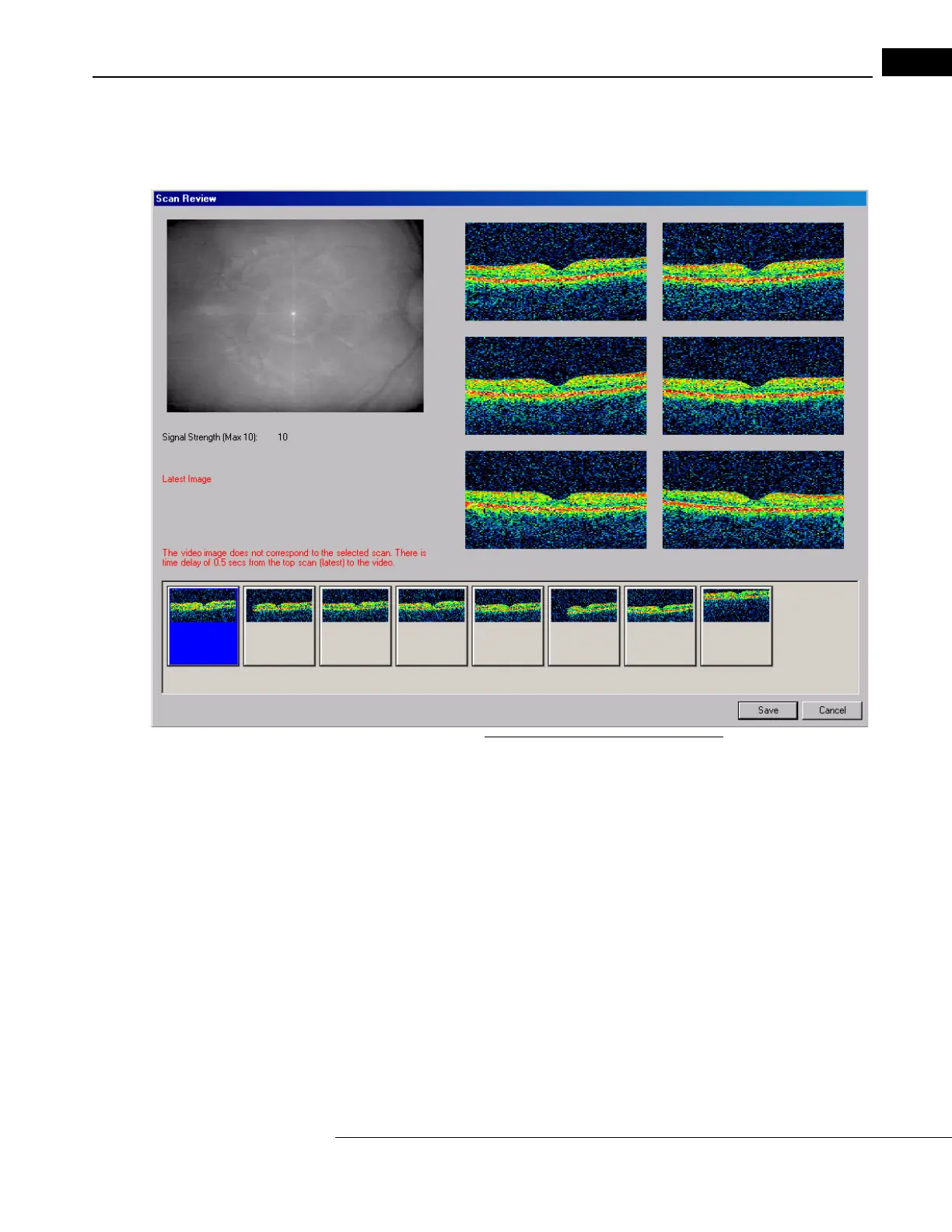
Scan Review Window
When you click the Re
view button after freezing a scan, the SCAN REVIEW WINDOW appears,
as pictured below.
Figure 3-7 The Scan Review Window
Along the bottom, it displays thumbnails of the last several images captured during
scanning, up to eight total. The selected thumbnail image is highlighted with blue borders
and displayed full size. The fundus photo is at upper left. The left thumbnail image is the
last one acquired (the one frozen on the S
CAN ACQUISITION WINDOW). It is selected by
default.
• Click any thumbnail image to display it full si
ze. The highlighted image is saved when
you click the Save button. If you do not want to save any of the scan images, click
Cancel to return to scan acquisition mode and acquire another scan
Other Scan Adjustments
To acquire scans with the Stratus OCT does not usually require adjustments beyond those
already covered in this chapter. Other possible adjustments before or during scan
acquisition were kept for this section to avoid complicating the operating instructions
unnecessarily.



 To Next Page