Stratus OCT User Manual PN 2660021134133 A
Data Transfer Using CDs and DVDs
D-5
or DVD, the CD or DVD must not be “finalized” (or closed), which is a process normally
used to enable the CD or DVD to be read on any computer. Finalizing a CD or DVD prevents
data from being written to it.
When shipped from the factory with the Stratus OCT
, the Roxio Drag-to-Disc software is
properly configured so that CDs and DVDs are not finalized. Do not change the
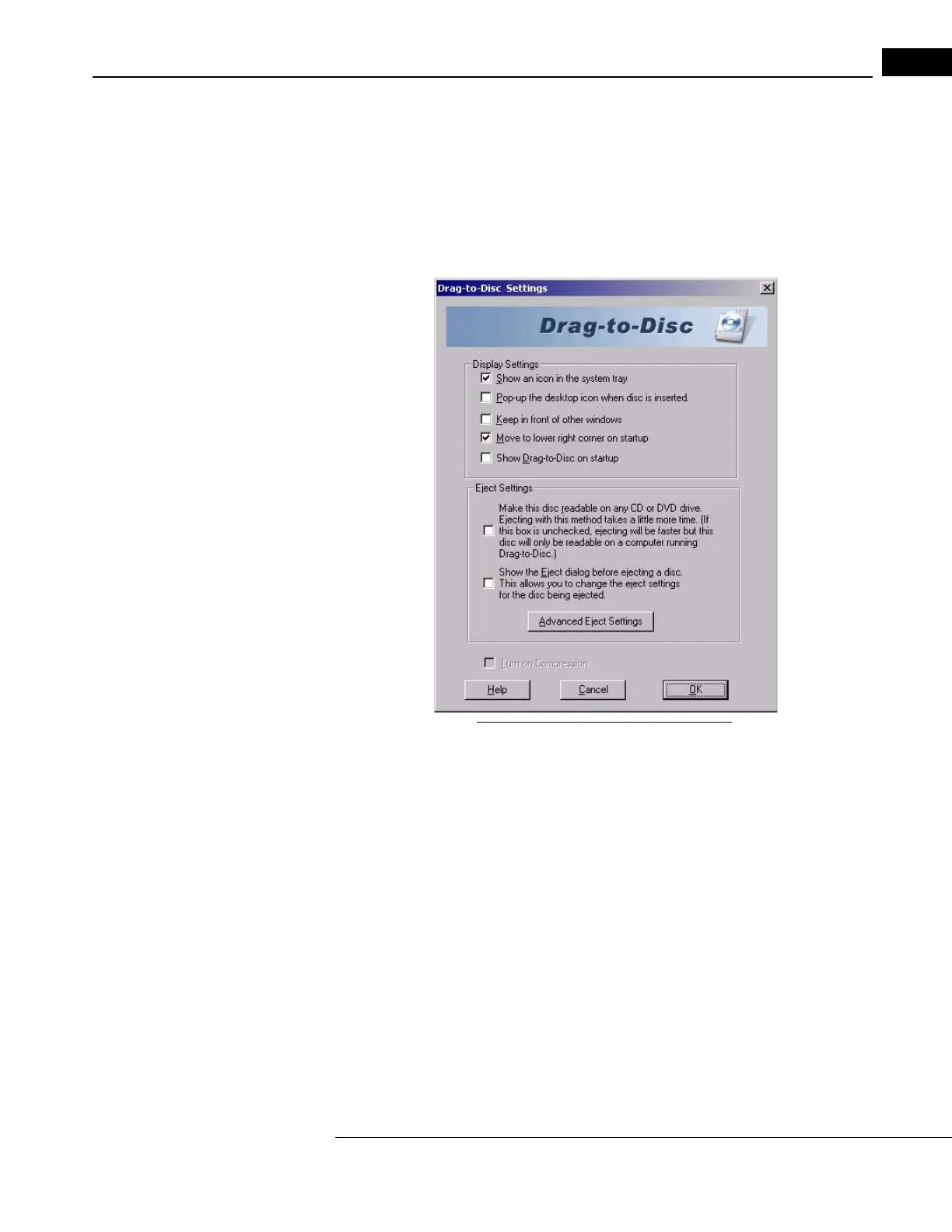
configuration of the Roxio Drag-to-Disc software, particularly the eject settings. The correct
eject settings are seen in Figure D-6 below.
Figure D-6 Roxio Drag-to-Disc Settings
Users who wish to use CDs or DVDs to transfer Stratus OCT data to a PC must have
installed Roxio software (version 6 or greater) configured not to finalize the disk upon
eject, as in Figure D-6. These are not the default settings when you install Roxio yourself.
To access the Drag-to-Disc settings, right-click
the Roxio Drag-to-Disc icon in the System
Tray and select Settings.
Warning: User Changes to Hardware or Software
Users who wish to install a DVD Multi-Drive or Roxio software on a Stratus OCT instrument
not so equipped are explicitly prohibited from doing so without first consulting Carl Zeiss
Meditec Technical Support. As of this writing, Carl Zeiss Meditec does not supply or
support the installation of a replacement DVD Multi-Drive on the Stratus OCT instrument;
and Roxio software is not approved for use on Stratus OCT instruments not equipped with
it at the factory.



 To Next Page