Stratus OCT User Manual PN 2660021134133 A
Scan Acquisition Protocols
4-11
Repeat Scan Function
The Repeat function allows you to repeat any saved scan group using the same set of
parameters. Repeat parameters include scan size, angle and placement, fixation LED
placement, and landmark placement. When you repeat a scan group, the parameters
unique to each scan in the series is recalled and repeated in the same order. You cannot
adjust any parameters except placement. The Repeat function allows you to compare
placement during and after scan acquisition.
1. To repeat a scan, first select a patient from the Patient List in the M
AIN WINDOW.
2. Select a desired scan protocol from the Sca
n Tab.
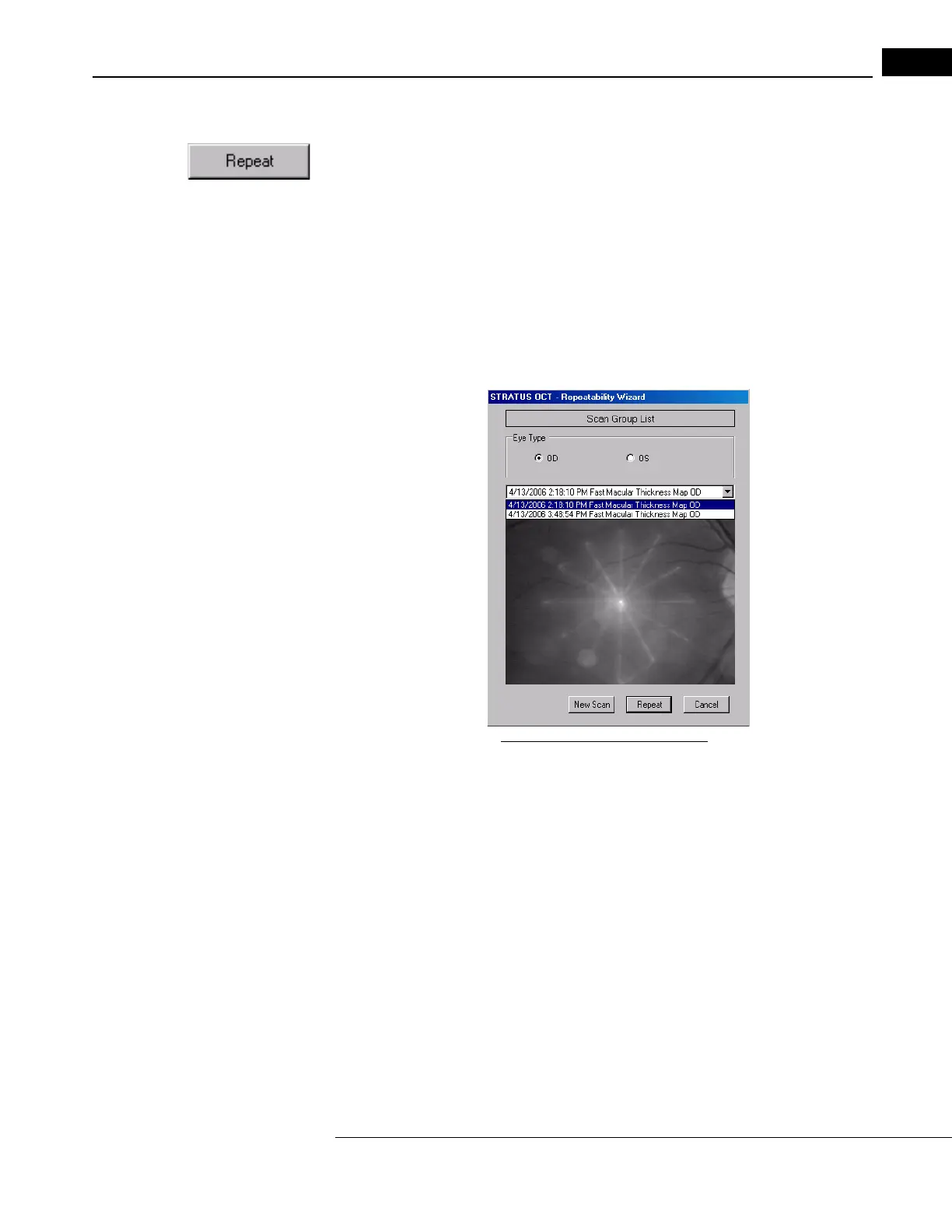
3. Click the Re
peat button at the bottom of the Scan Tab. The Repeatability Wizard
dialog appears.
Figure 4-1 Repeatability Wizard
4. Select OD or OS in the Eye Type field. The prior scans will appear in the pull-down
menu.
5. From the pull-down menu, select the scan you wan
t to repeat, and review the fundus
image saved with this scan.
6. Click the Re
peat button. If you do not want to repeat any of the prior scans, or if you
do not see any prior ones of this type, click the New Scan button to skip the Repeat
function and initiate a new scan.



 To Next Page