Stratus OCT User Manual PN 2660021134133 A
Data Management
7-5
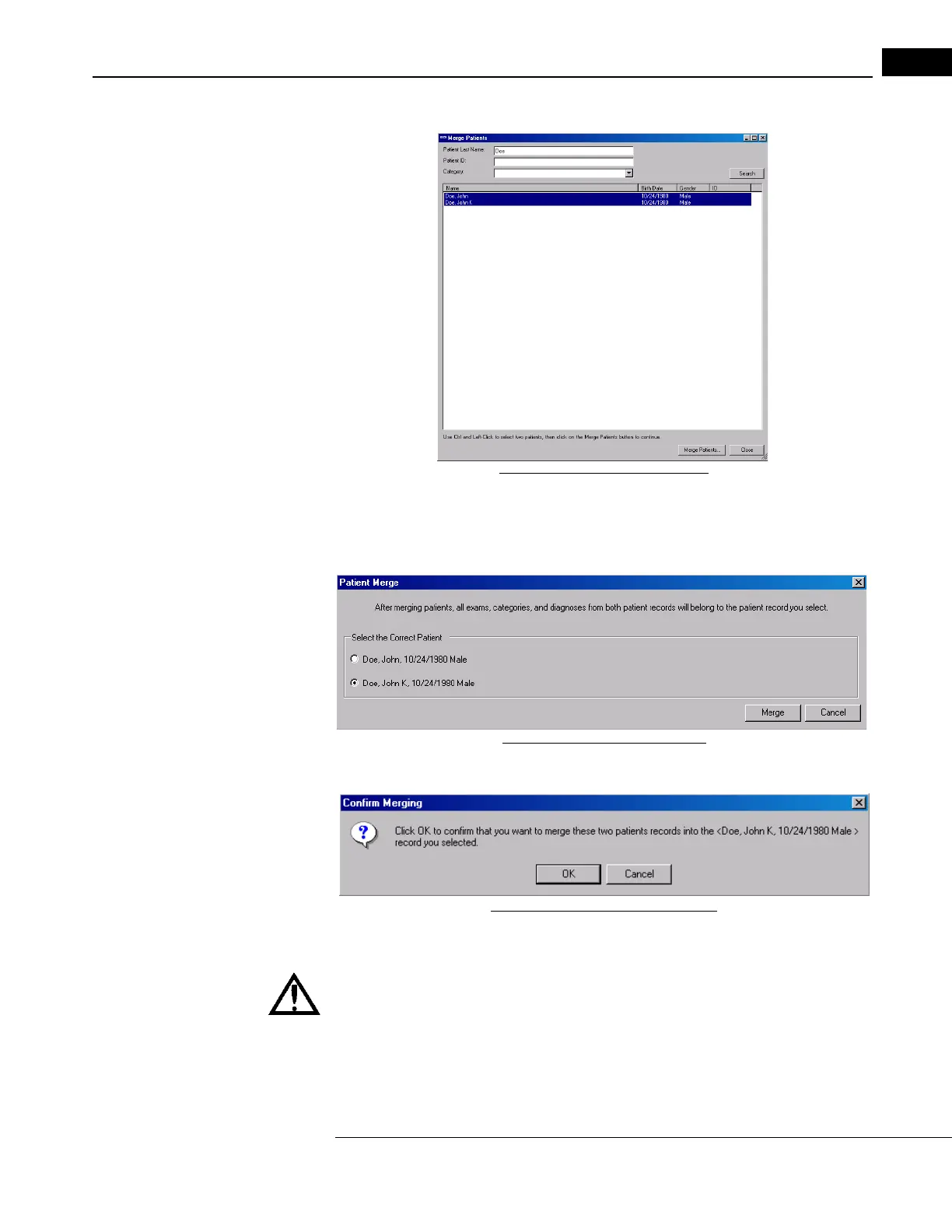
1. In the Patient Menu, select Merge Patients. The Merge Patient dialog appears.
Figure 7-2 Merge Patients dialog
2. You can search for a patient using the last name, patient ID, or category. Use Ctrl and
left-click to select two patients, then click on the Merge Patients button. The Patient
Merge dialog appears.
Figure 7-3 Patient Merge dialog
3. Select the correct patient, and click Merge. The Confirm Merging dialog appears.
Figure 7-4 Confirm Merging dialog
4. Click OK to merge the two patient records.
WARNING: Be certain that you select the correct patient records to merge.
Once you merge patient records, there is no way to separate the combined
r
ecords of erroneously merged patients, although it is possible to Delete
Exam Records that do not properly belong to a patient record (see page
7-17).



 To Next Page