Stratus OCT User Manual PN 2660021134133 A
Archive, Retrieve & Backup
8-7
3. Click Format DVD Ram Disk.
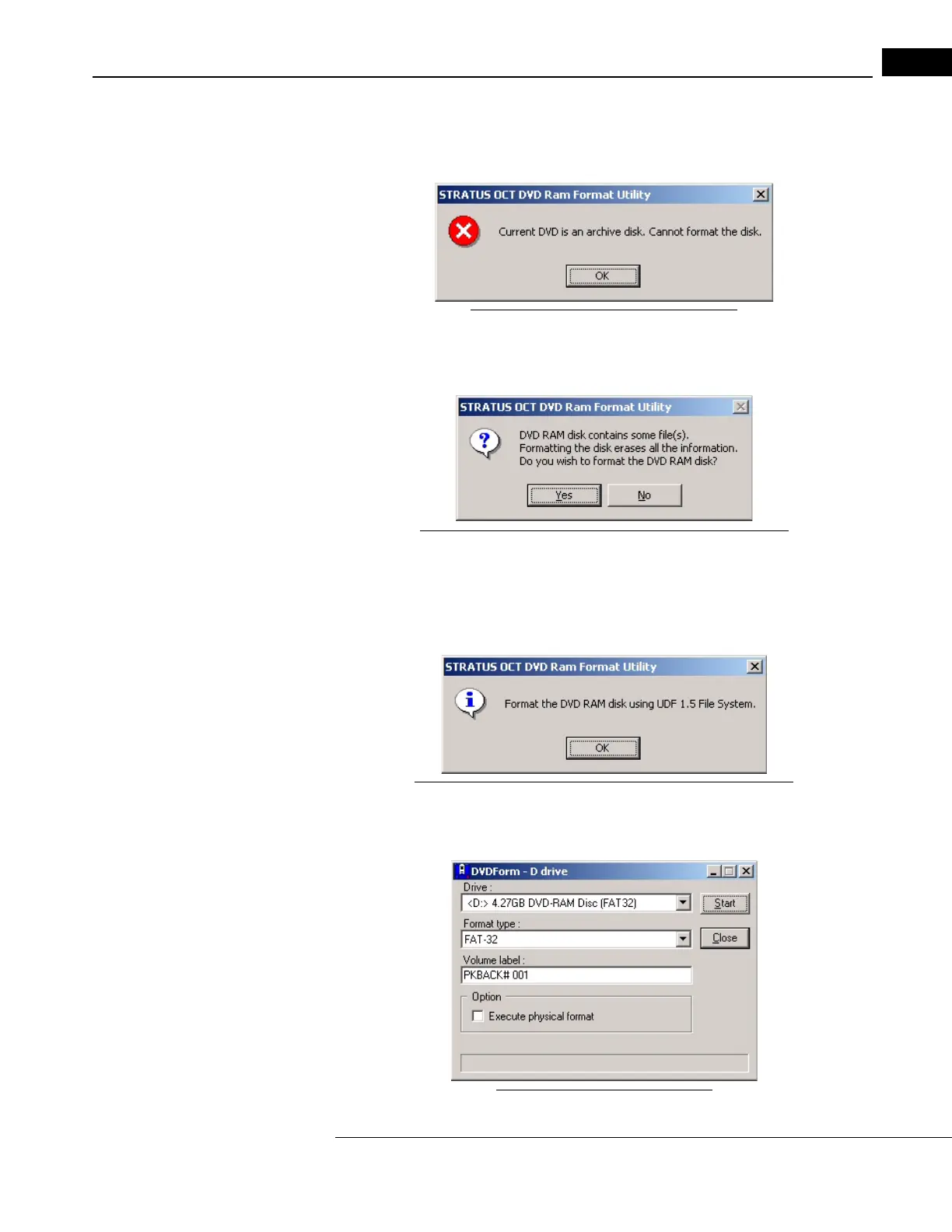
• The utility first checks the installed DVD for the presence of an OCT archive database.
If one is
present, the following dialog appears.
Figure 8-5 Cannot format an archive disk
You cannot format an archive disk. Click OK and formatting will be cancelled.
• Next, the utility checks if the disk
is empty. If it is not, the following dialog appears.
Figure 8-6 Formatting erases all files--confirm formatting
• Click No if you do not want to erase all files on the DVD; install another DVD instead.
Click Yes to erase all files and proceed with formatting.
4. When you proceed to formatting, the following dialog appears to remind you to use
the UDF1
.5 file system format:
Figure 8-7 Format the DVD using the UDF 1.5 File System
• Click OK to close the dialog and proceed with formatting. The DVDForm dialog
appears.
Figure 8-8 The DVDForm Dialog



 To Next Page