Acquire Scans
Stratus OCT User Manual PN 2660021134133 A
3-4
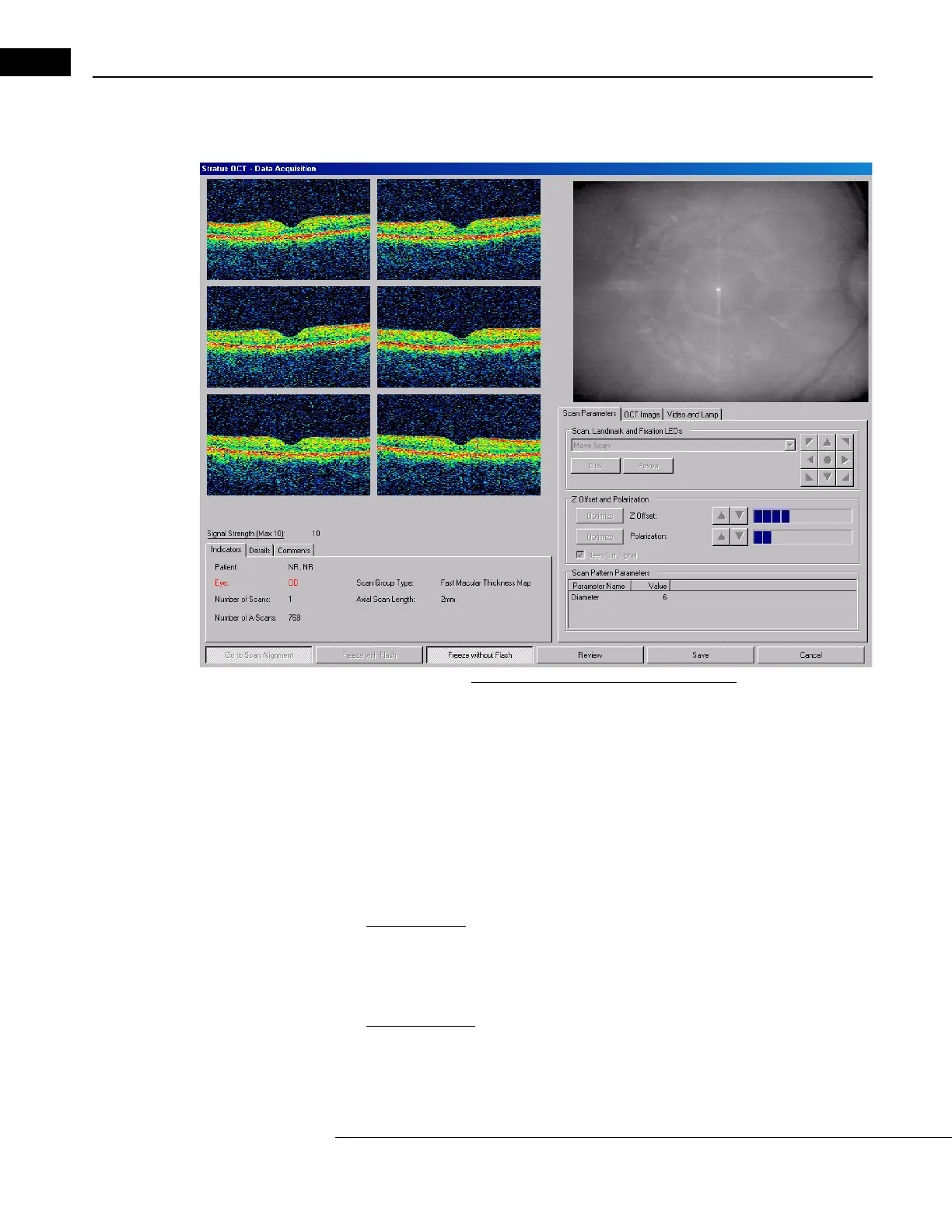
double-click the protocol. This activates the SCAN ACQUISITION window, as pictured
below.
Figure 3-3 The Scan Acquisition Window
The SCAN ACQUISITION window allows you to adjust video and scan parameters from a single
interface, enabling the acquisition of high quality scans.
The Re
peat button to the left of the Scan button allows you to repeat any saved scan group
using the same parameters. The Repeat Scan Function is explained on page 4-11.
Alignment and Acquisition Scan Modes
The Mo
de button, at lower left of the window, toggles between alignment and acquisition
scan modes.
•
Alignment Mode: The scanner activates by default in Go to Scan Alignment mode. In
this mode, the scanner traces an aiming pattern rapidly and continuously, which you
can see in the video monitor. Alignment mode is useful for scan placement on the
desired retinal feature.
•
Acquisition Mode: Click the Go to Scan Acquisition button to switch to scan
acquisition mode. In this mode, the scanner traces the actual scan pattern to be used
more slowly. The scanner must be in acquisition mode to acquire scans.



 To Next Page