Configuration
LITECOM, Commissioning and maintenance instructions 17.0 | 04.2024 | en 115
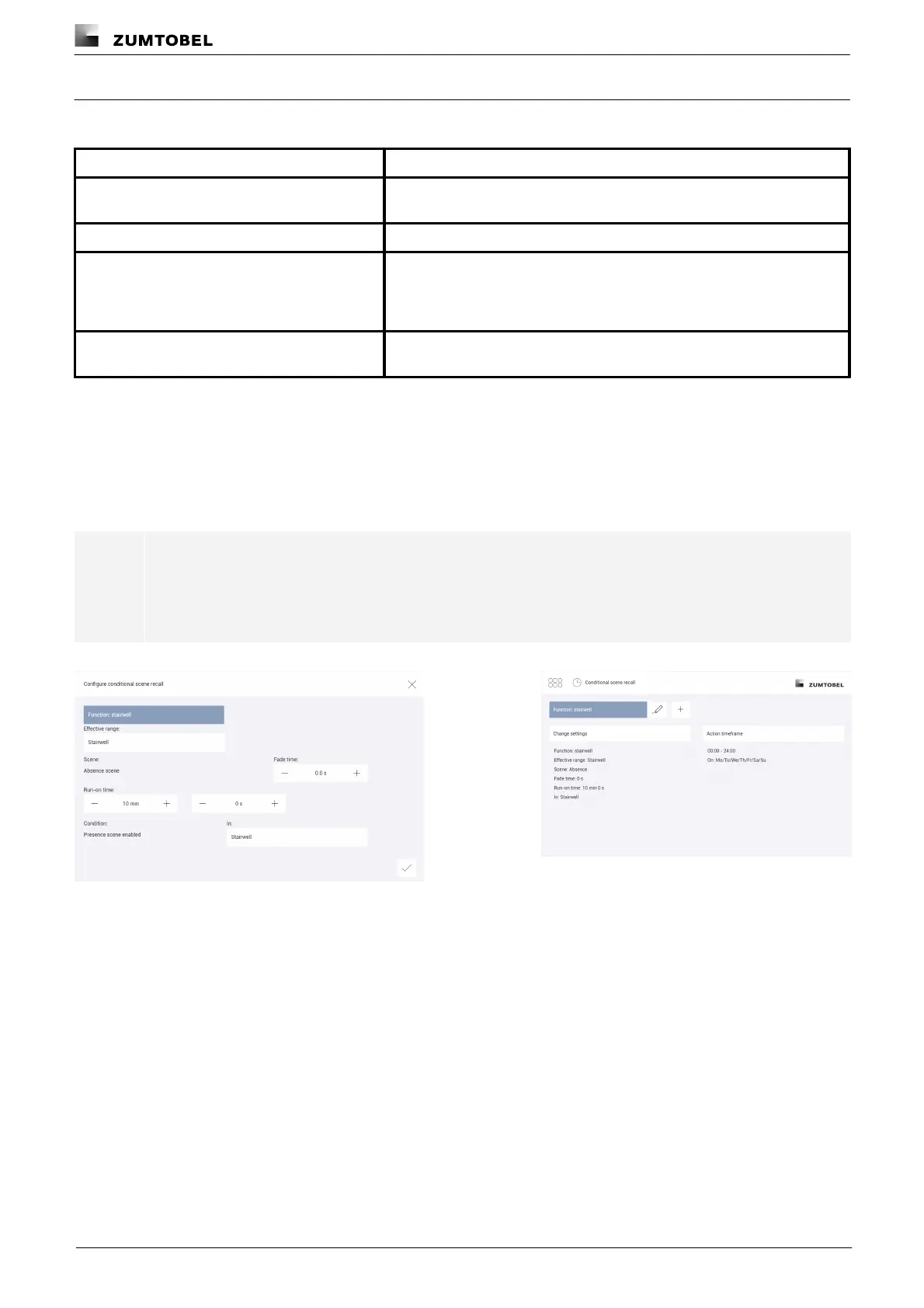
Function: stairwell
The following table provides a description of the individual configuration options:
Effective range (group, room or zone) in which the conditional scene recall
occurs.
The time it takes to change from the last value to the defined scene.
Time that starts as soon as a presence scene is enabled in a certain
room/zone and after which the absence scene is recalled. If during the run-
on time a presence scene is recalled again, the run-on time starts from the
beginning again.
Group, room or zone in which a presence scene must be active in order for
the stairwell function to be enabled.
Table 66: Configuration options – Conditional scene recall with function "stairwell"
Example
A person enters the stairwell and operates a momentary-action switch, recalling a presence scene and starting a
run-on time of 10 minutes. If no one presses a momentary-action switch in this stairwell again during this time, the
absence scene is recalled again. This function should always be enabled.
Note
In the action timeframe select the timeframe and the weekdays when the conditional scene recall is
to take place, and the exceptions when it does not take place.
Path: App overview > Conditional scene recall > Action timeframe
Figure 38: Configuring the conditional scene recall with function
"stairwell"
Figure 39: Summary of configuration for conditional scene
recall with function "stairwell"



 To Next Page