Configuration
LITECOM, Commissioning and maintenance instructions 17.0 | 04.2024 | en 82
Fade time to presence scene
Mode of operation
(presence/absence scene)
Mode of operation (dimming)
Scene recall and
dim/brighten
Table 32: Overview of configuration options for EnOcean switches depending on operating mode (part 2)
Rocker switch
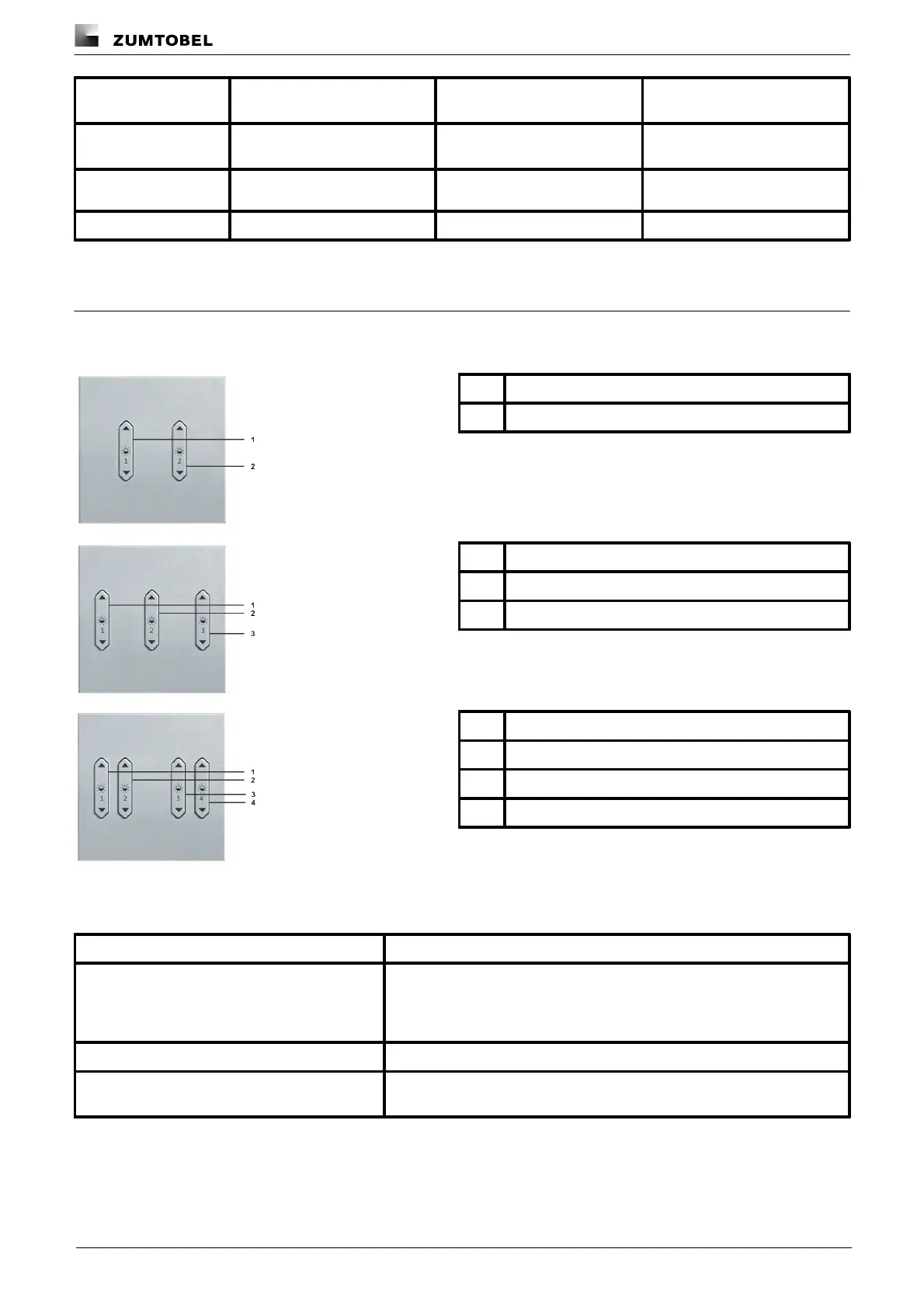
There are tree types of rocker switch: double, triple, quadruple. The labelling of the individual rockers may differ.
Table 33: Components of a rocker switch (double)
(e.g. LM-RCS2 Li)
Table 34: Components of a rocker switch (triple)
(e.g. LM-RCS3 Li)
Table 35: Components of a rocker switch (quadruple)
(e.g. LM-RCS4 Li)
The same possible configurations are available for each rocker. The following table provides a description of the
individual configuration options:
Effective range (room, group or device) which the rocker switch controls.
If the rocker switch is assigned to a room, you can select the entire room, a
group in this room or a device in this room. If the rocker switch is allocated
to a group, you can select the entire group or a device in this group.
Mode of operation controlled with the rocker.
The function of the rocker is reversed with this setting. This is
recommended in the event of incorrect wiring, for example.
Table 36: Configuration options – per rocker of one rocker switch



 To Next Page