82 XFC G4 2103335 Rev AB
Select Programs>Totalflow PCCU32 (or correct program folder if changed during installation) and then select
PCCU32. The PCCU32 initial screen displays.
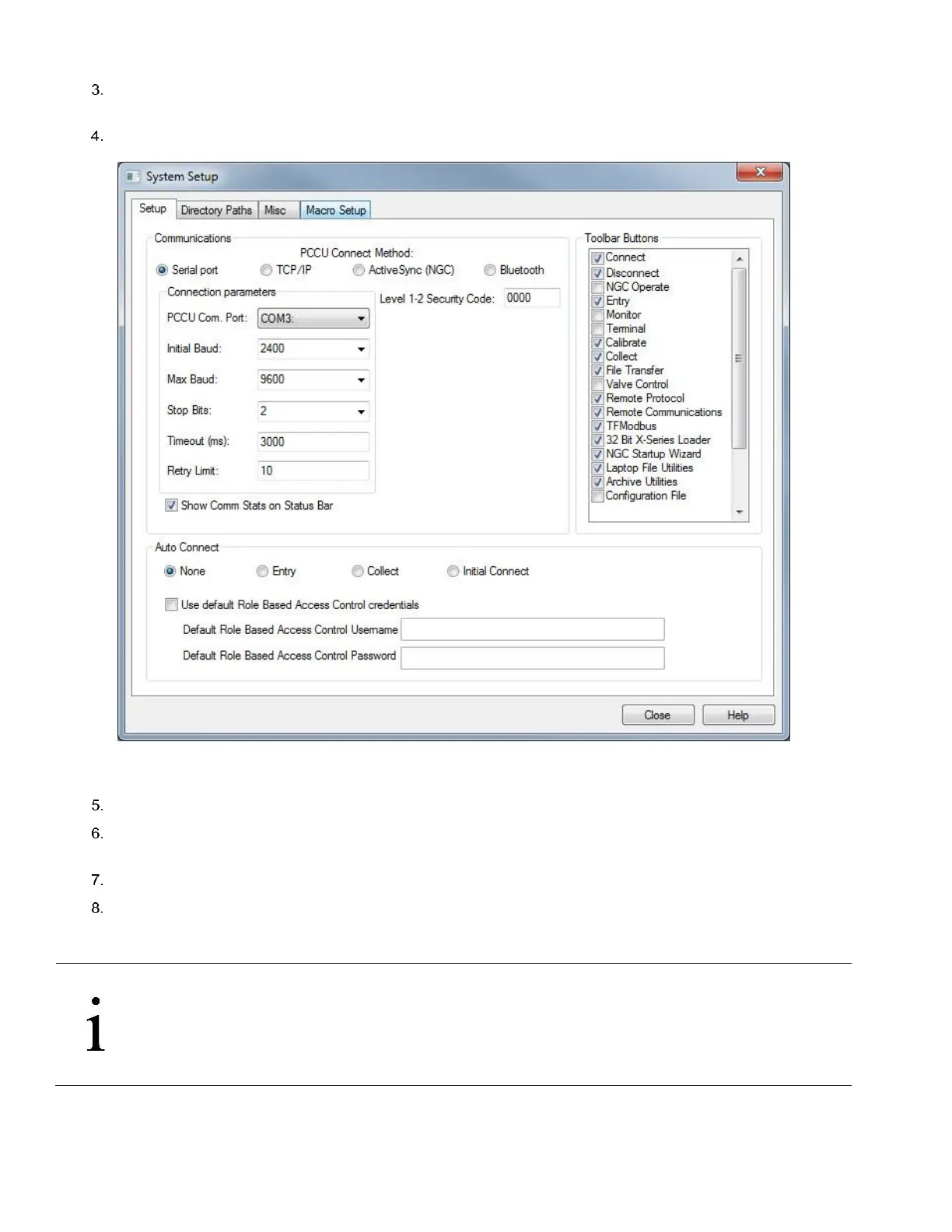
Click Setup on the top menu bar. The System Setup window displays the Setup tab (Figure 63).
Figure 63 Setup for local communication
Under Communications, select Serial port.
Under Connection parameters, expand the PCCU Com. Port drop down list to select the Com port designated for the
RS-232 communication on the PC.
Click Close to exit setup and return to the PCCU main screen.
Click the Entry icon on the top menu bar. For other screen options, click on the Connect Icon instead (left-most icon
at the top of the screen). The Local Connect screen displays other screen options in addition to the Entry screen.
When the selected screen displays, you have connected successfully to the device.
IMPORTANT NOTE: If the Invalid security code screen should appear, enter four zeros (0000) for the new code
and click OK. The flow comp should have defaulted to 0000 on Start-up.
If the meter has been given a security code, make sure that you have entered that code in PCCU32 System Setup
screen (see Figure 63). However, if your meter has been cold started, the security code will be reset to factory
default and historical data will be lost.



 To Next Page