99 XFC G4 2103335 Rev AB
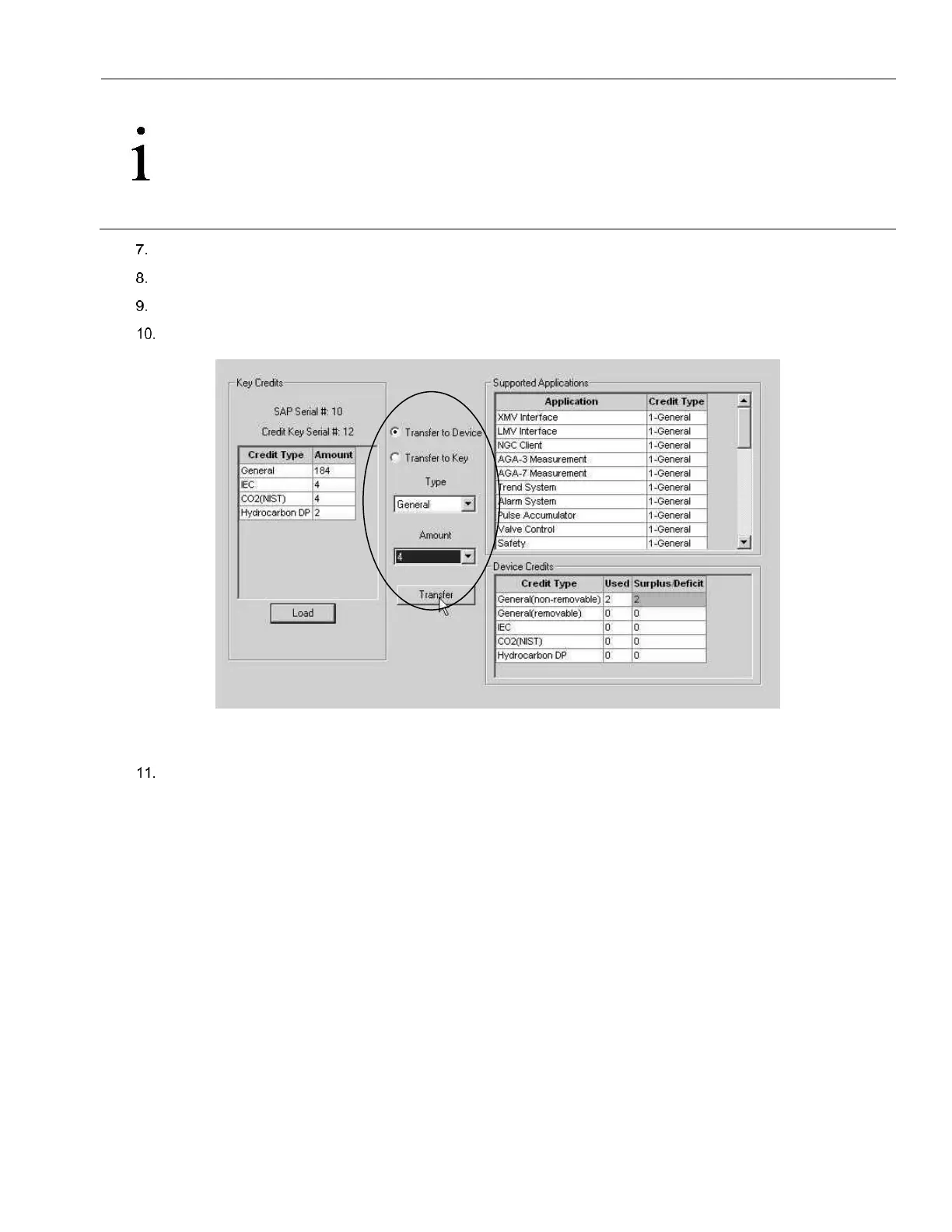
IMPORTANT NOTE: This Application Licensing tab allows for viewing of the licensing status of the flow computer
as well as the available credits on the credit key. The left pane shows the type and amount of the available credits
on the credit key. The upper-right pane is for information only. It shows the various applications available and the
type and amount of credit necessary to run the application. The standard credits (and four general credits) come
free with the purchase of the flow computer. The lower-right pane displays the licensing status of the flow
computer. It shows what credits are in the machine, what credits are being used and any surplus or deficit of
credits. A surplus of credits is highlighted in green. A deficit of credits is highlighted in red.
Select Transfer to Device, located in the center of the screen (see Figure 79).
Select the Type of credit using the drop down menu, in the center of the screen.
Select the number of credits to transfer, in the amount box.
Click Transfer.
Figure 79 Transfer to Device Application Credit Selections
Transferred credits should now show up on the lower right-hand side (see Figure 80).



 To Next Page