49File Operation
7. FileOperation
This chapter provides information on the file operation of the AT281x.
You can save up to 10 files into the internal non-volatile memory.
7.1 <CATALOG>Page
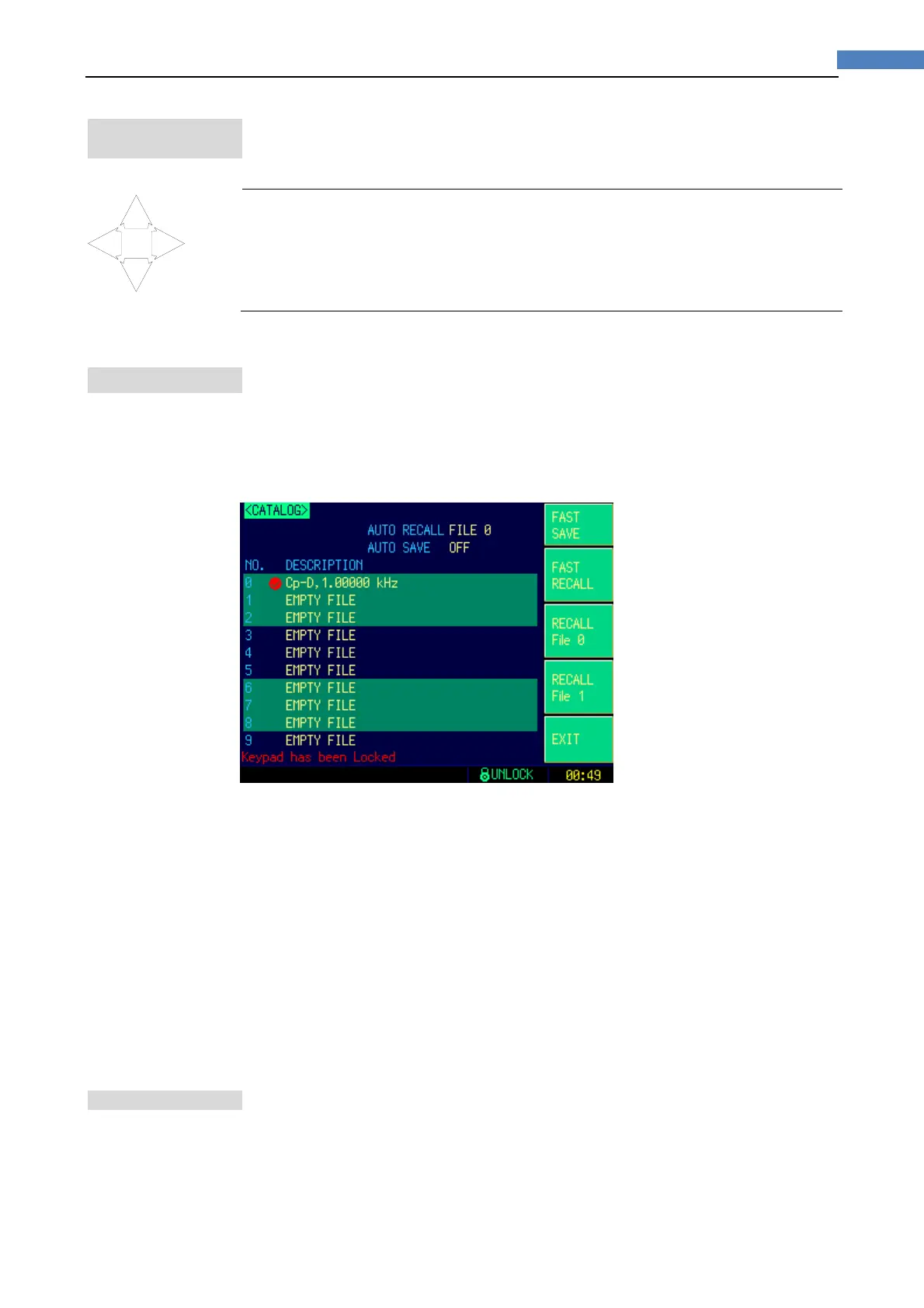
When press the [Meas] or [Setup] key followed by [FILE] bottom soft key, the
<CATALOG> page appears.
Figure7‐1 <CATALOG>Page
The soft key labels change to shortcuts when the <CATALOG> page appears. These
shortcut keys include:
[FAST SAVE]: Fast save user data to current file.
[FAST RECALL]: Fast recall data from current file.
[RECALL FILE0]: Fast recall data from file0.
[RECALL FILE1]: Fast recall data form file1.
In this page, you can configure each of the following controls with the cursor placed in
the corresponding field.
Recall a file at the instrument starts up [AUTO RECALL]
Auto save file when the instrument shuts down [AUTO SAVE]
7.1.1 RecallaFileatStartup[AUTORECALL]
You can recall file0 or current file at the instrument starts up.
To select auto recall file
Step 1. Press the [Meas] or [Setup] key
Step 2. Press the [FILE] bottom soft key.


 To Next Page